NETGEAR is aware of a growing number of phone and online scams. To learn how to stay safe click here.
Forum Discussion

Sairam
Feb 07, 2021Follower
Home Folder
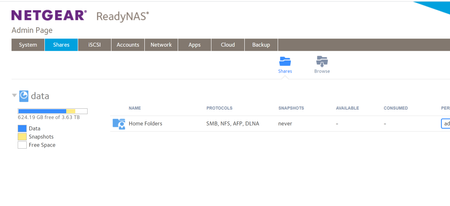
Hi, I have ReadyNas 212 and been using it from last 3 yrs. I see suddently my folders disappered from the NAS admin page. However I can see all folder when I login from network and access them my c...

StephenB
Feb 08, 2021Guru - Experienced User
You aren't seeing your home folder because you are accessing the NAS with admin credentials. I can tell that, because I see the admin home folder in your screen shot (and I see data and home in the share list).
If you click on the home folder, you should see all the home folders in the system. But it would be better to log in with the correct credentials.
FWIW, I find the home folders to be more trouble than they are worth. They have their place for enterprises, but I don't think there's much value for home NAS users. I suggest creating public shares instead, and disable SMB for home in the admin web ui. You will need to use a different name for the public share (maybe something like UsernameData)
- StephenBFeb 08, 2021Guru - Experienced User
StephenB wrote:
You aren't seeing your home folder because you are accessing the NAS with admin credentials. I can tell that, because I see the admin home folder in your screen shot (and I see data and home in the share list).
Sorry - I somehow missed your shares page post in the web ui.
Sandshark is correct - something is wrong, but before running the script from ssh you should check the logs (and whether the OS partition is full).
It'd be good to create (or update) a backup of the files, as they might be at risk.
Related Content
NETGEAR Academy

Boost your skills with the Netgear Academy - Get trained, certified and stay ahead with the latest Netgear technology!
Join Us!
