NETGEAR is aware of a growing number of phone and online scams. To learn how to stay safe click here.
Forum Discussion

makkistyle
Oct 03, 2024Tutor
how to format HDD and wipe all data
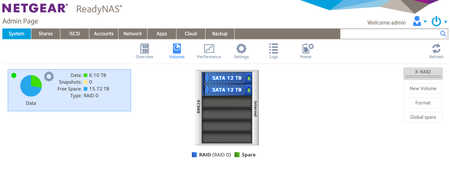
Hi, I would like to Wipe my HDD and Format all the data and reusing it again the format button is inactive but the DESTROY is active if I choose destroy then what next step will I be abl...
 Oct 05, 2024
makkistyle wrote:
but will my MAC will recognize and will show on list ?
I don't own a Mac, but I think it will
makkistyle wrote:
after this I can return the HDD to the NAS Server and it will work fine
or it will requires to do some settings
The secure erase done in the Mac will return the disks to an unformatted state.
Putting them back in the NAS will work fine. When you power up with the first one installed, the NAS will do a fresh factory install. Switch to flex-raid, and hot-insert the second disk. You can either set up RAID-0 or two JBOD volumes.
IMO, two JBOD volumes is better. With RAID-0 you lose everything in the volume when either disk fails. With JBOD you only lose what is on the failed disk.
makkistyle
Oct 03, 2024Tutor
IronWolf NAS
StephenB
Oct 03, 2024Guru - Experienced User
makkistyle wrote:
IronWolf NAS
Then connect the disks to a Windows PC using either SATA or a USB adapter/dock.
Then use Seatools to write zeros to the entire disk. That will ensure that the new owner cannot recovery your files.
After that you can put the disks back in the NAS and power it up. It will do a fresh factory install.
- makkistyleOct 03, 2024Tutor
the problem is that I'm using MAC not windows
but using Destroy and Format won't be enough ?
so at the end shall I go with this steps after all ?
" After that, use "destroy". You can then format them from the web ui, and create a new volume."
- StephenBOct 04, 2024Guru - Experienced User
makkistyle wrote:" After that, use "destroy". You can then format them from the web ui, and create a new volume."
The NAS format control doesn't over-write very many sectors on the disks. So the buyer could potentially recover your data it you only destroy+format.
The disk utility on your mac should have a secure erase facility. You could alternatively use that. One over-write is enough.
Related Content
NETGEAR Academy

Boost your skills with the Netgear Academy - Get trained, certified and stay ahead with the latest Netgear technology!
Join Us!
