NETGEAR is aware of a growing number of phone and online scams. To learn how to stay safe click here.
Forum Discussion

roynicho
Jan 06, 2016Tutor
I'm trying to add a file to one of the Disk folders but don't have permission
It is only from my laptop... and obviously I use that quite a bit
I have tried to change the permissions on the laptoip but to no avail.
I can access and have full contriol from two desktops that I also use.
Just the laptop giving me problems the user for the laptop sems to have the same permissions as all the other users
Can an yone advise or help.
Regadrs
Roy N.
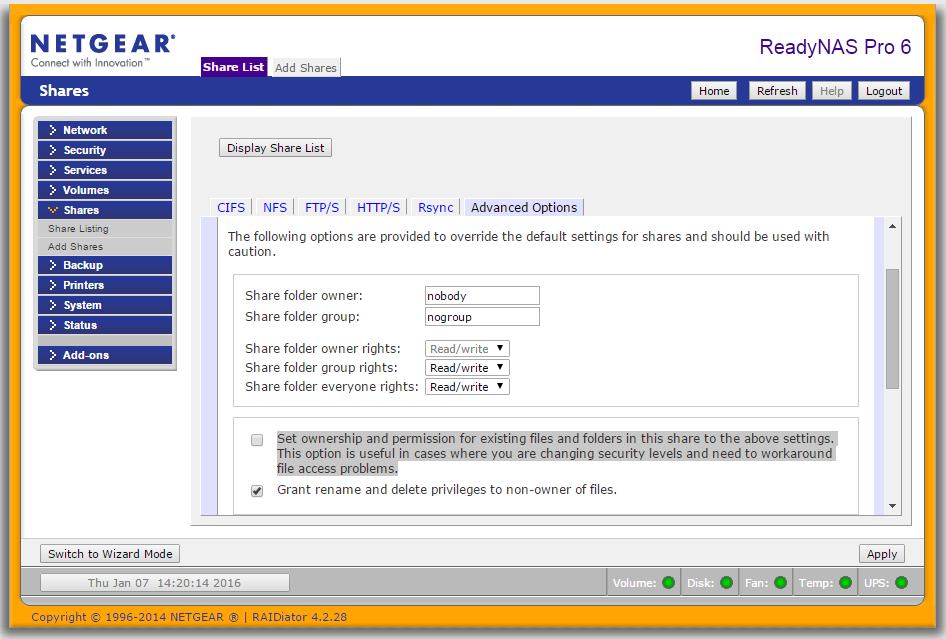
You can reset the permissions in a share by selecting the "cifs" icon for the share in the share list, and then the "advanced options" on the upper right.
Then check the box next to the highlighted section below:
Though you don't need to use nobody/nogroup for the owner/group, it is a reasonable choice if the share is open to all users on your system.
After checking the box, click on "apply" in the lower right. The checkbox will immediately clear, and the operation will proceed in the background. When it is complete, you will get a browser popup (it will also be in the log).
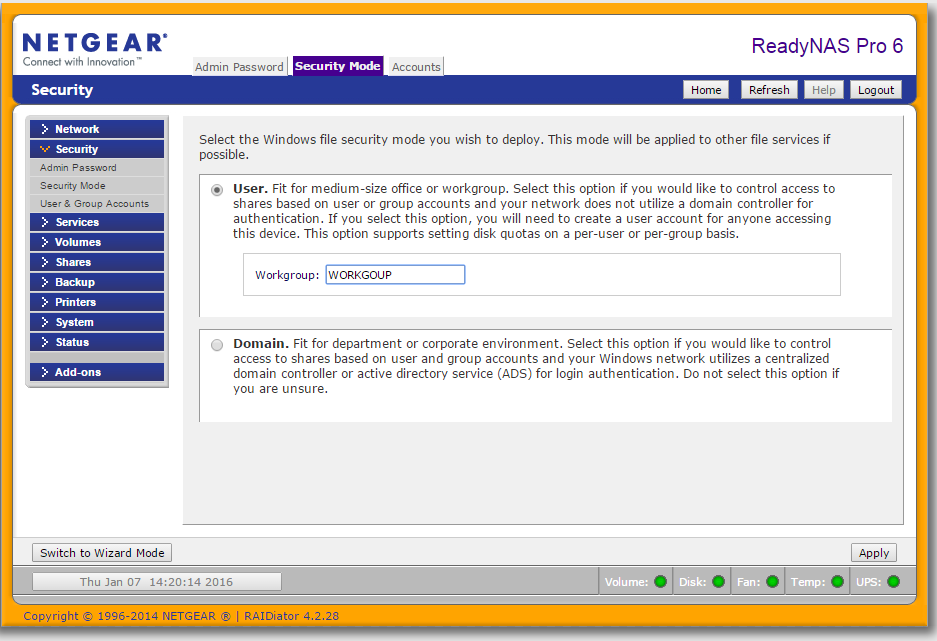
In addition, check that the workgroup setting on the NAS matches the workgoup settings on the PCs.
The NAS workgroup setting is found here:
On Windows 10, if you type "change workgroup name" into the windows search bar, you should see a "change workgroup name" control panel app icon appear. Click on that, and you can see/change your PC workgroup.
7 Replies
Replies have been turned off for this discussion
 roynichoTutor
It's a
NAS RNU4000
forgot to add that
Regards
Roy N.
 StephenBGuru - Experienced User
Are the PCs running Windows?
Either way, what OS are they running (e.g., windows 7, windows 10, etc).
- JennCNETGEAR Employee Retired
Hello roynicho,
Are you adding a file to a specific share on the NAS?
You might want to check the permission of that share, if it has Read-only and has host names or IP address in the Hosts allowed field and Allow guest access is not ticked then you may need to change it .

Regards,

Related Content
NETGEAR Academy

Boost your skills with the Netgear Academy - Get trained, certified and stay ahead with the latest Netgear technology!
Join Us!
