NETGEAR is aware of a growing number of phone and online scams. To learn how to stay safe click here.
Forum Discussion

shelitiedog
Sep 25, 2016Tutor
MacOS Sierra breaks Time Machine on ReadyNAS
So just updated two systems to MacOS Sierra. Mid 2010 iMac 27" and a 2015 MacBook Pro
Both we working without problem prior to the upgrade. Then Time Machine backups would spend around 24 hours "preparing backup" with the backupd taking around 98% CPU.
In trying to fix this a removed the backup disk in Time Machine preferences and then try to add it again. New problems.......
Although the ReadyNAS shows as a Time Machine Disk and you can select it, it never connects. It stays in "Connecting" for around 30 seconds, you are not prompted for the password. And it eventually fails with "There was a problem connecting to server "XXXXX". The server may not exist or it is unavailable......." followd by
"Time Machine can't connect to the backup disk. The operation couldn’t be completed. (OSStatus error 65.)"
What is strange is that the other shares on the NAS connect fine via AFP or CIFS
10 Replies
Replies have been turned off for this discussion
- mdgm-ntgrNETGEAR Employee Retired
Which model ReadyNAS do you have and which firmware are you running?
Model: ReadyNAS NV+ v2
Firmware: RAIDator 5.3.12
- mdgm-ntgrNETGEAR Employee Retired
If you login to AFP as the "ReadyNAS" (no quotes - Time Machine user on the ReadyNAS) what happens?
 svergie2Aspirant
I've got the exact same problem, but the strange thin is that Time Machine has been working throughout all of the public betas...
OK can back up and running.
Mount the ReadyNAS Time Machine Volume via afp prior to selecting the backup disk in Time Machine Preference.
Select the disk you have just mounted for the backup destination (I had anotther ReadyNAS volume being displayed which I ignored)
Time Machine successfully completed the backup.
You can dismount the and subsequent Time Machine backups still run.
Also their is a known issue with Sophos causing Time Machine to run very slowly.
Crude solution to fix has been to disable Sophos
OK can back up and running.
Mount the ReadyNAS Time Machine Volume via afp prior to selecting the backup disk in Time Machine Preference.
Select the disk you have just mounted for the backup destination (I had anotther ReadyNAS volume being displayed which I ignored)
Time Machine successfully completed the backup.
You can dismount the and subsequent Time Machine backups still run.
Also their is a known issue with Sophos causing Time Machine to run very slowly.
Crude solution to fix this is to disable Sophos, but the backups now take the expected amount of time.
 rmacbethApprentice
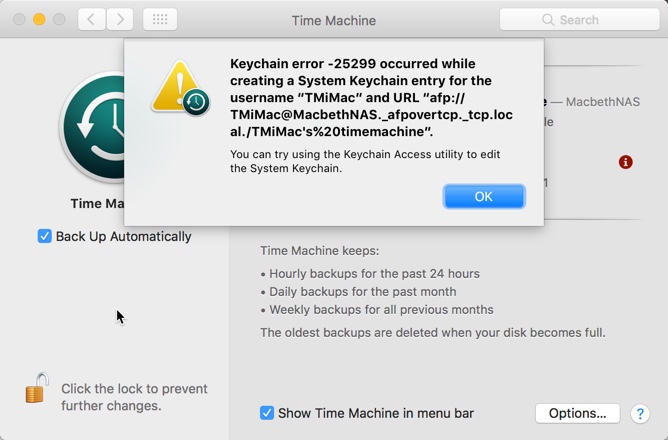
I have ReadyNAS 214 firmware 6.6.0 running MacOS Sierra. Both my iMac and Macbook Pro were working with Time Machine to the NAS with no issues on OS 10.11 I reloaded both my iMac and Macbook Pro with Sierra and restored my data etc from the Time Machine backups off the NAS with no issues. Untill after rebooting then my Time Machine backups started failing on both machines. This is the error that I now get. Eiditng the Keychain and also deleteing the ID in the keychain does not fix the problem. I also have a call open in Apple on this.
Any help would be appreciated
Rich
- montspolskyAspirant
This works perfectly: http://www.makeuseof.com/tag/turn-nas-windows-share-time-machine-backup/

Related Content
NETGEAR Academy

Boost your skills with the Netgear Academy - Get trained, certified and stay ahead with the latest Netgear technology!
Join Us!
