NETGEAR is aware of a growing number of phone and online scams. To learn how to stay safe click here.
Forum Discussion

LostInTokyos
Jan 20, 2025Aspirant
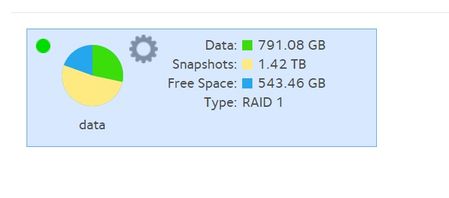
NAS RN104 with "gone" Snapshot is still using space. Software realese is 6.10.10
As from the title and th picture, i still have the snapshot problem error. I delete alot of snapshot and disabled the feature, but even using SSH, typing the command i saw in a couple of other p...

StephenB
Jan 20, 2025Guru - Experienced User
LostInTokyos wrote:
As from the title and th picture, i still have the snapshot problem error.
I delete alot of snapshot and disabled the feature, but even using SSH, typing the command i saw in a couple of other post here, leave the situation unchanged...
This is the result of a
# btrfs subvolume list -s /dat command
I guess is the case of those snapshot not updated after OS update.
Of course i'm not na ssh expert and maybe i doing something wrong.
Can someone please help me?
Thanks.
Did you want to delete all the snapshots?
It can take a while for the free space to be reclaimed. Try running a balance from the volume settings wheel.
- LostInTokyosJan 21, 2025Aspirant
Thnak You Stephen, i've already done it twice, but nothing changed.
I guess it's the same situation of orphanaged snapshot coming from a software update.
And it's strange that trying to use SSH Terminal seams like i just "talking to ghosts" as the commands i type, doesn't sort anykind of effects on the NAS.- StephenBJan 21, 2025Guru - Experienced User
LostInTokyos wrote:
And it's strange that trying to use SSH Terminal seams like i just "talking to ghosts" as the commands i type, doesn't sort anykind of effects on the NAS.
What firmware are you running? The command you are using was only for snapshots from 6.1.x firmware, so not relevant for anything current.
Post 2 here gives the command to delete a specific snapshot from ssh:
You could also
- back up all the files
- do a factory reset
- rebuild the NAS
- restore the files from the backup
Related Content
NETGEAR Academy

Boost your skills with the Netgear Academy - Get trained, certified and stay ahead with the latest Netgear technology!
Join Us!
