NETGEAR is aware of a growing number of phone and online scams. To learn how to stay safe click here.
Forum Discussion

Dan-Wabwile
Nov 15, 2023Aspirant
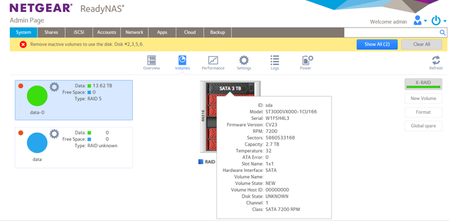
netgear readynas 316no volume exists. Netgear recommends that you create volume before configuring
Hello , I am getting the error netgear readynas 316 no volume exists. Netgear recommends that you create volume before configuring other settings. I have a readyNAS 316 with 6 disks each 3TB and o...

StephenB
Nov 16, 2023Guru - Experienced User
You can't restore the volume (or sync disk 4) without disk 1. Your RAID redundancy only handles one failure, not two. I suggest you try testing disk 1 in a PC next.
Did the original disk 4 completely fail? If not, do you still have it (intact)?
Dan-Wabwile
Nov 16, 2023Aspirant
I have tried to read the two degraded disk 1 and disk 4 and they are only showing 3.86GB.
- SandsharkNov 16, 2023Sensei
A moderator need to release your screen shots. I believe StephenB has privileges to see them, but the rest of us do not. If you add a description, those who can't see the graphics may be able to help before the graphics are released. As it stands, I have no idea how you even tried to test the drives, so I'm guessing that you expected to be able to read data from them. But when you test the drives in a PC, you will not be able to read their contents. You can only verify the drive's functionality.
You absolutely need one more drive to be able to recover anything. Hopefully, either drive 1 or the old drive 4 are functional enough to clone and use.
- StephenBNov 16, 2023Guru - Experienced User
Dan-Wabwile wrote:
I have tried to read the two degraded disk 1 and disk 4 and they are only showing 3.86GB.
Are you connecting them with a USB adapter/dock? Or with SATA directly?
If is it an adapter/dock, how old is it?
- Dan-WabwileNov 16, 2023Aspirant
Hello StephenB ,
I have been using an external 3.5'' External USB reader and also been connecting by enslaving it on desktop using SATA cable
- StephenBNov 16, 2023Guru - Experienced User
And have you tried Seatools? Or are you just checking with the Windows Disk Manager?
Maybe also try testing one of the good disks for comparison???

Related Content
NETGEAR Academy

Boost your skills with the Netgear Academy - Get trained, certified and stay ahead with the latest Netgear technology!
Join Us!
