NETGEAR is aware of a growing number of phone and online scams. To learn how to stay safe click here.
Forum Discussion

kkofsky
Oct 23, 2016Aspirant
On my Ready Nas 1100, I received a cannot find volume error
Windows Small Business Environment The errir i have gotten is as follows The paths for the shares listed below could not be found. Typically, this occurs when the NAS is unable to access the da...

JennC
Oct 24, 2016NETGEAR Employee Retired
Hello kkofsky,
I have some questions to ask, please see them below:
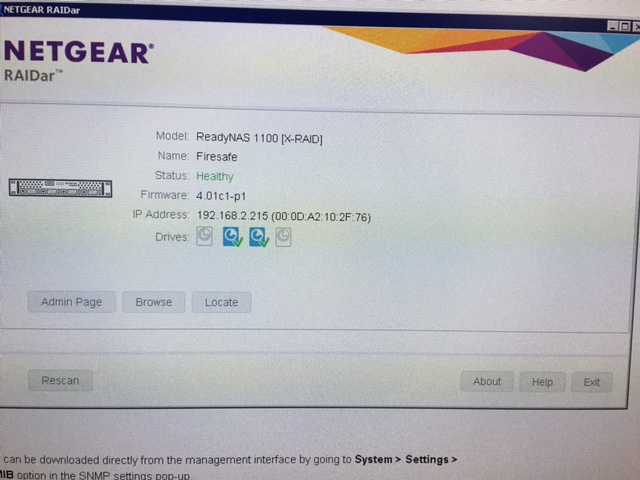
- What is the firmware version of the NAS?
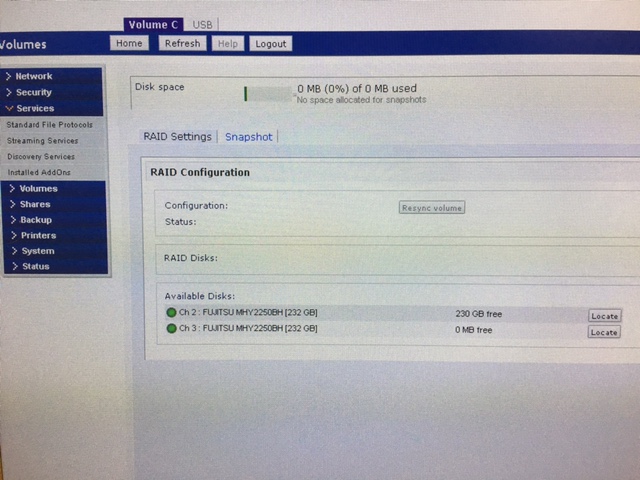
- What does it show in the Volumes of the admin page? Please post screenshot if possible.
- What does RAIDar show as the status of the NAS?
- How many disks are inserted?
- Where is the NAS connected directly? Please describe how the network is setup.
Welcome to the community!
Regards,
- kkofskyOct 24, 2016Aspirant
Firmware
Radiator 4.01c1-p1 [1.00a146] (screen shot attached)
Volume screen shot attached. It does not see that all the drives are appearing.
I don't know a lot about the unit, but I thought there were 4 disks
The NAS is connected to our network via an Ethernet cable. It runs like another drive off of the network.
Thank you for your help
- JennCOct 24, 2016NETGEAR Employee Retired
Hello kkofsky,
Do you have backup of the data? It does not look good. There is a big possibility that 2 disks have gone bad and that means if this was configured as XRAID (RAID5) it broke the volume as the it only allows to 1 faulty disk to keep the volume and data intact.
Can you download the logs please then look for disk_smart log that has no date?
Regards,
- kkofskyOct 25, 2016Aspirant
I do not have a back up of some of this data.
How do you download the logs?
Related Content
NETGEAR Academy

Boost your skills with the Netgear Academy - Get trained, certified and stay ahead with the latest Netgear technology!
Join Us!
