NETGEAR is aware of a growing number of phone and online scams. To learn how to stay safe click here.
Forum Discussion

Retired_Member
Mar 17, 2017OPENVPN autologin on boot (script dosn't start)
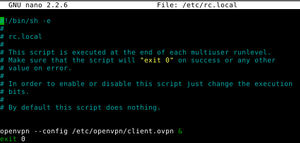
Hi, I have a problem with autologin OPENVPN on RN102 boot. I will describe what I have already done, and plese check what is wrong or what I omitted. 1. I have prepared VPS and open VPN server on p...
 Mar 17, 2017
The script for /etc/init.d/ should be in specific format. Move your openvpn_start.sh into /root/ folder.
Create new script /etc/init.d/openvpn_start (without extention). Change script root permissions to executable
openvpn_start script
#!/bin/sh
### BEGIN INIT INFO
# Provides: check_pseudo_UPS
# Required-Start: $local_fs $network $named $time $syslog
# Required-Stop: $local_fs $network $named $time $syslog
# Default-Start: 2 3 4 5
# Default-Stop: 0 1 6
# Description: check_pseudo_UPS the default ReadyNAS UPS control
### END INIT INFO

SCRIPT=~/openvpn_start.sh
RUNAS=root

PIDFILE=/var/run/openvpn_start.pid
LOGFILE=/var/log/openvpn_start.log

start() {
if [ -f /var/run/$PIDNAME ] && kill -0 $(cat /var/run/$PIDNAME); then
echo 'Service already running' >&2
return 1
fi
echo 'Starting service.' >&2
local CMD="$SCRIPT &> \"$LOGFILE\" & echo \$!"
su -c "$CMD" $RUNAS > "$PIDFILE"
echo 'Service started' >&2
}

stop() {
if [ ! -f "$PIDFILE" ] || ! kill -0 $(cat "$PIDFILE"); then
echo 'Service not running' >&2
return 1
fi
echo 'Stopping service.' >&2
kill -15 $(cat "$PIDFILE") && rm -f "$PIDFILE"
echo 'Service stopped' >&2
}

uninstall() {
echo -n "Are you really sure you want to uninstall this service? That cannot be undone. [yes|No] "
local SURE
read SURE
if [ "$SURE" = "yes" ]; then
stop
rm -f "$PIDFILE"
echo "Notice: log file is not be removed: '$LOGFILE'" >&2
update-rc.d -f <NAME> remove
rm -fv "$0"
fi
}

case "$1" in
start)
start
;;
stop)
stop
;;
uninstall)
uninstall
;;
restart)
stop
start
;;
*)
echo "Usage: $0 {start|stop|restart|uninstall}"
esac
--add script from /etc/init.d to autostart
# update-rc.d openvpn_start defaults
--or
# insserv openvpn_start--start service
# /etc/init.d/openvpn_start start
# /etc/init.d/openvpn_start restart--stop service
# /etc/init.d/openvpn_start stop--check service status
#systemctl status openvpn_start
sotrack
Mar 17, 2017Luminary
The script for /etc/init.d/ should be in specific format. Move your openvpn_start.sh into /root/ folder.
Create new script /etc/init.d/openvpn_start (without extention). Change script root permissions to executable
openvpn_start script
#!/bin/sh
### BEGIN INIT INFO
# Provides: check_pseudo_UPS
# Required-Start: $local_fs $network $named $time $syslog
# Required-Stop: $local_fs $network $named $time $syslog
# Default-Start: 2 3 4 5
# Default-Stop: 0 1 6
# Description: check_pseudo_UPS the default ReadyNAS UPS control
### END INIT INFO

SCRIPT=~/openvpn_start.sh
RUNAS=root

PIDFILE=/var/run/openvpn_start.pid
LOGFILE=/var/log/openvpn_start.log

start() {
if [ -f /var/run/$PIDNAME ] && kill -0 $(cat /var/run/$PIDNAME); then
echo 'Service already running' >&2
return 1
fi
echo 'Starting service.' >&2
local CMD="$SCRIPT &> \"$LOGFILE\" & echo \$!"
su -c "$CMD" $RUNAS > "$PIDFILE"
echo 'Service started' >&2
}

stop() {
if [ ! -f "$PIDFILE" ] || ! kill -0 $(cat "$PIDFILE"); then
echo 'Service not running' >&2
return 1
fi
echo 'Stopping service.' >&2
kill -15 $(cat "$PIDFILE") && rm -f "$PIDFILE"
echo 'Service stopped' >&2
}

uninstall() {
echo -n "Are you really sure you want to uninstall this service? That cannot be undone. [yes|No] "
local SURE
read SURE
if [ "$SURE" = "yes" ]; then
stop
rm -f "$PIDFILE"
echo "Notice: log file is not be removed: '$LOGFILE'" >&2
update-rc.d -f <NAME> remove
rm -fv "$0"
fi
}

case "$1" in
start)
start
;;
stop)
stop
;;
uninstall)
uninstall
;;
restart)
stop
start
;;
*)
echo "Usage: $0 {start|stop|restart|uninstall}"
esac
--add script from /etc/init.d to autostart
# update-rc.d openvpn_start defaults
--or
# insserv openvpn_start
--start service
# /etc/init.d/openvpn_start start
# /etc/init.d/openvpn_start restart
--stop service
# /etc/init.d/openvpn_start stop
--check service status
#systemctl status openvpn_start
- Retired_MemberMar 17, 2017
After reboot, stsill no connection... logs of starting below:
root@nas-36-0D-9D:~# systemctl status openvpn_start
● openvpn_start.service - LSB: check_pseudo_UPS the default ReadyNAS UPS control
   Loaded: loaded (/etc/init.d/openvpn_start; generated; vendor preset: enabled)
   Active: active (exited) since Fri 2017-03-17 14:16:05 CET; 6min ago
     Docs: man:systemd-sysv-generator(8)
   CGroup: /system.slice/openvpn_start.service

Mar 17 14:16:04 nas-36-0D-9D systemd[1]: Starting LSB: check_pseudo_UPS the default ReadyNAS UPS control...
Mar 17 14:16:04 nas-36-0D-9D openvpn_start[2144]: Starting service.
Mar 17 14:16:05 nas-36-0D-9D su[2147]: Successful su for root by root
Mar 17 14:16:05 nas-36-0D-9D su[2147]: + ??? root:root
Mar 17 14:16:05 nas-36-0D-9D su[2147]: pam_unix(su:session): session opened for user root by (uid=0)
Mar 17 14:16:05 nas-36-0D-9D su[2147]: pam_unix(su:session): session closed for user root
Mar 17 14:16:05 nas-36-0D-9D openvpn_start[2144]: Service started
Mar 17 14:16:05 nas-36-0D-9D systemd[1]: Started LSB: check_pseudo_UPS the default ReadyNAS UPS control.
Warning: openvpn_start.service changed on disk. Run 'systemctl daemon-reload' to reload units.
root@nas-36-0D-9D:~#
root@nas-36-0D-9D:~# systemctl daemon-reload
root@nas-36-0D-9D:~# systemctl status openvpn_start
● openvpn_start.service - LSB: check_pseudo_UPS the default ReadyNAS UPS control
   Loaded: loaded (/etc/init.d/openvpn_start; generated; vendor preset: enabled)
   Active: active (exited) since Fri 2017-03-17 14:16:05 CET; 6min ago
     Docs: man:systemd-sysv-generator(8)
   CGroup: /system.slice/openvpn_start.service

Mar 17 14:16:04 nas-36-0D-9D systemd[1]: Starting LSB: check_pseudo_UPS the default ReadyNAS UPS control...
Mar 17 14:16:04 nas-36-0D-9D openvpn_start[2144]: Starting service.
Mar 17 14:16:05 nas-36-0D-9D su[2147]: Successful su for root by root
Mar 17 14:16:05 nas-36-0D-9D su[2147]: + ??? root:root
Mar 17 14:16:05 nas-36-0D-9D su[2147]: pam_unix(su:session): session opened for user root by (uid=0)
Mar 17 14:16:05 nas-36-0D-9D su[2147]: pam_unix(su:session): session closed for user root
Mar 17 14:16:05 nas-36-0D-9D openvpn_start[2144]: Service started
Mar 17 14:16:05 nas-36-0D-9D systemd[1]: Started LSB: check_pseudo_UPS the default ReadyNAS UPS control.
root@nas-36-0D-9D:~#
After next reboot still, service is on, but not connectin:
Additionally openvpnservice is ON
so is should autoconnect as I have marked in config:
resolv-retry infinite
- sotrackMar 17, 2017Luminary
My script check_pseudo_UPS was updated to openvpn_start.
Replace in script comments check_pseudo_UPS to openvpn_start self. This is important.
Don't reboot NAS. Just check with command
# /etc/init.d/openvpn_start restart
- Retired_MemberMar 17, 2017
root@nas-36-0D-9D:~# /etc/init.d/openvpn_start restart
/etc/init.d/openvpn_start: 29: kill: No such process
Service not running
Starting service.
Service started


Related Content
- Aug 23, 2020Retired_Member
NETGEAR Academy

Boost your skills with the Netgear Academy - Get trained, certified and stay ahead with the latest Netgear technology!
Join Us!
