NETGEAR is aware of a growing number of phone and online scams. To learn how to stay safe click here.
Forum Discussion

CBCC
Apr 04, 2014Aspirant
Permissions over Network
Hello,
I am having trouble with my ReadyNAS Duo V2. I can do anything I want to from the WinXP computer that originally put the files on it, but not with other computers on my network. The ReadyNAS is a RND2150-100NAS. It is connect to a Netgear FVS338 ProSafe VPN Firewall Router.
On other computers, I cannot do things like rename or move, or delete the Recycle Bin files.
For example, on another WinXP computer, if I try to move this file, I get this error . . .
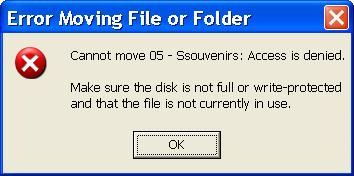
If I try to rename it to Souvenirs.mp3, I get the same error saying it cannot rename it instead of cannot move it.
When trying to rename the same file to Souvenirs.mp3 on a Win7 computer, I get this error . . .
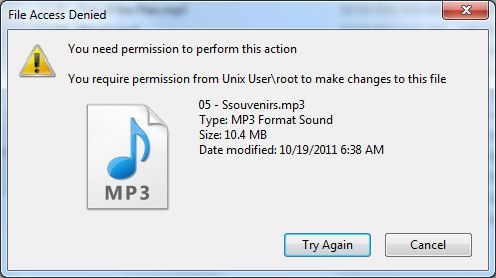
Plus, if I go to rename a file on the original XP computer, I have to do it twice... it doesn’t take the first time.
On the original XP PC, I have always uploaded and made any changes with Windows Explorer. I cannot do this on other PCs.
I have RAIDar 4.1.5 on the original XP PC, but no RAIDar on the others. I have RAIDar 4.1.6 and 4.3.4 downloaded, but not installed anywhere. I also downloaded RAIDiator and ReadyNAS Remote, but never used them.
I’d like to know what can be done to gain full access and control of all of my ReadyNAS files from all connected PCs. I'd like to be able to add, rename, move, and delete from all computers. I figured I could format the ReadyNAS drives and rebuild from Win7, but then I’d have permission problems from WinXP PCs, and I likely won’t be getting rid of them soon. I can access files on other PCs to play them, but I cannot manipulate them. I am not beyond formatting the drives to do whatever will help.
Any advice will be appreciated. Thank you in advance. :)
Craig
I am having trouble with my ReadyNAS Duo V2. I can do anything I want to from the WinXP computer that originally put the files on it, but not with other computers on my network. The ReadyNAS is a RND2150-100NAS. It is connect to a Netgear FVS338 ProSafe VPN Firewall Router.
On other computers, I cannot do things like rename or move, or delete the Recycle Bin files.
For example, on another WinXP computer, if I try to move this file, I get this error . . .
If I try to rename it to Souvenirs.mp3, I get the same error saying it cannot rename it instead of cannot move it.
When trying to rename the same file to Souvenirs.mp3 on a Win7 computer, I get this error . . .
Plus, if I go to rename a file on the original XP computer, I have to do it twice... it doesn’t take the first time.
On the original XP PC, I have always uploaded and made any changes with Windows Explorer. I cannot do this on other PCs.
I have RAIDar 4.1.5 on the original XP PC, but no RAIDar on the others. I have RAIDar 4.1.6 and 4.3.4 downloaded, but not installed anywhere. I also downloaded RAIDiator and ReadyNAS Remote, but never used them.
I’d like to know what can be done to gain full access and control of all of my ReadyNAS files from all connected PCs. I'd like to be able to add, rename, move, and delete from all computers. I figured I could format the ReadyNAS drives and rebuild from Win7, but then I’d have permission problems from WinXP PCs, and I likely won’t be getting rid of them soon. I can access files on other PCs to play them, but I cannot manipulate them. I am not beyond formatting the drives to do whatever will help.
Any advice will be appreciated. Thank you in advance. :)
Craig
39 Replies
Replies have been turned off for this discussion
 StephenBGuru - Experienced UserYou have a duo v1 (see this guide: http://www.rnasguide.com/2012/01/09/how ... -or-nv-v2/)
What firmware is running on the NAS? (Raidar is not relevant)? What security model are you using (share or user mode)? CBCCAspirantThanks for the reply! :)
When I open RAIDar, it shows on the first screen that the Firmware is RAIDiator 4.1.6 [1.00a043]
I'm not sure how to find the Security Model. RAIDar shows these things . . .
Services:
Standard File Protocols: CIFS, AFP, HTTP are checked.
Streaming:
iTunes Streaming Server and ReadyDLNA are checked.
Discovery Services:
Bonjour Service and UPnP are checked.
Installed Add-ons:
Bit Torrent is checked. ReadyNAS Photos and ReadyNAS Remote are installed, but not checked.
Shares:
Customers: CIFS (This is where everything is. There are subfolders in here.)
Flash Drives: CIFS
backup: CIFS and AFP
media: CIFS
If this isn't what you need for the Security Model, I'll need help finding that info for you.
Thanks again!- CBCCAspirantI have been told by Netgear Tech Support that I have a Duo V2. I'm not arguing with you... just sayin'. My Serial Number is 1VB384RSOODD3.
One of the USB Ports went bad in a Power Storm (my UPS was bad). I had a Printer connected to that USB Port, but of course, not plugged into a UPS. The Power Storm took out the USB to Parallel Port Adapter and that USB Port on the ReadyNAS. I was asking questions about getting it repaired. That's when I was told it's a Duo V2. - CBCCAspirantNever mind. The document explained about the Versions. Thanks for that!
- StephenBGuru - Experienced UserYou can see the security mode by going into frontview (https://nasip/admin) and clicking the security tab on the left, and then clicking on security mode.
Your firmware is pretty old, you might start by updating it to the current version (4.1.13). Click on System (again on the left), then update. (always a good idea to update your backup, especially before doing updates). - CBCCAspirantI don't have a Security Mode showing in Frontview . . .
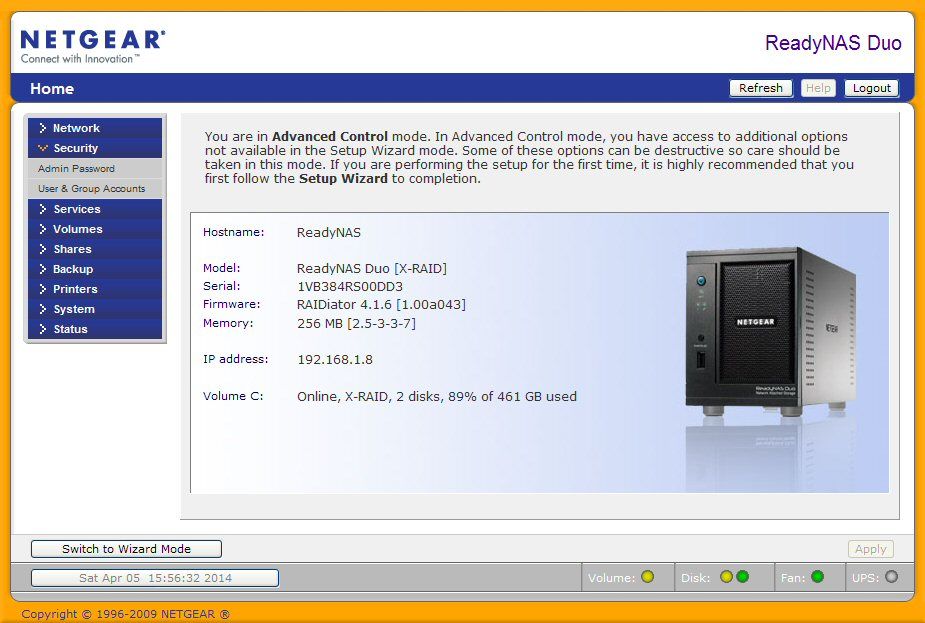
I'll get version 4.1.13 installed and get back to you. Thanks!!! :thumbsup: - CBCCAspirantWill RAIDar 4.3.8 help me find the Security Mode? Is it compatible with XP 32-bit? Or is that a RAIDiator V4.1.13 thing?
- CBCCAspirantSorry for so many questions, but...
I'm making a full backup now, before installing the new Firmware. Do you think I should format the ReadyNAS and start over from scratch? And if I do, should I do it with RAIDar from WinXP or Win7. Which do you think would help best for overall network compatibility? And while I'm at it, maybe I should reset the ReadyNAS to factory defaults first, and then upgrade the Firmware.
What are your thoughts on these things?  tony359ApprenticeFormatting won't help. A Factory reset will recreate your volumes and if the new firmware has changed the way the volumes are created/handled, you will end up with the new settings. Sometimes new features require a factory reset, data cannot be retained.
Having just 500GB in your Duo, it should not be a problem to factory reset. Update the unit and when it's done just do a factory reset. That will wipe your unit of course.- StephenBGuru - Experienced UserWith all due respect to tony359, I don't recommend doing a factory reset (at least not yet). Since you have no "security" tab then you are in user security mode.
First update the firmware.
Then reset the owners and permissions of all the existing shares. The way you do this is through frontview.
(1) select "shares" from the left menu, then "share listing"
(2) for each share, select the CIFS icon (should be the first after the share name)
(a) scroll down to "advanced CIFS permission"
(b) check "Automatically set permissions on new files and folders"
(c) check "Do not allow ACL changes to be more restrictive than this."
(d) click "apply" on the bottom right.
(e) click on "advanced options" on the upper right.
(f) set share owner to "nobody", group to "nogroup"
(g) set all three rights to "read/write"
(i) check " Set ownership and permission for existing files..."
(j) check "Grant rename and delete privileges to non-owner of files."
(k) click "apply" on the bottom right. The "set ownership and permission" checkbox will clear, that is normal.
After a bit, you will get a popup saying that the set ownership is complete. Then switch to the next.
Related Content
NETGEAR Academy

Boost your skills with the Netgear Academy - Get trained, certified and stay ahead with the latest Netgear technology!
Join Us!
