NETGEAR is aware of a growing number of phone and online scams. To learn how to stay safe click here.
Forum Discussion

DS327
May 20, 2018Aspirant
PLEASE HELP. I hot swapped a new drive into the ReadyNAS. New drive fails to scan or run.
I have a ReadyNAS Ultra 2 Plus with two drives in RAID configuration. I hot swapped a new 2 TB Seagate IronWolf drive into the ReadyNAS chassis. It was to replace a failed drive.
I logged in...

StephenB
May 20, 2018Guru - Experienced User
Was the failed drive complete dead, or was it just on the way out?
DS327
Jul 20, 2018Aspirant
I don't know what condition the failed drive is in.
The sequence of events is as follows:
ReadyNAS Duo enclosure with 2 2 tb DRIVES configured as RAID 1 mirrored pair.
I used this set up for many years without failure.
First problem that occurred was that one drive of the pair failed. I replaced that with a new, Seagate IronWolf 2 TB drive. I had some difficulty getting the new drive to sync and pair with the existing drive, but eventually it worked.
I used this for another two months, then the other old, original drive failed. I bought another Seagate IronWolf 2 TB drive and attempted to mate it with the newer drive I had installed as above.
The drives will now not mount and using ReadyNAS software, I still cannot get the system to work.
I can't get either drive to mount using ReadyNAS online system.
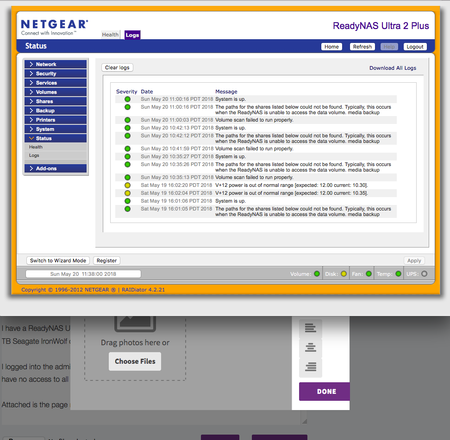
I suspect that the housing itself is not functioning correctly. It was giving the "incorrect voltage supplied" error previously as you can see in the diagnostic image.
How can I recover the data from the Seagate 2TB drive that had worked originally?
My number one priority is to save the data.
If I buy a new ReadyNAS Duo enclosure, will it recognize the drive and pair it with the new drive to make an operating RAID one pair again? Or will it see the drives as new, and write over my data?
Thanks. Hope you can help
- StephenBJul 21, 2018Guru - Experienced User
To be clear, you don't have a ReadyNAS Duo - if you purchased a used Duo, it would not be compatible with your disks.
A used Ultra, Ultra Plus or Pro would be compatible (including 4 or 6 bay models), but anything you purchase will be at least 5 years old.
Perhaps a risk-buy of a third-party power brick is worth a try.
You could of course also replace it with a new ReadyNAS (RN212 or RN422). You'd set up the new NAS using your new disk (the new NAS will reformat it), and then copy your data from your old NAS using rsync backup jobs for each share. Then you can move the disk from your old NAS to the new one (reformatting it, and syncing it).
Related Content
NETGEAR Academy

Boost your skills with the Netgear Academy - Get trained, certified and stay ahead with the latest Netgear technology!
Join Us!
