NETGEAR is aware of a growing number of phone and online scams. To learn how to stay safe click here.
Forum Discussion

chocosuiss
Dec 07, 2023Aspirant
Plus d'accès à mon ReadyNAS NV+V2
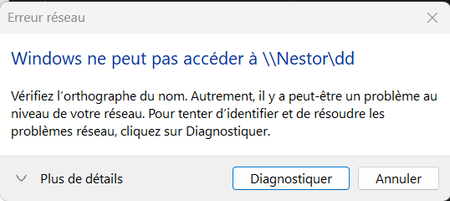
Bonjour, Je n'ai plus d'accès à mon NAS depuis quelques temps. J'obtiens l'erreur suivante : Si quelqu'un pourrait m'aider... Merci d'avance.
 Jan 30, 2024
chocosuiss wrote:
- Non je n'ai pas de sauvegarde ☹️
- Comment faut-il faire la sauvegarde ?
Best to deal with that after the volume is fixed. The NAS does have a backup job capability. There are also PC utilities like FreeFileSync that can be used to back up shares on the NAS.
chocosuiss wrote:
- Quel genre de disques me suggérez vous ? HDD ou SSD ?
Personally I use HDDs in my NAS. They are more cost-effective for backups also.
chocosuiss wrote:- Accéder au NAS me fait un peu peur... Je ne voudrais pas faire plus de dégâts. Si vous avez une idée de "comment faire" ou y accéder directement ?
There is risk, and that is why I also suggested the options of RAID recovery software and data recovery. They do cost, but the risk is much less.
I have helped several folks manually mount the volume. If you want to pursue that, then the first step is to download the full log zip file. Then copy the full zip into cloud storage (dropbox, google drive, etc). Send me a private message (PM) using the envelope icon at the top right of the forum page. Include a link to the zip file. Make sure the link permissions allow anyone with the link to download.
chocosuiss
Jan 30, 2024Aspirant
Oupsss !!!
StephenB
Jan 30, 2024Guru - Experienced User
You actually have an RN424, not an NV+V2. They are very different platforms.
The inactive volume error you are seeing generally has two different causes
- two or more failed disks
- cached writes never being written to the disks (usually a result of power loss, or doing a forced shutdown of the NAS).
Although it failed quite a while ago, the errors might still in the system logs. I suggest downloading the full log zip file from the logs page in the web ui.
Do you have a backup of the files?
If you have no backup, then there are three paths to try and recover the files:
- Access the NAS in tech support mode, and attempt to repair and mount the volume. This requires use of the linux command line and there is risk of doing more damage if you make a mistake.
- Connect the disks to a Windows PC (with USB adapter/docks) and purchase RAID recovery software that supports BTRFS. ReclaiMe is a software package many here have used successfully. You'll also need enough storage to copy off the data.
- Find a data recovery service, use them to recover your files.
- chocosuissJan 30, 2024Aspirant
- Non je n'ai pas de sauvegarde ☹️
- Accéder au NAS me fait un peu peur... Je ne voudrais pas faire plus de dégâts. Si vous avez une idée de "comment faire" ou y accéder directement ?
- Comment faut-il faire la sauvegarde ?
- Quel genre de disques me suggérez vous ? HDD ou SSD ?
- StephenBJan 30, 2024Guru - Experienced User
chocosuiss wrote:
- Non je n'ai pas de sauvegarde ☹️
- Comment faut-il faire la sauvegarde ?
Best to deal with that after the volume is fixed. The NAS does have a backup job capability. There are also PC utilities like FreeFileSync that can be used to back up shares on the NAS.
chocosuiss wrote:
- Quel genre de disques me suggérez vous ? HDD ou SSD ?
Personally I use HDDs in my NAS. They are more cost-effective for backups also.
chocosuiss wrote:- Accéder au NAS me fait un peu peur... Je ne voudrais pas faire plus de dégâts. Si vous avez une idée de "comment faire" ou y accéder directement ?
There is risk, and that is why I also suggested the options of RAID recovery software and data recovery. They do cost, but the risk is much less.
I have helped several folks manually mount the volume. If you want to pursue that, then the first step is to download the full log zip file. Then copy the full zip into cloud storage (dropbox, google drive, etc). Send me a private message (PM) using the envelope icon at the top right of the forum page. Include a link to the zip file. Make sure the link permissions allow anyone with the link to download.
- chocosuissJan 31, 2024Aspirant
Bonjour,
J'ai téléchargé "FreeFileSync" mais pour "ReclaiMe" je ne sais pas comment faire.
Related Content
NETGEAR Academy

Boost your skills with the Netgear Academy - Get trained, certified and stay ahead with the latest Netgear technology!
Join Us!
