NETGEAR is aware of a growing number of phone and online scams. To learn how to stay safe click here.
Forum Discussion

pong1
Apr 17, 2013Aspirant
Problems OS6 and AFP?
after years of finding lots of useful information here i finally gave up guest and registered. i'm not sure this is the right part of the forum but in fact for me os 6 it looks a lot like beta after ...

Leia
Apr 22, 2013NETGEAR Employee Retired
There're 2 ways access NAS shares via afp:
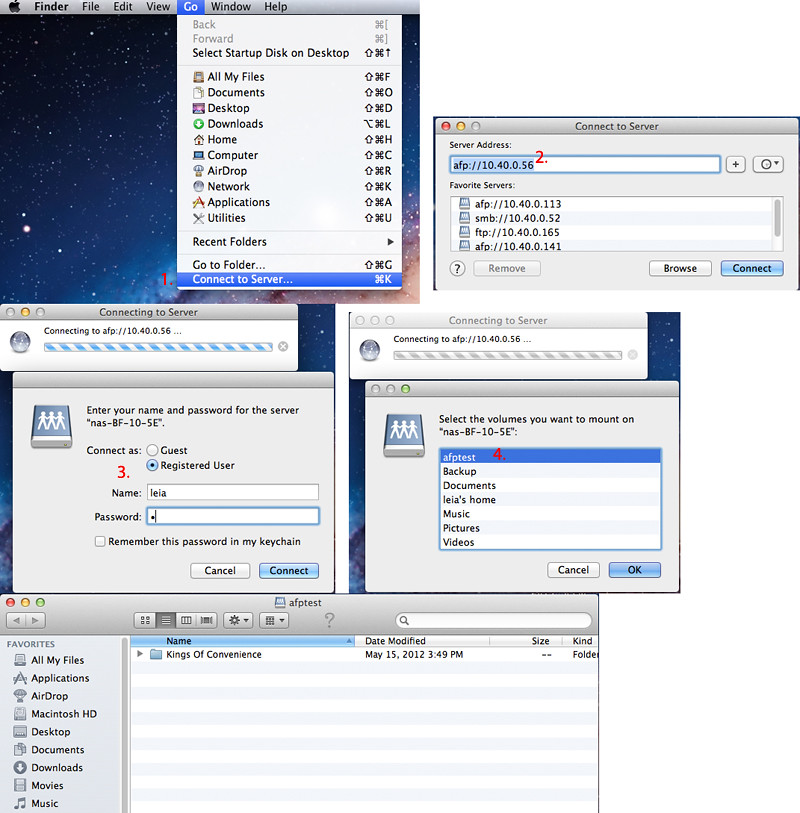
1. In Mac client: Finder->Go->Connect to Server...
Enter afp://nas_ip. Click "Connect".
Then enter username/password.
Then you can see all shares enabled afp and can read by logined user.
This way works on 6.0.4.
2. I guess you used this way to access via afp.
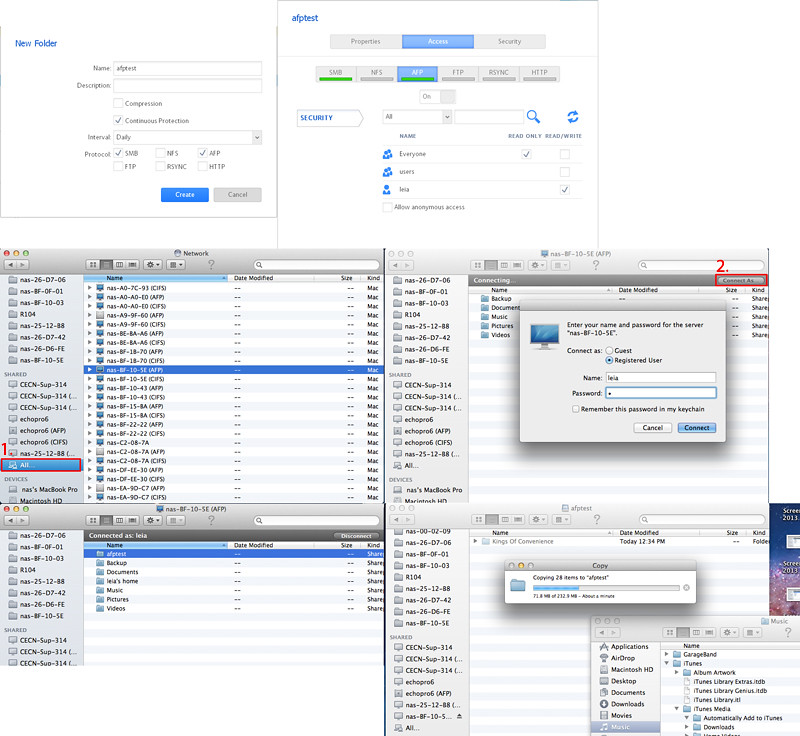
In Mac client, Finder->Sidebar SHARED All... Select your nas(AFP), click "Connect As" (in the top right of the finder window, under the search bar) to login. Then all shares you have read permission listed there.
It doesn't work on 6.0.4, but in latest 6.0.5 test build, this issue has been fixed.
So you can use the 1st way to access nas shares via afp for now. We will release 6.0.5 soon.
Thanks a lot for your post.
-Leia
1. In Mac client: Finder->Go->Connect to Server...
Enter afp://nas_ip. Click "Connect".
Then enter username/password.
Then you can see all shares enabled afp and can read by logined user.
This way works on 6.0.4.
2. I guess you used this way to access via afp.
In Mac client, Finder->Sidebar SHARED All... Select your nas(AFP), click "Connect As" (in the top right of the finder window, under the search bar) to login. Then all shares you have read permission listed there.
It doesn't work on 6.0.4, but in latest 6.0.5 test build, this issue has been fixed.
So you can use the 1st way to access nas shares via afp for now. We will release 6.0.5 soon.
Thanks a lot for your post.
-Leia
Related Content
NETGEAR Academy

Boost your skills with the Netgear Academy - Get trained, certified and stay ahead with the latest Netgear technology!
Join Us!
