NETGEAR is aware of a growing number of phone and online scams. To learn how to stay safe click here.
Forum Discussion

afarensis
Apr 19, 2017Guide
Problems with sharing files from IP-camera to ReadyNas 102
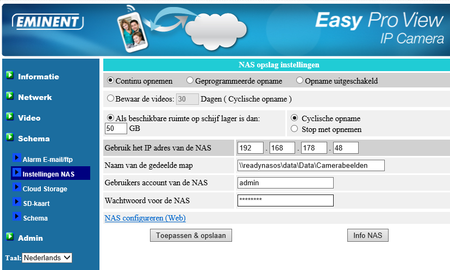
Hello, I have an Eminent EM6260 IP camera. I use the camera also for storage camera-images on my Netgear NAS 102. I can connect the NAS. From the settings I can access the NAS by using but...

afarensis
Apr 19, 2017Guide
Thank you very much for your quick reply....
I don't no the answer on the first question. I have asked on the Eminent-forum. You here as soon as possible....
George
afarensis
Apr 21, 2017Guide
Hello,
Sorry for late reply...
The camera is using FTP. I have change that. See attachement

I have change the share-name Data into Kopie-dataas you suggest.
I have tried the following combinations, but... is still doesn’t still works :smileysad:
- FTP \\readynasos\Camerabeelden (sure there is a space between FTP and \\?
- \\readynasos\Camerabeelden
- \\readynasos\data\Camerabeelden
George
 StephenBApr 21, 2017Guru - Experienced User
Did you try /Camerabeeden (and Camerabeeden) for the path?
The \\readynas format is only for Windows file sharing (SMB).
- afarensisApr 22, 2017Guide
Hello,
Unfortunately, even with the two proposed options it will not succeed. Unless you have another good idea, it doesn't seem to get work. A great pity.
Kindly regards,
George van der Ven
- jak0lantashApr 22, 2017Mentor
You could try to create a normal user, give that user r/w permission on the FTP share and try with that on the software. Can you show the settings of the FTP service on the NAS?

Related Content
NETGEAR Academy

Boost your skills with the Netgear Academy - Get trained, certified and stay ahead with the latest Netgear technology!
Join Us!
