NETGEAR is aware of a growing number of phone and online scams. To learn how to stay safe click here.
Forum Discussion

AKLGUY
Aug 20, 2021Apprentice
Failed Hard Drive Upgrade
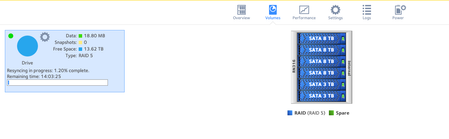
Hi Team. I have an RN316 slowly built it up to have 6x 3TB Drives. (started with 3) Then I have slowly replaced the 3TB drives with 8TB Drives (one at a time) For a while I was running fine on ...
 Aug 28, 2021
AKLGUY wrote:
Failed to expand volume with disk Model: WDC WD30EFRX-68EUZN0 from Channel 5. Volume requires drive capacity to be the same size or larger before volume expansion can begin.
Does the System to really want me to replace the last 2 3TB bays with 8TB I wonder?
Note it was telling you it can't expand the volume (which is true). Though it is a confusing message to get on a disk replacement.

AKLGUY
Aug 27, 2021Apprentice
Just finished testing the old bay 4 drive and it passed so Zeroed the data.
Placed it in Bay 5 (which Readynas said had failed) Both old 4 and the bay 5 drives were 3TB Red Drives.
(Previous) Bay 5- WDC_WD30EFRX-68EUZN0
Old Bay 4 now in Bay 5 WDC WD30EFRX-68EUZN0
This is the error message I got right before it said it was starting the resync
Failed to expand volume with disk Model: WDC WD30EFRX-68EUZN0 from Channel 5. Volume requires drive capacity to be the same size or larger before volume expansion can begin.
Does the System to really want me to replace the last 2 3TB bays with 8TB I wonder?
AKLGUY
Aug 27, 2021Apprentice
**Update. The previous bay 5 drive.. Too many bad sectors..
Checked the warranty status.. out by 1 month.. still checking with the shop though to see if I can get something done.
Related Content
NETGEAR Academy

Boost your skills with the Netgear Academy - Get trained, certified and stay ahead with the latest Netgear technology!
Join Us!
