NETGEAR is aware of a growing number of phone and online scams. To learn how to stay safe click here.
Forum Discussion

elfworks
Oct 07, 2015Tutor
RN104 - Stuck "Booting..." after automatic 6.4.0 upgrade.
Went to Boot Mode. Tried OS Reinstall. Tried Factory Reset. Pulled out the drives. Always end up stuck on 'Booting..." Please give us instructions on how to do a USB Recovery. Please don'...
 Oct 07, 2015
Hi,
If you've bricked your chassis during upgrade, you can do the USB boot recovery tool from this KB article:
http://kb.netgear.com/app/answers/detail/a_id/29952
Review our KB for the steps.
Put the ReadyNAS 6.4.0 firmware into the marvell folder, insert a USB less than 8 GB and format it fat32, then open the tool and select the drive letter, click format again, then drill down to the RN100 series and execute the tool with 6.4.0 selected.Then during boot of your ReadyNAS, hold the backup button for around 10 seconds. Then the unit will blink repeatedly for some time and when it was successful, it will just shut off. Then remove the USB and try to boot normally again.The RN104 will tell you on the LCD that it is in USB recovery mode.I'll update the tool later for the new ReadyNAS units.I just updated the tool to include RN2xx series devices. It might take time to replicate on our CDN though.
sanman969
Oct 08, 2015Tutor
Quick question about recovery on my RN102 (no display).
When I hold down the 'backup' button during boot both lights (power / backup) continuously flash. If this is the recovery process how long should they continue to flash until the unit shuts down?
Confirming the recovery USB disk goes in the front USB port?
Thanks!
elfworks
Oct 08, 2015Tutor
Both lights alternated flashing for about 2-3 minutes while it booted from the USB drive.
I used the front port, which allowed me to see the activity light on the USB drive.
If you can't see any activity on the USB stick, try another one. (I had trouble booting with an SD card in a USB adapter. I had to use a USB drive to get it to boot properly.)
- alexshabOct 08, 2015Aspirant
Hello! I have the same problem with RN 2120. I've made the repare USB flash disk, but there no instructions how to boot the RN 2120 from USB! Please, help!!!!!
- kohdeeOct 08, 2015NETGEAR Expert
For the RN2120, prepare the USB the same way for in marvell and then press and hold the reset button during boot. It should also be around 10 seconds of boot for it to USB recover the device.
- alexshabOct 09, 2015Aspirant
Thanks! I've been able to boot from USB recovery drive. The recover process completed with powering off the RN. But the situation is the same!((( The device is not visible neither by IP (the DHCP server is configured to lease the specific IP address to RN by MAC) nor by RAIDar. I've tried different virsions of FW (6.4.0 6.2.4)...... The result is the same((((
One note: my device is RN2120v2
- anthonyxpOct 14, 2015Aspirant
Hi
I am having the same issue after upgrading but it is with the creation of the USB Recovery stick. At step 6 I cannot select the firmware version. It remains blank. I have followed the excellent instructions to the letter. Any assistance would be appreciated. Mine is an RN102
Anthony
- elfworksOct 14, 2015Tutor
Did you extract the Firmware Image into the same folder as the Recovery Tool?
--------2. Download the latest firmware package for ReadyNAS for your model.
- Visit our support page for OS 6.
- If you're using a ReadyNAS 100, 200, 210, or 2120 series device, download ARM.
- If you're using any other unit, download the x86 package.
- Extract the firmware file (.img) and release notes from the zip file to the same folder you extracted the Recovery tool.
- popsterOct 14, 2015Aspirant
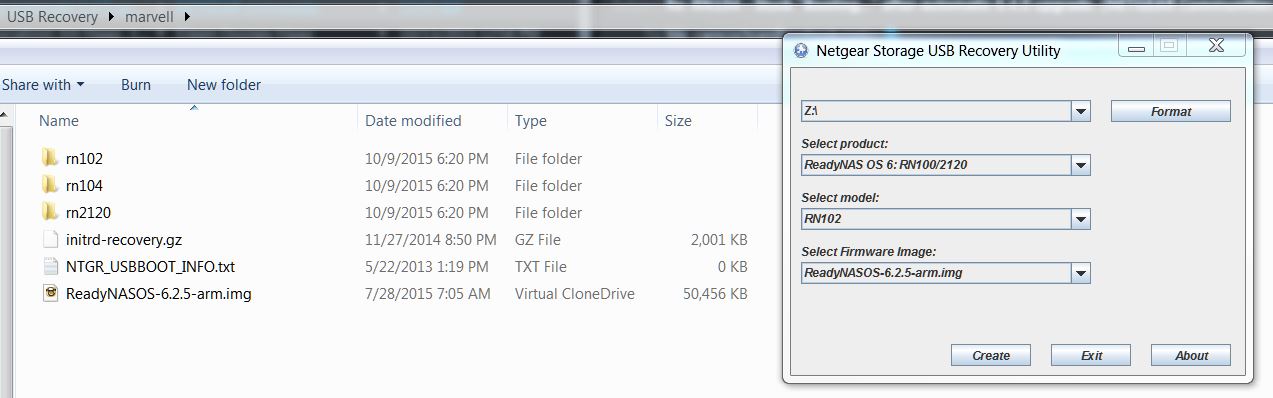
D/L the version you want and place it in the "marvell" folder.
This is how it should look inside the "marvell" folder.
This is how the interface should look.
Hope this helps.
- elfworksOct 14, 2015Tutor
Ignore my last message.
Popster is correct.
The online instructions are incorrect.
The image file should be in the marvell folder. (I had to reinstall the USB Recovery Tool and image file to verify.)
- digimonster101Oct 14, 2015Aspirant
I have tried 7 different USB drives and I have had no luck. Been holding for support 2 separate times for over 45+ minutes and haven't reached anyone. Most of the USB drives have activity LED on them and blink briefly while the LCD says "Booting..." but nothing after that. I am using RN104.
USB 1.1/2.0
PNY 16 GB
PNY 4 GB
Sandisk Cruzer Glide 16 GB
Sandisk Cruzer 8 GB
Sandisk Cruzer U 16 GB
USB 3.0
Sony 32 GB
PNY 32 GB
Related Content
NETGEAR Academy

Boost your skills with the Netgear Academy - Get trained, certified and stay ahead with the latest Netgear technology!
Join Us!
