NETGEAR is aware of a growing number of phone and online scams. To learn how to stay safe click here.
Forum Discussion

RichardB56
Oct 03, 2025Apprentice
RN212 Cannot Update Virus definitions
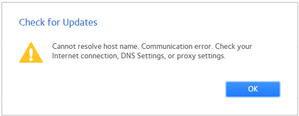
I have an RN212 with firmware 6.10.10. It has been working well for a couple of months. 2 days ago, I'm getting the below error message. The NAS is on the network and accessible without issues. I...

StephenB
Oct 09, 2025Guru - Experienced User
scrjs wrote:I meant to say manually from ClamAV myself as I agree that ReadyNAS are end-of-life, I suspect they won't provide an update?
FYI, I enquired and was told that Netgear has no plans to update.
Netgear built and distributed the software using ClamAV source. They likely made some mods to enable control and status reporting from the ReadyNAS Web UI.
Attempts to install current ClamAV from the ClamAV repo will fail. So if you want to do this yourself, you'd either need to figure out how to rebuild the current ClamAV for Debian 8, or maybe try a docker container.
ChrisKing
Oct 09, 2025Apprentice
Totally understand that, but its a shame there is no way to get the ReadyNAS to run external apps as part of the Interface.. i.e. install it from SH or BASH, then use a script to call it (even if we find an app that runs on that version of the OS). There also seems to be no way to stop the download Alert logs, i.e. if you leave the AV active, it still moans it can't download the definition, which is fine as at least its running on the 30th Sept, but if there was a way to stop the alert email but still leave the 30th Sept AV Defs installed. I see you can turn off the Firmware checks... and the AV, but no way to stop the "AV alert"
 scrjsOct 09, 2025Apprentice
Thank you also ChrisKing
I replied to StephenB
I also very much appreciate you're input
Related Content
NETGEAR Academy

Boost your skills with the Netgear Academy - Get trained, certified and stay ahead with the latest Netgear technology!
Join Us!
