NETGEAR is aware of a growing number of phone and online scams. To learn how to stay safe click here.
Forum Discussion

Laserbait
Sep 01, 2022Luminary
ReadyDR performance
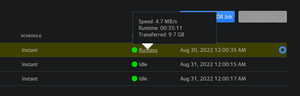
If you're using ReadyDR, what kind of performance are you seeing for your backups? I think mine is performing quite slow, or at least, slower than I think it should. I have a RN316 (6x4TB drive...

Sandshark
Sep 01, 2022Sensei
An EDA500 is extremely slow due to the eSATA expander interface, and it especially shows when there is a lot to read or write. Basically, you are transferring data from 5 drives over an interface designed for one. When used in a JBOB configuration and only one of the drives is accessed at a time, it doesn't make much difference. But in a RAID situation, it's horrendous. When data spans multiple drives, as it does in RAID, large transfers are especially affected.
Netgear removed the EDA500 from the market for good reason: It had poor performance at a too-high price. Whether they later recognized the error of their interface selection or simply recognized the poor sales that resulted, I have no idea. At the original price point, this forum was generally recommending a second NAS over an EDA500. When they went on fire sale after discontinuation, I bought one, and learned to regret it even at that low price.
The 204 as a receiver might be a factor due to its limited CPU power if the share weren't on an EDA500, but I suspect the eSATA slowness is a much bigger driver.
BTW, I have one ReadyDR backup on a machine that also has rsync backups, and it seems to progress about as quickly. But the sender and receiver are 12-bay rack mount systems, so there is no drive channel or CPU restriction coming in play. And the ReadyDR backed share doesn't have a lot of "churn". I use it only on my share that contains VeraCrypt volumes, as it properly recognizes and transfers only changes in the files that are VeraCrypt volumes, where rsync will copy the entire file if there is any change.
That you use it for your backups may also be a factor. Could Veeam be doing something that makes ReadyDR identify all the backup as new and transferring everything every time instead of just new incremental data? I'm not familiar enough with it's storage method to know.
But I guess the real question is: Do you really care? If the backup is causing other operations to slow down, then I expect you do. But if you can continue to use your NAS at a reasonable speed, and you now have reason to believe nothing is actually "wrong" with your units, does it matter?
- LaserbaitSep 08, 2022Luminary
Thanks. The perf of the backup is about the same between the volumes on the RN316 as the EDA500, but the amount of change data in the snapshots is far less. The problem that I am seeing is that sometimes after several back to back heavy usage days, the ReadyDR backup will start to lag and get days behind, and this leads to a gap of protection.
It just seems to me that with as much CPU idle time (as reported by TOP) on both the RN316 and RN204, it should be able to process the backups much faster. In fact it is, when the backup first starts, it's upwards of 30MB/s, and the after a couple of hours it starts dwindling down to the 3-4 MB/s. It's like something is getting is getting bound up.
- SandsharkSep 09, 2022Sensei
I didn't have a ReadyDR backup when I had an EDA500, but I saw other long-term processes cause backups (Scrubs especially, but balances to a lesser extent). It wasn't those processes that were the backed up ones, but rather ReadyNASD that hit 100% CPU usage because the other process was in some way interfering with it. But TOP clearly showed the problem being 100& CPU usage, so yours seems a bit different if TOP shows plenty of CPU time.
What I suspect, but don't know enough about the BTRFS send/receive at the heart of READYDR to know for sure, is that it's going all though your volume and looking for any changes. Since it is finding none, the transfer rate slows, but it still has to do a lot of I/O on the eSATA volume just to look.

Related Content
NETGEAR Academy

Boost your skills with the Netgear Academy - Get trained, certified and stay ahead with the latest Netgear technology!
Join Us!
