NETGEAR is aware of a growing number of phone and online scams. To learn how to stay safe click here.
Forum Discussion

Equitas
Oct 16, 2018Aspirant
ReadyNas - Time Machine - Insufficient space
I have been successfully backing up my iMac through TIME MACHINE to my ReadyNas now for months.
Recently, TIME MACHINE advised that it cannot connect to the NAS because there is insufficient space (the TM requires 350Gb) I have not added significant data to my computer...so this is an issue.
When I look at the NAS on its portal (sometimes I can easily do it, sometimes the portal won't open...for instance, now, I can't open that portal...otherwise I'd take a screenshot and show you), I can see that I have 850Gb available.
HOWEVER, I do NOT see where the TM has been putting its data. It just doesn't show on the ReadyNas. The other files (movies, etc...) that I have there show.
Q: How can I find all the files on the NAS, and ensure that there is sufficient space?
Q: Is there something else I should do to connect TM to the NAS?
7 Replies
Replies have been turned off for this discussion
- Marc_VNETGEAR Employee Retired
Hi Equitas
Welcome to the Community!
Setting up Time Machine for backup you will have to allocate space for it to use. See Backing up with Time Machine. You might have set a lower capacity than to what you are planning to backup right now.
You can actually access the Sparse Bundle by accessing it through AFP/SMB. You may want to check this article Increasing TM Capacity.
If you plan on increasing your TM Capacity you will have to delete the old one.
Hope this helps!
Regards
- EquitasAspirant
Thanks Marc_V...I was able to connect via: Finder > Go > COnnect to Server....but I couldn't see Time Machine on the list. In fact the list contained nothing I could actually select (all the items on the NAS were there, but greyed out). [Screen shot included]
Also, how can I see how much space is on the NAS? I have been able in the past (sometimes...not always...and not now) been able to access the NAS via my internet browser (computer says it cannot connect) When I have been able access it, the NAS showed 850Gb available. It is a 2TB unit, so about 1.15Gb have supposedly been used...but my files only tally up to about 500Gb used. I can't figure out (1) how to properly access the NAS from my computer, and (2) how to see where all the data is on the NAS.
Any suggestions?
- EquitasAspirant
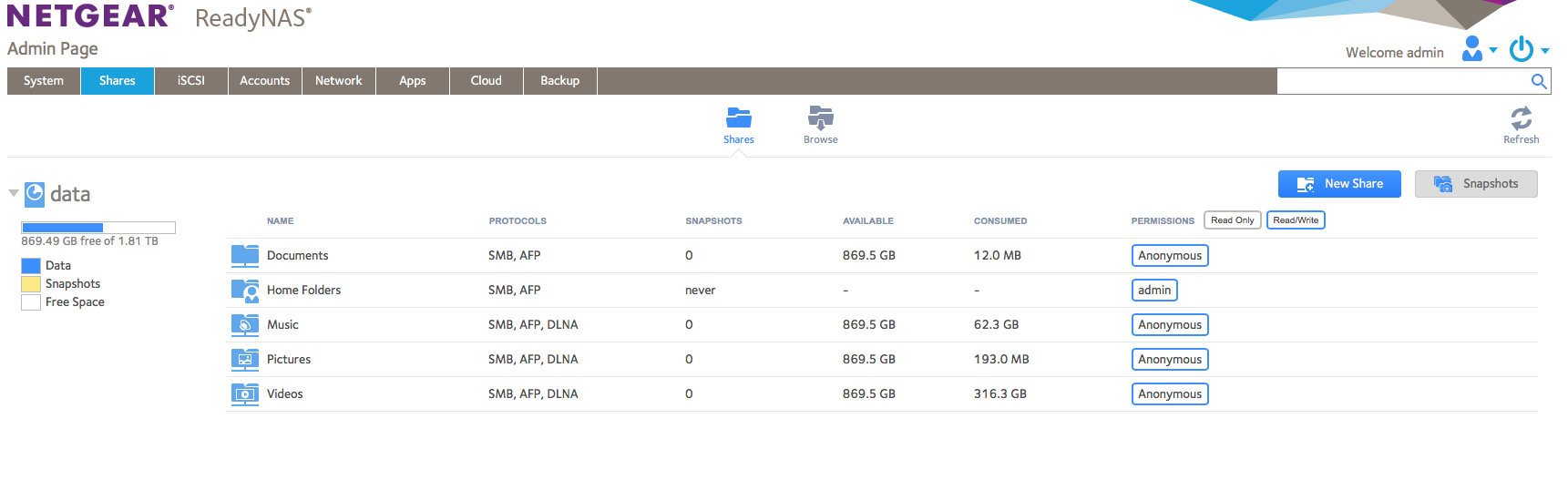
Marc_V - Of course, just as soon as I sent the message, I was able to log-in. Here's the screen shot of the ReadyNas admin page.
You can see, it says I have used over 1Tb of data...but my files take up WAY less than that. I presume the rest is Time Machine backups. Or, maybe it was partitioned?
In any event...how can I see what all the rest of the data is?
Many thanks
- schumakuGuru - Experienced User
While configuring the ReadyNAS for TIme Machine, you had to define the allowed space. Check Backup -> Time Machine for the current settings.
How do I back up Time Machine data to my ReadyNAS OS 6 storage system?
- EquitasAspirant
- schumakuGuru - Experienced User
Equitas wrote:
Recently, TIME MACHINE advised that it cannot connect to the NAS because there is insufficient space (the TM requires 350Gb) I have not added significant data to my computer...so this is an issue.
Wait. If the Time Machine quota set on the ReadyNAS is approached, Time Machine will let you know offering to purge older backups. Anything else might indicate another possible problem - probably related to the inability to access the ReadyNAS admin portal.
If this is not a basic connection problem, have an eye there https://discussions.apple.com/thread/8270199
Equitas wrote:
When I look at the NAS on its portal (sometimes I can easily do it, sometimes the portal won't open...for instance, now, I can't open that portal...otherwise I'd take a screenshot and show you), I can see that I have 850Gb available.
This might indicate a potential issue on your ReadyNAS.
Equitas wrote:
HOWEVER, I do NOT see where the TM has been putting its data. It just doesn't show on the ReadyNas. The other files (movies, etc...) that I have there show.
Yes, that's correct. Time Machine does make use of sparse files, these form a kind of a container, which is mounted again as a macOS file system. The ReadyNAS can't deal with this proprietary data, neither with the file system nor with the TimeMachine specific organisation, and concurrent access would bring the data at risk. ReadyNAS does put the TIme Machine spare files in folders named to the username (for both shared and private Time Machines), here three private and a shared with it's default username.
root@RN516:~# ls /data/.timemachine/
user1 user2 user2 ReadyNASOnly the shell access does allow to see the allocated space, like...
root@RN516:~# du -s /data/.timemachine/ReadyNAS
8488480 /data/.timemachine/Public/- EquitasAspirant
THanks for your help schumaku ...
However, I tried increasing the TM size ( https://kb.netgear.com/23835/How-do-I-increase-the-capacity-of-the-Time-Machine-backup-on-my-ReadyNAS-OS-6-storage-system )...but the "timemachine" doesn't show up on the items to mount.
I don't want to erase the NAS drive (as was suggested in: ( https://discussions.apple.com/thread/8270199 ), because it will erase all of the other items I have saved there (I can't see those sparse bundles, so I can't manually remove them).
Any suggestions? Thx


Related Content
NETGEAR Academy

Boost your skills with the Netgear Academy - Get trained, certified and stay ahead with the latest Netgear technology!
Join Us!