NETGEAR is aware of a growing number of phone and online scams. To learn how to stay safe click here.
Forum Discussion

nate1380
Jan 04, 2016Tutor
ReadyNas 104 stuck in read only mode
Hi Folks, Hoping for some help here. My issue started with an alert on a disk 1 failure, a day after that the NAS froze up and the only way to reboot it was to power cycle the system. After tha...
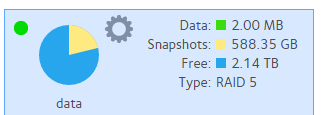
nate1380
Jan 04, 2016Tutor
If the flash was unsuccessful in doing an OS reinstall from the boot menu that most certainly tells me the flash got corrupt, especially when going off the USB finally worked.
To go from a failed drive then the next morning end up with a corrupt OS and flash before I can even get a replacement drive doesn't leave me with many options. THen to hear "hope you had a backup" gives me even less confidence in my product purchase. Then to be told I should be prepared to pay extra for help really starts to make my blood boil. A price point of $600 for a NAS that supports RAID 5 and snapshot options sould have no issues with a single failed drive and the last thing I should ever expect to see is a corrupt file system on the supporting OS.
Since all that has been mentioned is that I should have several different backups I assume my snapshots are useless?

mdgm-ntgr
Jan 04, 2016NETGEAR Employee Retired
nate1380 wrote:
If the flash was unsuccessful in doing an OS reinstall from the boot menu that most certainly tells me the flash got corrupt, especially when going off the USB finally worked.
Your logs indicate that the extraction of the firmware was successful when you did an OS Re-install. It could be there was a bug fix between 6.2.5 and 6.4.1 which meant that you were able to regain access to the web interface in 6.4.1, but if the firmware on the internal flash was corrupt there would have been an error indicating this in the logs.
nate1380 wrote:
To go from a failed drive then the next morning end up with a corrupt OS and flash before I can even get a replacement drive doesn't leave me with many options.
The flash was fine, but the problems you ran into led to the management service going offline.
You could have removed the disk that has failed and start testing it. Now, I would not even do that, but rather power off the system, contact support and wait for their advice.
nate1380 wrote:
THen to hear "hope you had a backup" gives me even less confidence in my product purchase.
Well, backing up is certainly preferable to needing data recovery or a support contract.
nate1380 wrote:
Then to be told I should be prepared to pay extra for help really starts to make my blood boil.
A 90 day support warranty is common in the industry and is the case for our home models such as the 104 and I did not want to set unrealistic expectations.
In any case if it is a data recovery situation this is not something that would be covered under a support warranty anyway.
nate1380 wrote:
A price point of $600 for a NAS that supports RAID 5 and snapshot options sould have no issues with a single failed drive
On Amazon a diskless RN104 is selling for under $250. Of course, disks add to this cost. Businesses spend 5 figures or even more, use RAID and still see the importance of backup.
In most cases things should be fine when a single drive has failed, but as I stated clearly there is more going on here.
RAID provides redundancy not backup as described here: Preventing Catastrophic Data Loss
nate1380 wrote:
and snapshot options sould have no issues with a single failed drive
Snapshots do not provide redundancy. They allow you to rollback a file share/LUN to how things were in the past frozen at a point in time or in the case of ordinary file shares recover a subset of your files/folders on the share from a given point in the past (rather than needing to roll everything back).
Like RAID snapshots can help reduce the likelihood of needing to do a full restore from backup, but they are not a replacement for backups.
A backup is a copy of your data that is stored on a different device to the primary copy. So if the primary copy is on your PC then the copy on the NAS is a backup.
Furthermore keeping at least one backup off-site at all times is recommended to allow for the possibility of fire, flood and theft.
It's up the individual to decide what value data has and what backup strategy is put in place.
nate1380 wrote:
and the last thing I should ever expect to see is a corrupt file system on the supporting OS.
Any filesystem can get corrupted. It's unfortunate, but it does happen.
nate1380 wrote:
Since all that has been mentioned is that I should have several different backups I assume my snapshots are useless?
Snapshots are useless, but it must be stressed that they are not a replacement for backups. Also snapshots are more appropriate for some use cases than for others.
Should you wish for support to make an attempt to recover your data, your snapshots may yet prove crucial to the chances of success.
Related Content
NETGEAR Academy

Boost your skills with the Netgear Academy - Get trained, certified and stay ahead with the latest Netgear technology!
Join Us!
