NETGEAR is aware of a growing number of phone and online scams. To learn how to stay safe click here.
Forum Discussion

jnandi
Jun 25, 2023Aspirant
readynas 204 4-bay - 1 disk not recognized
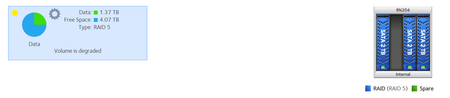
Hi, I have a 4-bay RN204. One disk of the 4 is suddenly not recognized so the entire volume has degraded. Using OS 6.10.8. Here is a screenshot of system->volume page. In the logs, I don't se...
jnandi
Jul 03, 2023Aspirant
Hi, thanks for your suggestion. I tried another disk (spare one I had), and plugged it into disk 2 drive/bay, but that is also not being read.
If I connect the existing disk 2 into the USB port of the RN204, can I include that to re-create the RAID5 with a global spare?

StephenB
Jul 03, 2023Guru - Experienced User
jnandi wrote:
If I connect the existing disk 2 into the USB port of the RN204, can I include that to re-create the RAID5
No. I guess you could do it manually with ssh, but it wouldn't be a good idea.
The best path is to first off-load all the data. Then either
- get a new NAS (probably not ReadyNAS, as Netgear seems to be exiting that business).
- or create a new volume with 2-3 larger disks, leaving bay 2 empty.
jnandi wrote:
with a global spare?
There might be some confusion here. A global spare is added to the array when the NAS detects a failure of another drive. It's not part of the array until that happens.
- jnandiJul 07, 2023Aspirant
Hi, thanks for all your support. Unfortunately it seems both the Disk 2 and bay 2 slot are both damaged. The spare HDD I had, I connected to bay 2, but it wasn't recognised. The hdd-disk 2 I had I tried connecting using USB enclosure to PC - can't be read. However the spare HDD I connected to another NAS (Synology 423+) and that is read. So, it now Time to migrate all data from RN204 to my DS423+. I've moved most of my data (setup backup jobs on Netgear, but there a few failures (can't read some files from some of the folders).
Ran a diagnostic using RAIDAR, and got these errors. Any guidance on how to fix these so that all my data I can migrate.
Successfully completed diagnostics
System
- Disk 3 has 2 Current Pending Sectors
- Disk 4 has 1 Reallocated Sectors
- Disk 4 has 1 Reallocation Events
- Disk 4 has 6 Current Pending Sectors
- Disk 4 has 4 Uncorrectable Sectors
- Volume root is degraded
- Volume Data is degraded
Logs
- 2023-07-08 10:20:53: BTRFS critical (device md127): corrupt node: root=1 block=808026112 slot=0, unaligned pointer, have 1954840805480 should be aligned to 4096
- 2023-07-08 10:20:52: BTRFS critical (device md127): corrupt node: root=1 block=808026112 slot=0, unaligned pointer, have 1695506235459 should be aligned to 4096
- 2023-07-08 10:20:51: BTRFS critical (device md127): corrupt node: root=1 block=808026112 slot=0, unaligned pointer, have 1954840805480 should be aligned to 4096
- 2023-07-08 10:19:47: ufsd: "mount" (sdd2): is mounted as NTFS(rw) at 2023-07-08 04:49:47
- 2023-07-08 10:18:00: md/raid:md127: raid level 5 active with 3 out of 4 devices, algorithm 2
- 2023-07-08 10:16:36: ufsd: "umount" (sdd2): is unmounted at 2023-07-08 04:46:36
- 2023-07-08 09:57:52: BTRFS critical (device md127): corrupt node: root=1 block=808026112 slot=0, unaligned pointer, have 1954840805480 should be aligned to 4096
- 2023-07-08 09:57:51: BTRFS critical (device md127): corrupt node: root=1 block=808026112 slot=0, unaligned pointer, have 1954840805480 should be aligned to 4096
- 2023-07-08 09:57:49: BTRFS critical (device md127): corrupt node: root=1 block=808026112 slot=0, unaligned pointer, have 1954840805480 should be aligned to 4096
- StephenBJul 08, 2023Guru - Experienced User
jnandi wrote:- 2023-07-08 09:57:52: BTRFS critical (device md127): corrupt node: root=1 block=808026112 slot=0, unaligned pointer, have 1954840805480 should be aligned to 4096
- 2023-07-08 09:57:51: BTRFS critical (device md127): corrupt node: root=1 block=808026112 slot=0, unaligned pointer, have 1954840805480 should be aligned to 4096
- 2023-07-08 09:57:49: BTRFS critical (device md127): corrupt node: root=1 block=808026112 slot=0, unaligned pointer, have 1954840805480 should be aligned to 4096
The safest (but most expensive) option is to use RAID recovery software that supports BTRFS. ReclaiMe is a popular package that folks here have used. You'd have to connect the disks to a Windows PC (likely needing USB docks or an enclosure), and also have a place to offload the data.
If you can connect a large enough USB disk to the NAS, you could also try offloading files using btrfs restore. Like RAID recovery software, it wouldn't attempt any repairs.
A far riskier option is to attempt to repair the file system:
btrfs check --repair --progress /dev/md127or
btrfs rescue chunk-recover -y /dev/md127Not sure how two repair methods differ - I've never needed to use either one.
If the data is important to you I suggest restore or RAID recovery software.
Related Content
NETGEAR Academy

Boost your skills with the Netgear Academy - Get trained, certified and stay ahead with the latest Netgear technology!
Join Us!
