NETGEAR is aware of a growing number of phone and online scams. To learn how to stay safe click here.
Forum Discussion

Yuri_van_Anraad
Apr 20, 2017Aspirant
ReadyNAS 2120 Missing diskspace
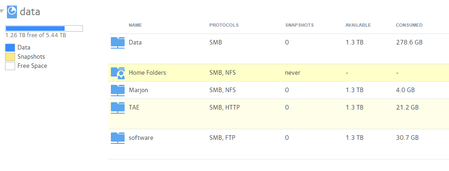
I am using a RN2120 readynas with firmware version 6.6.1. Recently we started to receive issues that we are unable to write new files to the NAS. Comming close to the inspection we notice that th...
- May 03, 2017
Finally after a few days of struggeling i found the missing data.
First i tried upgrading the NAS to firmware version 6.6.1 and restore the NAS to factory defaults. This left me with an empty NAS.
We found out that our backup tool Symantic Backup Exec is placing its backup in the home folder of the NAS. You can only find these folders if you access them through the webinterface or by logging in with the user that is performing the backups.
We are not using the home folders so we disabled the SMB ptrotocol of the "Home Folder" and we changed the backup towards a different medium.

mdgm-ntgr
Apr 21, 2017NETGEAR Employee Retired
Not sure what's filling it.
Have you logged on using SMB as the admin user and checked each share, checked home folders, Time Machine etc.?
Yuri_van_Anraad
May 03, 2017Aspirant
Finally after a few days of struggeling i found the missing data.
First i tried upgrading the NAS to firmware version 6.6.1 and restore the NAS to factory defaults. This left me with an empty NAS.
We found out that our backup tool Symantic Backup Exec is placing its backup in the home folder of the NAS. You can only find these folders if you access them through the webinterface or by logging in with the user that is performing the backups.
We are not using the home folders so we disabled the SMB ptrotocol of the "Home Folder" and we changed the backup towards a different medium.
- SandsharkMay 03, 2017Sensei
You may want to upvote my suggestion in the Idea Exchange that the usage in home folders be reported on the Shares page and add this as a reason why it's needed. It's inconceivable to me that Netgear did not consider it a basic requirement that users can account for all space used.
BTW, you should be able to see the user shares if you connect as Admin, too.

Related Content
NETGEAR Academy

Boost your skills with the Netgear Academy - Get trained, certified and stay ahead with the latest Netgear technology!
Join Us!
