NETGEAR is aware of a growing number of phone and online scams. To learn how to stay safe click here.
Forum Discussion

hazelbag
Apr 04, 2021Aspirant
ReadyNas 316 - Mono - radarr /root 99%
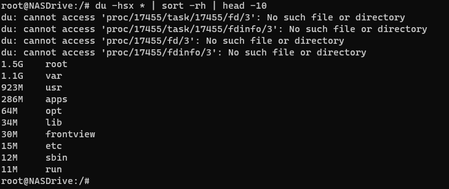
Hi, I use my NAS soley for media and file storage and recently install radarr using this guide but now I seem to be running into issues where plex stops working or crashes the NAS. I delete a bunch...
hazelbag
Apr 05, 2021Aspirant
Thanks StephenB
Yeah I used apt get for mono, added
StephenB wrote:I've not installed them myself, and the details will depend on what you did. apt-get remove --purge should work for things you installed with apt-get.
mono-devel mediainfo sqlite3 libmono-cil-dev
So using apt-get remove mono-devel mediainfo libmono-cil-dev --purge will then do the trick?
Then for radarr, would I just delete it in the opt folder? as per the link I followed here

StephenB
Apr 05, 2021Guru - Experienced User
hazelbag wrote:
Then for radarr, would I just delete it in the opt folder? as per the link I followed here
You do need to delete the .service file you created. I'd stop the service before deleting anything
systemctl stop radarr
You don't need the sudo if you are logged in as root (which is what you should be doing).
In general you want to go through the process backwards (removing radarr before running apt-get remove).
hazelbag wrote:So using apt-get remove mono-devel mediainfo libmono-cil-dev --purge will then do the trick?
Not sure if it matters, but I think you need to put the --purge right aftger the remove.
- hazelbagApr 05, 2021Aspirant
Thank you StephenB
StephenB wrote:You do need to delete the .service file you created. I'd stop the service before deleting anything
systemctl stop radarr
You don't need the sudo if you are logged in as root (which is what you should be doing).
Okay cool I will do the below first and then follow the process. Would it maybe not be advisable to factory reset the NAS?
- hazelbagApr 05, 2021Aspirant
True yes, I will rather do that and then stick to the available apps on the NAS and hopefully someone makes a radarr/sonarr fork for the NAS.
The factory reset can be done via the web ui right? As my screen on the NAS wont power on for some reason.
StephenB wrote:That of course would resolve the problem. One advantage is that you'd know for sure that you have a fully clean system.
- StephenBApr 05, 2021Guru - Experienced User
hazelbag wrote:
The factory reset can be done via the web ui right? As my screen on the NAS wont power on for some reason.
Yes. It's in the system->settings->update section (underneath "check for updates"). Of course it is destructive, so you will need to reconfigure the NAS and restore all the data.
Related Content
NETGEAR Academy

Boost your skills with the Netgear Academy - Get trained, certified and stay ahead with the latest Netgear technology!
Join Us!

