NETGEAR is aware of a growing number of phone and online scams. To learn how to stay safe click here.
Forum Discussion

pgjscottieuk
Sep 13, 2021Guide
Readynas 526x Anivirus scanner definition update failed
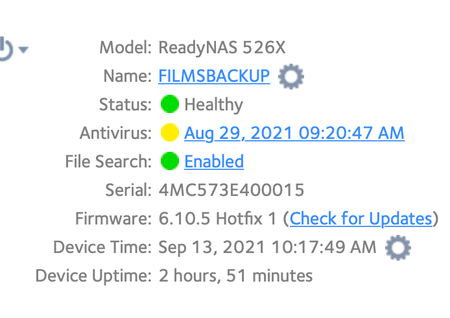
On Sep 10th the antivirus scanner definition file failed due to download failure check your internet connection Firstly i received an email Readynas Alert message system error Have turned off anti...

Sandshark
Sep 14, 2021Sensei
I think ZHS on you Mac is what's blocking you, not the NAS. I'm not a Mac user, but the message seems to be pretty clearly telling you you need to update your (Mac) account to use ZHS and that lock symbol is definately not coming from the NAS.

StephenB
Sep 14, 2021Guru - Experienced User
Sandshark wrote:
I think ZHS on you Mac is what's blocking you, not the NAS.
That makes sense, as the info directs to an apple support article.
pgjscottieuk - this is probably what you need to do: https://support.apple.com/guide/terminal/change-the-default-shell-trml113/mac
- pgjscottieukSep 14, 2021Guide
Have also looked at the terminal preferences shells open with the other option is command ( complete path )
- StephenBSep 14, 2021Guru - Experienced User
pgjscottieuk wrote:
Have also looked at the terminal preferences shells open with the other option is command ( complete path )
I'm not a mac user, so I don't know what you need to change here to be able to use terminal.
- pgjscottieukSep 14, 2021Guide
I tried on windows typed the ssh root@nas ip address a black box opened up but then disappered
- StephenBSep 14, 2021Guru - Experienced User
pgjscottieuk wrote:
I tried on windows typed the ssh root@nas ip address a black box opened up but then disappered
Did it disappear really fast? Or did it hang around for a bit?
Is the NAS using the same IP?
- pgjscottieukSep 14, 2021Guide
It disappered really quickly and yes when i set it up again i reasigned the old ip address as other things rely on it
- StephenBSep 14, 2021Guru - Experienced User
I think you need to manually delete the old fingerprint on the Windows PC.
Navigate to %homepath%\.ssh (entering that in the windows explorer search bar). You can either delete the known_hosts file there, or edit it (removing the line that starts with the NAS IP address).
Then run ssh again.
- pgjscottieukSep 15, 2021Guide
Hi i typed %homepath%\.ssh into the windows search bar and this was the result did i misunderstand you ?
- pgjscottieukSep 15, 2021Guide
I did get back in with the CMD managed to enter the password for the NAS same result see attached
- pgjscottieukSep 15, 2021Guide
I uploaded shots of results it is unable to download as mine is out of date says i need newer version
- StephenBSep 15, 2021Guru - Experienced User
pgjscottieuk wrote:
Hi i typed %homepath%\.ssh into the windows search bar and this was the result did i misunderstand you ?
Yes. I wanted you to type it into the windows explorer bar
%homepath% is an environment variable, on most systems it expands to c:\users\username
Anyway, it isn't needed as you have regained ssh access.
- StephenBSep 15, 2021Guru - Experienced User
pgjscottieuk wrote:
I uploaded shots of results it is unable to download as mine is out of date says i need newer version
No, it doesn't say that. It just says there is a newer version. Note the "DON'T PANIC" comment. The version being a bit old isn't the issue, if it were the main cvd file would also have failed to download (and it is up to date).
One question to ask here is whether you really need the AV protection on the NAS. If you are the only one uploading content, then you probably don't need it (as you likely already have AV on the PCs that are adding content). Though if you have apps on the NAS that add content (transmission for example), then you should have AV on the NAS.
Assuming you do need it:
The next step would be to try renaming the daily.cvd file, and see if freshclam then updates. Do that by
cd /var/lib/clamav
mv daily.cvd daily.tmp
Then run freshclam.
If that succeeds, then enter
rm daily.tmp
to get rid of the old definition file.
If it fails, then enter
mv daily.tmp daily.cvd
to make sure you get some protection (even though the definitions are dated).
Be careful when typing these commands.
- pgjscottieukSep 16, 2021Guide
Thank you for trying to restart the antivirus update the final result from the last command was as follows
- StephenBSep 16, 2021Guru - Experienced User
As I noted above "Be careful when typing these commands"
You skipped a step.
StephenB wrote:
The next step would be to try renaming the daily.cvd file, and see if freshclam then updates. Do that by
cd /var/lib/clamav
mv daily.cvd daily.tmp
Then run freshclam.
- pgjscottieukSep 17, 2021Guide
Hi sorry about that here is the result of that still no luck
- StephenBSep 17, 2021Guru - Experienced User
pgjscottieuk wrote:
Hi sorry about that here is the result of that still no luck
You typed it wrong. Two commands (entered one at a time).
- pgjscottieukSep 17, 2021Guide
I copy and pasted your supplied command
cd /var/lib/clamavmv daily.cvd daily.tmp
Let that run then ran freshclam again?
- StephenBSep 17, 2021Guru - Experienced User
pgjscottieuk wrote:
I copy and pasted your supplied command
Again, I gave you TWO commands (each on their own line).
First
cd /var/lib/clamav
and then press enter.
Second
mv daily.cvd daily.tmp
The first command will put you in the clamav folder. The second command renames the daily.cvd file to daily.tmp.
- pgjscottieukSep 18, 2021Guide
This was the result of your instruction two clips one after each command what am i doing wrong?
- StephenBSep 18, 2021Guru - Experienced User
pgjscottieuk wrote:
This was the result of your instruction two clips one after each command what am i doing wrong?
Can you enter this, and post the results?
ls -als /var/lib/clamav
- pgjscottieukSep 18, 2021Guide
Here it is
- pgjscottieukSep 18, 2021Guide
This was the result
- SandsharkSep 18, 2021Sensei
FYI, pictures have to be approved by a mod, so others can't comment until they are. They are also harder to read than pasting the text into the message. To keep the formatting the same on the pasted text, you can use the code tool (shown as </> at the top of the edit window).
- pgjscottieukSep 18, 2021Guide
Hi i am sorry but as i stated i am not it literate and am just doing the best i can to provide the information requested i am sorry if i have broken any rules guidlines it was not intentional i think i tried copy and pasting fron the command panel but it didn't work perhaps you can give me explicit instruction as to abide by forum rules
- SandsharkSep 18, 2021Sensei
You have broken no rules. I was trying to be helpful. While you can see your posted pics, most users currently cannot, so they cannot comment. This is a user-to-user forum, so the more people who can see and comment on your post, the more likely you are to get a quick resolution. StephenB can, and I'm sure soon will, release them.
Copy from within a Windows CMD (including when running SSH) is done by selecting "Mark" from the right-click menu, then selecting the text to be copied. Then select the text to copy and press the right button again.
To paste them within a window here that has a non-proportional font, so makes it easier to read text of that type, select the "code" button </> above the editor, then use CTRL-V to paste in what you copied before into the window that opened. It may look odd in that window, but it will look right in the main editor and the final message. If you need to copy a lot of different things, you can paste them into Notepad or something similar before coming to post in the forum.
- StephenBSep 18, 2021Guru - Experienced User
FWIW, I am able to release the embedded pictures from the approval queue, so don't worry when they don't show up right away.
pgjscottieuk wrote:
Here it is
Thx.
So this one is my fault - I gave you the wrong file name (.cvd instead of .cld).
So first enter
cd /var/lib/clamav
and then enter
mv daily.cld daily.tmp
Then try freshclam again
freshclam
Related Content
NETGEAR Academy

Boost your skills with the Netgear Academy - Get trained, certified and stay ahead with the latest Netgear technology!
Join Us!
