NETGEAR is aware of a growing number of phone and online scams. To learn how to stay safe click here.
Forum Discussion

pgjscottieuk
Sep 13, 2021Guide
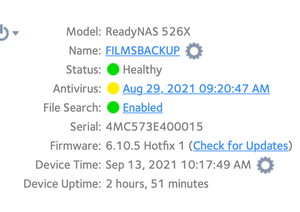
Readynas 526x Anivirus scanner definition update failed
On Sep 10th the antivirus scanner definition file failed due to download failure check your internet connection Firstly i received an email Readynas Alert message system error Have turned off anti...

StephenB
Sep 18, 2021Guru - Experienced User
FWIW, I am able to release the embedded pictures from the approval queue, so don't worry when they don't show up right away.
pgjscottieuk wrote:
Here it is
Thx.
So this one is my fault - I gave you the wrong file name (.cvd instead of .cld).
So first enter
cd /var/lib/clamav
and then enter
mv daily.cld daily.tmp
Then try freshclam again
freshclam
pgjscottieuk
Sep 19, 2021Guide
Hi This was the result of the commandsThis was the progress
- StephenBSep 19, 2021Guru - Experienced User
pgjscottieuk wrote:
Hi This was the result of the commands
Thx. Did it every finish with a successful update? I'm guessing not.
In that case I don't think there is much more I can suggest. More probing would require knowledge of linux that you don't have, and I think would risk doing damage to the NAS software.
So if it never competed then undo the rename
cd /var/lib/clamav
and then
mv daily.tmp daily.cld
FWIW, I did try running freshclam on my own NAS, and it completed ok. So this is a puzzle.
- pgjscottieukSep 19, 2021Guide
Hi unfortunately not but thank you very much for all your efforts in trying yes its one on those
anoying itches you have to scratch
Related Content
NETGEAR Academy

Boost your skills with the Netgear Academy - Get trained, certified and stay ahead with the latest Netgear technology!
Join Us!
