NETGEAR is aware of a growing number of phone and online scams. To learn how to stay safe click here.
Forum Discussion

david_lafleur
Jan 17, 2010Aspirant
ReadyNas Duo Frontview backup error with Windows 7 Pro (64)
I am trying to create a backup job in order to back up files from my remote windows 7 64-bit computer. Using the "Test connection" in Frontview>Backup>Add a new backup job I get the following message: "Error connecting to //lafleur/test" (lafleur is the name of the computer). I have also tried providing the host address (//192.168.1.2/c) with a share setup on C:.
This address also does not work: Host 192.168.1.12 ; path C$.
I can't figure this one out. Can anyone help?
This address also does not work: Host 192.168.1.12 ; path C$.
I can't figure this one out. Can anyone help?
24 Replies
Replies have been turned off for this discussion
 ClumpcoAspirant
IanWegg wrote: I've been struggling to get Backup working on Windows7 (64bit) for the last couple of weeks and finally fixed it last night.
As Clumpco above says, setting up the shares is more complicated than in previous Windows (in order to make it simpler!!)
This Wiki article - http://www.networkedmediatank.com/wiki/ ... p/Windows7 - details some further steps.
However, there is another problem. For it to work at all you have to remove the Windows component Windows Live ID Sign-In Assistant.
Stopping and disabling the service is not enough, you have to remove the entire programme. It requires a reboot, although I found that Backup worked even before I had.
If you have this component on your system the backup appears to complete successfully but the log will show this:
session setup failed: SUCCESS - 0
Files copied: 0
Goggle that error message with the strings Ubuntu and "Windows 7" for more info.
~iw
Good info Ian... However in 32 bit Win7 I didn't need to go as far as your link suggested (which really leaves your system quite wide open), nor did I have to remove Live ID Sign-In Assistant, probably because I refused everything when I installed Messenger.
I think that the key to getting sharing to work for access from the NAS is this setting: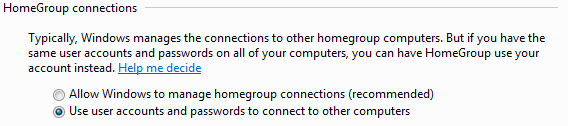
 david_lafleurAspirant:D The above help worked for me. My ReadyNas backup log:
-----------------------------------------------------------
INCREMENTAL Backup started. Thu Feb 11 23:17:19 EST 2010
Job: 001
Protocol: cifs-ab
Source: //192.168.1.12/nTest
Destination: [nTest]/
\nTest.txt
Total bytes written: 512
Files copied: 1
Backup finished. Thu Feb 11 23:17:21 EST 2010
----------------------------------------------
Thank you for your help!
-David DaveRosserAspirantI have given up, I have tried every suggestion but cannot get backup to work with my Win 7 64bit machine. Does anyone know of a good use for a ReadyNas Duo other than throwing it in the electronic re-cycling skip at my local tip?
- ewokNETGEAR ExpertPerhaps you may want to contact support? Or maybe describe the problem you're seeing?
 IanWeggAspirant
Well this has worked for me since I posted that fix ... until last week when Windows update installed Windows Live Essentials on my PC. Apparently one of the "essentials" is the dreaded Windows Live ID Sign-In Assistant which was not only reinstalled but now can't be deinstalled, as far as I can see. Stopping and disabling the service doesn't fix the problem but now actually prevents Mail from working which probably explains why the component is not seperately uninstallable anymore.IanWegg wrote: For it to work at all you have to remove the Windows component Windows Live ID Sign-In Assistant.
Stopping and disabling the service is not enough, you have to remove the entire programme. It requires a reboot, although I found that Backup worked even before I had.
If you have this component on your system the backup appears to complete successfully but the log will show this:
session setup failed: SUCCESS - 0
Files copied: 0
I tried an upgrade on the ReadyNas but there have been no updates since I last did it so it looks like the problem hasn't been fixed at the NAS end. I can't roll back Live Essentials without the risk of loosing my email so it looks like I'm stuck with this now, unless someone can suggest a fix?
~iw- IanWeggAspirantApologies for replying to my own post.
I have now found that a patch for SAMBA was released back in July:
Bugzilla Bug 7577 - SPNEGO auth fails when contacting Win7 system using Microsoft Live Sign-in Assistant
https://bugzilla.samba.org/show_bug.cgi?id=7577
The fix is included in SAMBA 3.5.6 (http://www.samba.org/samba/history/samba-3.5.6.html)
How do we get this incorporated into a ReadyNas upgrade? This problem is going to get increasingly common as Windows7 and Windows Live 2011 roll out.
~iw  Roger_Luiz_PereAspirantHi,
Searching on web i found this trick to disable SMB 2.0: Works for me.
- Run "regedit"
- Expand and locate the sub tree as follows.
HKLM\System\CurrentControlSet\Services\LanmanServer\Parameters
-Add a new REG_DWORD key:
Name: Smb2
Type: REG_DWORD
Value: 0
Reboot the Machine
Set the value to 0 to disable SMB 2.0, or set it to 1 to re-enable SMB 2.0. markhulaAspirantSigh.
Nope, none of the above work for me!
Anyone else got another plan? - be great if Netgear had a plan for windows 7; because it certainly wasn't my idea!- ewokNETGEAR Expert
markhula wrote: Sigh.
Nope, none of the above work for me!
Anyone else got another plan? - be great if Netgear had a plan for windows 7; because it certainly wasn't my idea!
What problems are you seeing exactly, and which version of the firmware are you using? - IanWeggAspirantThe problem is fully detailed in the earlier posts.
In summary, ReadyNas Duo cannot connect to a system running Windows 7 64 bit with Windows Live ID, even with the latest firmware 4.1.7.
The problem is particulary nasty because backup jobs complete successfully even though nothing is backed up. The backup log contains the message - session setup failed: SUCCESS - 0
The latest Windows Live ID is embedded in a number of Windows apps, including Windows Live Mail, so it is no longer practical to remove it.
The bug fix was included in Samba version 3.5.6 released in October. This needs to be in the Duo firmware, without it the Duo will not function as a backup device for Windows 7 64 bit machines.
~iw
Related Content
NETGEAR Academy

Boost your skills with the Netgear Academy - Get trained, certified and stay ahead with the latest Netgear technology!
Join Us!
