NETGEAR is aware of a growing number of phone and online scams. To learn how to stay safe click here.
Forum Discussion

ecomaniac
Oct 30, 2016Aspirant
ReadyNAS NV+ v1 - corrupt frontview screen not fixed by factory reset
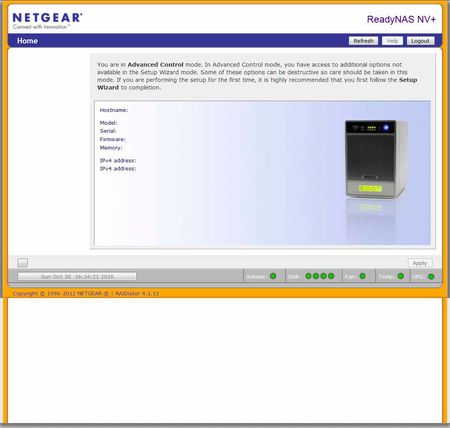
Had my second power supply fail last week. Found another in the UK, installed, and was greeted with this screen... I first tried OS re-install, but no change. I'm followed that with fact...
- Nov 06, 2016
I've got the page loading properly now, but I didn't pinpoint the issue. Somewhere in the following steps, it got corrected. Sry can't be more specific.
Summary of issues and tries:
Corrupt settings page above appeared in both Firefox (49.02) & iexplorer (11.0.96), prolly unrelated to power supply failure. It appeared correctly in Android devices on the same LAN.
This was NOT corrected by:
- Firefox in safe mode
- cleanup and reinstallation of java
- uninstallation of Kaspersky
- blockage of (notorious) Kaspersky javascript injection
- Reinstallation of ReadyNAS OS
- Factory reset of ReadyNAS
- Windows (Win7 x64) rebooted with unessential services disabled.
The setup page did appear normal in mobile device on same LAN (Firefox for Android), and was also normal in a newly created profile on the same desktop as above. I setup the ReadyNAS through the new windows profile and upgraded it to the latest firmware (4.1.15). This did not appear to correct the issue for the old profile. I then went through the process of migrating the old profile to the new which involved taking ownership of user file directories and copying them over. When that was complete, I reloaded Frontview in the new profile and it appeared corrupt again. After pulling out a few chunks of my hair, it occurred to me that the browser cache was copied over as well, so I cleared it and Frontview loaded correctly for the first time in this machine since the problem started.
The thing is, when I went back to the original profile, cleared the cache, and tried again - it loaded normally there as well. So though I thought I was being careful to clear the cache at every change, I may have missed it somewhere near the end. Either that or taking ownership of the user files via another profile corrected something - not likely, imho. Regardless, I don't know exactly what fixed it.
I'm copying files back to the NAS now as I type. Windows reports 19+ MBps transfer speed and task manager shows a nice smooth graph. I'm a happy camper.
This new power supply, unlike the 2 prior units, has it's own fan. While that might prolong it's life, I'm planning on upgrading this unit before the next failure and relegating it to a backup role.
My thanks to StephenB for helping out.

StephenB
Oct 30, 2016Guru - Experienced User
The factory reset sometimes will make the NAS unaccessible for a bit, and perhaps the PC browser is simply giving you a cached page.
If you don't get access back in a few hours, you might want to test the disks in a windows PC using vendor tools (seatools for seagate, lifeguard for western digital).
ecomaniac
Oct 31, 2016Aspirant
Thanks for the reply. I had cleared the cache, and the file system appeared correct and behaved normally prior to the reset.
Syncing finished without incident and I got the usual notification it was complete via Raidar. The Frontview problem has precluded me completing the setup at this point.
I'm still getting the above Frontview screen in Firefox, even after several cache wipes. It's exactly the same in iexplorer. I'm astounded the reset had no apparent effect. Pausing Kaspersky had no effect as well (one of the first things I tried).
I've noted prior discussions where the ReadyNAS root drive was full because of an overly large log file. That would have been cleared by the reset, no? If that's the case, what else can I try? Thanks...
- StephenBOct 31, 2016Guru - Experienced User
The disks should have been reformatted, so the log files should have been wiped.
Maybe try rebooting the NAS and see what happens.
- ecomaniacNov 01, 2016Aspirant
Shutting down and restarting didn't change anything, I'm afraid. I then uninstalled Kaspersky and tried again since pausing the app doesn't stop everything - but, again, no change.
Is it safe at this point to assume that after the factory reset, the problem is external to the NAS?
- StephenBNov 01, 2016Guru - Experienced User
ecomaniac wrote:
Is it safe at this point to assume that after the factory reset, the problem is external to the NAS?
Sounds like it. What firmware are you running on the NAS? There are some browser incompatibilities if you are running old firmware. If you have IE, you can try to set "compatibility mode" in the browser.
Do you have another device you could use (smartphone or tablet perhaps)?
Related Content
NETGEAR Academy

Boost your skills with the Netgear Academy - Get trained, certified and stay ahead with the latest Netgear technology!
Join Us!
