NETGEAR is aware of a growing number of phone and online scams. To learn how to stay safe click here.
Forum Discussion

DCA-IT
Dec 12, 2019Aspirant
ReadyNAS OS Rsync job permissions incorrect
We've set up a DR Rsync job to copy data on NAS1 to NAS2. We'd like to have the job running weekly but when the job runs, it copies the data but creates a completely bizzare (and very incorrect) set ...

DCA-IT
Dec 12, 2019Aspirant
I've managed to connect Putty using SSH now. What commands would I use to view the permissions?
DCA-IT
Dec 12, 2019Aspirant
I'm trying the command below to browse to the directory I want to check permissions on but when I enter the path, I get an error saying "No such file or directory exists".
cd /<share name>/
The directory does very much exist. I can browse to it and open files. For some reason, the command line will not see it.
- DCA-ITDec 12, 2019Aspirant
Sussed it...
btrfs permissions on the subject share are:
drwxrwx---+ 1 administrator domain admins 172 Oct 30 07:56 <directory>
Sub-folders are the same.
- DCA-ITDec 12, 2019Aspirant
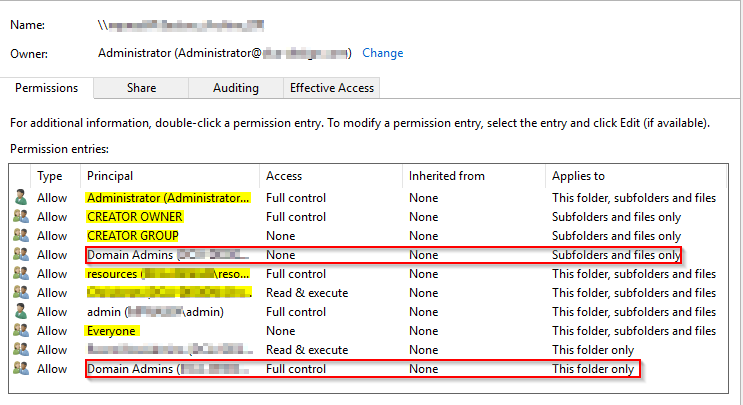
I've attached a screenshot of what I can see in Windows Explorer. The highlighted yellow items should not be there and the two red boxes are duplicates.
 StephenBDec 13, 2019Guru - Experienced User
DCA-IT wrote:
btrfs permissions on the subject share are:
drwxrwx---+ 1 administrator domain admins 172 Oct 30 07:56 <directory>
Sub-folders are the same.
Is the system using Active Directory?
If you look on the "options" tab of the backup job, is the option to change ownership of files in the backup destination set?
When you look at the file access tab in the share settings are you seeing "administrator" as the folder owner, and "domain admins" as the folder group? What are you seeing on the file access tab for the source share?
You should also check if the UID for administrator and GID for "domain admins" on the destination NAS matches the UID/GID for the folder owner and folder group on the source.
- DCA-ITDec 13, 2019Aspirant
- Yes, the NAS is connected to an AD domain.
- In the Options tab of the Rsync job settings, both tick box options are unticked and greyed out.
- Administrator and Domain Admins are set as Folder Owner and Folder Group respectively for both source and destination NASs.
- Where would I find the UID and GID?
Related Content
NETGEAR Academy

Boost your skills with the Netgear Academy - Get trained, certified and stay ahead with the latest Netgear technology!
Join Us!