NETGEAR is aware of a growing number of phone and online scams. To learn how to stay safe click here.
Forum Discussion

Spoonman56
Apr 14, 2018Aspirant
ReadyNas Pro 6 - Invalid Image and ReadyNas dead message
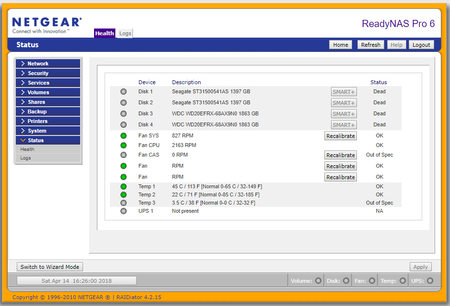
I recenlty logged into Frontview and got the message that all my disks were dead: However, everything seems to be working fine (although the ReadyNas seems a little slow. Then I trie...
- Apr 18, 2018
Thank you for your help.
I don't know what happened, but everything is back to normal, with all disks reading Healthy.
I was able to upgrade my firmware to RAIDiator 4.2.31 and all is good !
I didn't do anything?

StephenB
Apr 16, 2018Guru - Experienced User
Though you should plan on upgrading firmware at some point, you shouldn't try that until you sort out what's happening.
I suggest looking at the disk health (via the health tab in frontview). That won't work with Chrome (you'll probably get an empty popup), but it definitely works with edge and internet explorer. You might need to use a "compatibility mode" in the browser because of the age of your firmware.
More importantly, your data is at risk, so you should back up what you can.
Spoonman56
Apr 18, 2018Aspirant
Thank you for your help.
I don't know what happened, but everything is back to normal, with all disks reading Healthy.
I was able to upgrade my firmware to RAIDiator 4.2.31 and all is good !
I didn't do anything?
- mdgm-ntgrApr 18, 2018NETGEAR Employee Retired
RAIDiator-x86 4.2.16 added support for disks larger than 2TB, so you would have wanted to update the firmware eventually anyway.
You were running an extremely old firmware version.

Related Content
NETGEAR Academy

Boost your skills with the Netgear Academy - Get trained, certified and stay ahead with the latest Netgear technology!
Join Us!
