NETGEAR is aware of a growing number of phone and online scams. To learn how to stay safe click here.
Forum Discussion

ramymounir
Nov 18, 2016Aspirant
ReadyNas pro 6 fan stopped working
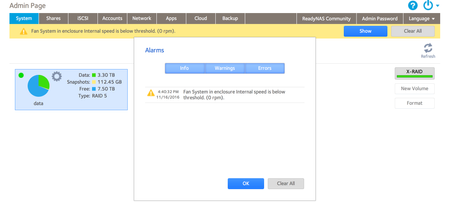
I am not technical at all i will try to explain as much as posssible This device has been running for 3 years or so straight, it sound is quite, unless i reboot or something its sound becomes ver...
- Nov 19, 2016
Still cannot see the photo's
But here is something you can try, disconnect power from NAS first, it does involve cutting the extender cable leaving plenty of cable, so cut in the middle.
Remove the insulation from each of the cut ends for about 10mm.
Then join the cables by twisting them together as following:
Connector to Power End Fan End
Black to Blue
Yellow to Black
Green to Yellow
Blue to Green
Insulate the joins with insulating tape, with some more around all 4 for added strength
Connect connector to board, reconnect power, boot and see what happens
No guarantee this will work, but you have nothing to lose, at your own risk of course


JennC
Nov 18, 2016NETGEAR Employee Retired
Hello ramymounir,
Is this ReadyNAS Pro 6 or ReadyNAS 516?
If ReadyNAS Pro 6 then it means you have loaded an OS6 firmware. Please check the discussion here if it helps as the user also replaced the fan.
Welcome to the community!
Regards,

ramymounir
Nov 19, 2016Aspirant


I dont see that metal case with the fan that was replaced in the other post. mine only has one fan which i tried to replace..
I dont see the power supply in my model.. did i change the wrong fan? but if so why is it still not spining?
- bedlam1Nov 19, 2016Prodigy
You have a Readynas 516
I did a bit of digging regarding the fan and found this snippet
" Rewire fan connector, RN 516 does not use standard wiring for CPU or Case fan...
Standard PWM Fan:
1 - Black(GND), 2 - Yellow(12v), 3 - Green(tach), 4 - Blue(Control)
RN 516 PWM Fan:
1 - Blue, 2 - Black, 3 - Yellow, 4 - GreenMaybe this is why your new fan does not work....? Maybe a bit of trial and error.....this will probably mean cutting the cables and reconnecting them somehow or preferably buying a few new spare 4 pin PWM Connectors.
What manufacturer detail is on the old (original) fan - Manufacturer Name, Part Number etc.
- ramymounirNov 19, 2016Aspirant
only because i am stupid i throw it away, i thought i would just buy a similar one and it will work!
I know it was a DC brushles fan 12V 0.8 amp model: AFB 1212SH
but i dont know the color os the 4 cables that were coming out of it..
the one i triedhas not mobel number, I tried it once as it is,
and once with the extension cable that came with it and in both cases it didnt spin..
the fan's cable has black blue brown grey cable and its extension has black yellow green blue cables
- bedlam1Nov 19, 2016Prodigy
OK
from my post above
Standard PWM Fan:
1 - Black(GND), 2 - Yellow(12v), 3 - Green(tach), 4 - Blue(Control)
RN 516 PWM Fan:
1 - Blue, 2 - Black, 3 - Yellow, 4 - GreenThe numbers correspond to which pin on the connector the colour of cable should be on that pin
, i.e. 1,2,3 or 4
Can you take a photo of your extension cable connector and cables and post it?
Related Content
NETGEAR Academy

Boost your skills with the Netgear Academy - Get trained, certified and stay ahead with the latest Netgear technology!
Join Us!
