Forum Discussion

McRob1
Aug 23, 2018Luminary
ReadyNas Pro 6 High Temperature
I am running firmware version 6.9.3 on a old ReadyNAS Pro 6. Lately I have noticed that the system temperature is running higher than normal. I have noticed temperatures up to 68C. Hard drives and...

McRob1
Aug 25, 2018Luminary
Thanks for everyones input.
As suggested I tried turning off Bit Rot Protection for each share on the NAS.
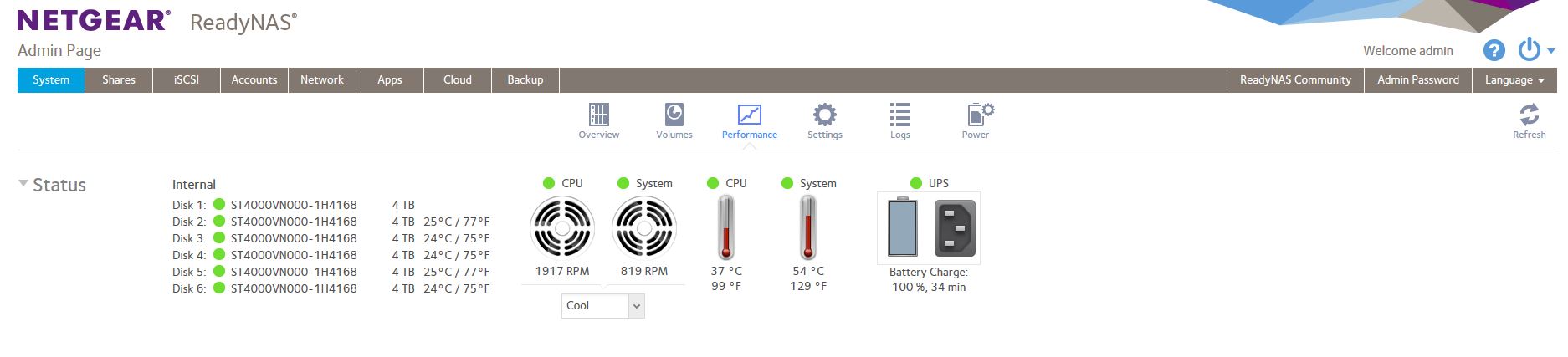
After letting it run overnight it cooled down to a new record low temperature with a system temperature of 54C.
Please note that this is with it set on the Cool setting. Not sure what happens at the Balanced or Quiet setting.
See new attached screen capture.
It appears that both fans are working properly. I also set the hard drives to go to sleep after 15 minutes.
I think my next step is to do a real good cleaning of each fan and surrounding internal areas.
I am much more comfortable with the lower temperatures now. I just hope that turning off Bit Rot Protection does not cause other problems in the future.
 StephenBAug 26, 2018Guru - Experienced User
McRob1 wrote:
As suggested I tried turning off Bit Rot Protection for each share on the NASAfter letting it run overnight it cooled down to a new record low temperature with a system temperature of 54C.
McRob1, that seems odd to me. Bit Rot Protection does add some overhead - buf when you aren't reading/writing files it shouldn't be doing anything. Do you have an app running in the background that might be doing disk access (transmission for example)?
Perhaps try turning bit-rot protection on in shares that aren't updated that much, and see if the temps rise again.
You might also try enabling spin-down (if it isn't enabled already).
- McRob1Aug 26, 2018Luminary
I am not sure what is going on here. I changed nothing last night and the NAS system temperature was back up to 60C this morning. The system fan speed was reported as 753 RPM which is lower than normal. It appears that the NAS simply wants to run hot by lowering the system fan speed just to keep warm.
I already have disk spin down enabled after 15 minutes. Disk temperature is around 85F.
I grabbed a screen shot showing how much work the NAS was doing for 24 hours. It was almost nothing but the temeratures slowly increased overnight.
Is there something in the operating system software that controls the fan speed relative to temperature?
If there is then it does not appear to be working as I would expect it to.
- StephenBAug 27, 2018Guru - Experienced User
The fan is system-controlled, and I'd also expect it to maintain a lower system temp when set to cool.
But I am wondering if the system is really as hot as is being reported.
Related Content
NETGEAR Academy

Boost your skills with the Netgear Academy - Get trained, certified and stay ahead with the latest Netgear technology!
Join Us!