NETGEAR is aware of a growing number of phone and online scams. To learn how to stay safe click here.
Forum Discussion

elian1
Aug 09, 2006Aspirant
ReadyNV: Can´t get out the Tray...
Hi Folks, seems to me i´m stupid. Due to a diskfailure i like to replace a HardDisk#2. But I can´t get the Tray out. Tried to push the Button and tried to do it with a paper clip. No latch comes ou...

r2_d21
Aug 09, 2006Tutor
In below picture, first try to push in pinhole at "A". If this does not work, insert pin at "B", and move pin toward to buttom gently to release latch. This will move plastic block (colored in Cyan) behind front cover.
Please be carefull while using pin.
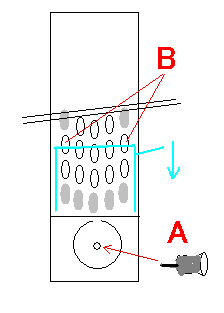
Please be carefull while using pin.
Related Content
NETGEAR Academy

Boost your skills with the Netgear Academy - Get trained, certified and stay ahead with the latest Netgear technology!
Join Us!
