NETGEAR is aware of a growing number of phone and online scams. To learn how to stay safe click here.
Forum Discussion

Rimbalza
Jul 03, 2018Aspirant
Rebuild state is stuck
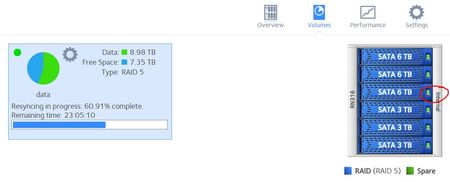
I'm in the middle of a storage upgrade replacing 3Tb disks with 6Tb.
After replacing the first disc it went of course in degraded/rebuild state. Disk indicator was amber. Based on half a day work, ...

Rimbalza
Jul 04, 2018Aspirant
Makes sense (raid has 6 disks not 3 as you can see but I got the concept). So I have to plan for a 8 days downtime for this operation (2 days for each 3tb to replace)
StephenB
Jul 04, 2018Guru - Experienced User
Rimbalza wrote:
Makes sense (raid has 6 disks not 3 as you can see but I got the concept).
Perhaps you didn't get it completely. To clarify what mdgm-ntgr is saying:
Your 6x3TB array had one RAID group - 6x3TB.
When you increased the size of the disks, the system creates a second RAID group, and concatenates that to the volume. With 2x6TB+4x3TB, that "upper" RAID group is 2x3TB RAID-1 (using the newly added 3 TB in the two larger disks). When you added the third disk, that "upper" RAID group is converted to 3x3TB RAID-5. When you are done, you'll have two 6x3TB RAID groups.
Since these are concatenated into a single volume, the two groups aren't visible to you unless you delve into the logs.
Rimbalza wrote:
So I have to plan for a 8 days downtime for this operation (2 days for each 3tb to replace)
Or more. The resync time will increase as the volume gets larger. If you have a full backup, it would actually be faster to do a factory default with all the new disks in place, reconfigure the NAS and restore the data from backup.
Though your data is still available during the "downtime" when you are adding disks incrementally. If you do the default approach, it isn't available until you restore it, but in your case would be faster becaues it only builds the volume once.
Related Content
NETGEAR Academy

Boost your skills with the Netgear Academy - Get trained, certified and stay ahead with the latest Netgear technology!
Join Us!
