NETGEAR is aware of a growing number of phone and online scams. To learn how to stay safe click here.
Forum Discussion

jeff1203
Feb 09, 2023Aspirant
Recover/resume volume sync after system restart when device was unresponsive
Support wasn't very helpful and directed me here. Hope you guys can help. Have a ReadyNAS 626x (FW: 6.10.8) and was just finishing up on upgrading three of my disk drives in the system. 6x8TB -> ...
jeff1203
Feb 09, 2023Aspirant
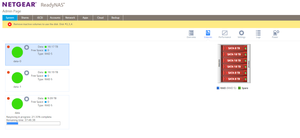
I should add that appears the "sync" on the `data` volume is progressing, but it feels wrong, not everything is detected correctly. I turned off my NAS up until now in the hopes that there is no irreversable writes that will kill everything up til now. I'm shutting it down again just in case.
 StephenBFeb 09, 2023Guru - Experienced User
It would be helpful to see the log zip file. I'd be happy to take a look at it.
But don't post it publicly, as there is some privacy leakage. Instead put the zip file into cloud storage (dropbox, etc), and send a private message (PM) with a link to the download. You send a PM by clicking on the envelope icon in the upper right of the forum page.
- jeff1203Feb 10, 2023AspirantThank you Stephen. I sent you the details.
- StephenBFeb 10, 2023Guru - Experienced User
Before the unexpected reboot on 3 Feb, your data volume looks like it comprised three RAID groups - md127, md126, and md125. This is due to the expansion history, and not unusual. All three need to be operational in order for the data volume to be mounted.
After the reboot I am seeing that the system is resyncing md127 - which is what was interrupted.
But I am also seeing this:
Feb 03 03:21:53 Jeff-Storage kernel: md/raid:md126: device sda3 operational as raid disk 0
Feb 03 03:21:53 Jeff-Storage kernel: md/raid:md126: device sdf3 operational as raid disk 5
Feb 03 03:21:53 Jeff-Storage kernel: md/raid:md126: device sde3 operational as raid disk 4
Feb 03 03:21:53 Jeff-Storage kernel: md/raid:md126: device sdb3 operational as raid disk 1
Feb 03 03:21:53 Jeff-Storage kernel: md/raid:md126: allocated 6474kB
Feb 03 03:21:53 Jeff-Storage kernel: md/raid:md126: not enough operational devices (2/6 failed)
And md125 isn't showing up at all, perhaps due to the issue with md126
The disks appear healthy, and I am not seeing details on the error that resulted in sdc3 and sdd3 dropping out of md126.
FWIW, sdb and sdc are also not not operational in the OS partition. Per mdstat:
md0 : active raid1 sda1[6] sdf1[5] sde1[4] sdb1[7]
4190208 blocks super 1.2 [6/4] [UU__UU]
While it might be possible for you to forcibly assemble the missing RAID groups, I think it would be best to contract with Netgear's data recovery service (in part because more diagnosis is needed). That will cost of course (initial diagnosis is $200 USD).
Related Content
NETGEAR Academy

Boost your skills with the Netgear Academy - Get trained, certified and stay ahead with the latest Netgear technology!
Join Us!
