NETGEAR is aware of a growing number of phone and online scams. To learn how to stay safe click here.
Forum Discussion

bizmate
Sep 25, 2025Tutor
Remove inactive volumes to use the disk. Disk #1,2. troubleshooting
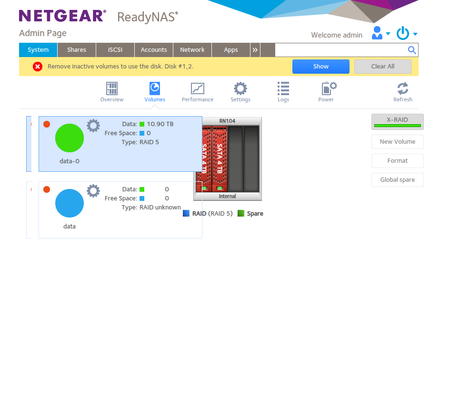
I had previously posted this thread Remove inactive volumes to use the disk. Disk #1,2,3,4. troubleshooting | NETGEAR Communities but I had to wait for replacement disks that i bought during th...

StephenB
Sep 30, 2025Guru - Experienced User
bizmate wrote:i will open a new ticket
Just to clarify this. This is a user-to-user forum, so there are no support tickets here. I am a "Netgear Insider", but don't work for Netgear or represent them in any way. All ReadyNAS products are end of life, so there is no possibility of Netgear support.
bizmate wrote:but the forum software is eventually discarding it, i think
Yes, they were "caught" by the automatic spam filter. I released one of them (they looked the same when I glanced at them).
Now that that is out of the way:
bizmate wrote:These are my files and folders so it seems it is fine at the moment to be backed up but i dont see a web interface or not sure how to mount them remotely so difficult to say.
1 - how can i remotely connect and save/inspect the files?
2 - is there a way to mount it remotely?
3 - from the lsblk command i dont know which disk is which. Can i hot swap new disks now and how do i know which one to replace and when the new disk is added to the array and the full array is operational?
4 - also how to proceed with the other new disks and remove the old ones? Do i still need to do it in support mode? Any guidance here would be welcome as i have never done this stuff
So it looks like you have successfully remounted the volume - which is great news.
I've never been able to start up the remote access protocols from tech support mode. There are limits to what you can do with services when using chroot. Also getting NTFS disks to mount is difficult in tech support mode. You can mount a FAT32 or EXT formatted USB drive, and copy your files using the command line. EXT is better if you can read it on other devices.
Another option is to just power down the NAS and then boot. The safest approach is to boot it up read-only initially, and then back up the data. I'd do that before doing any disk diagnosis or replacement. After the data is safe, you can reboot the NAS in normal mode, and proceed with the disk replacement process. If you need more help on that, you can send me fresh logs when the time comes. I suggest using the private message feature (the envelope icon in the upper right of the forum page) instead of posting redacted logs publicaly.
FYI, the easiest way to see more information on disk health from ssh is to use smartctl, and also to look for errors in the journal with journalctl.
bizmate
Sep 30, 2025Tutor
Another option is to just power down the NAS and then boot. The safest approach is to boot it up read-only initially, and then back up the data. I'd do that before doing any disk diagnosis or replacement. After the data is safe, you can reboot the NAS in normal mode, and proceed with the disk replacement process. If you need more help on that, you can send me fresh logs when the time comes. I suggest using the private message feature (the envelope icon in the upper right of the forum page) instead of posting redacted logs publicaly.
Thank you for all you are doing.
I just tried to power the unit down based on what you wrote above , to then attempt a "Volume read only" boot but the unit is not shutting down when i press the power button, i also tried to press multiple times or holding the button for a long time.
I assume that just switching off the socket is not healthy, so any suggestions on how I could proceed ?
Also just to confirm will the "Volume read only" new boot session have the volume i just forcibly assembled?
Once I have saved the backup, hoping i get there, what can i then do to recover everything?
I know the NAS stores the volume, users etc conf info separately, ie i have seen this info in some config logs, so if in the next reply you could confirm what the next steps are it would be great. I hope there is a guide somewhere because i looked around in the forums and could not find a clear article.
- StephenBSep 30, 2025Guru - Experienced User
bizmate wrote:
I just tried to power the unit down based on what you wrote above , to then attempt a "Volume read only" boot but the unit is not shutting down when i press the power button, i also tried to press multiple times or holding the button for a long time.
Another limitation in tech support mode. Linux shutdown commands should work if you exit the chroot. But just switching off the socket should be ok now.
When you reboot, the transaction counters should match, so the volume will assemble normally.
Related Content
NETGEAR Academy

Boost your skills with the Netgear Academy - Get trained, certified and stay ahead with the latest Netgear technology!
Join Us!
