NETGEAR is aware of a growing number of phone and online scams. To learn how to stay safe click here.
Forum Discussion

bizmate
Sep 25, 2025Tutor
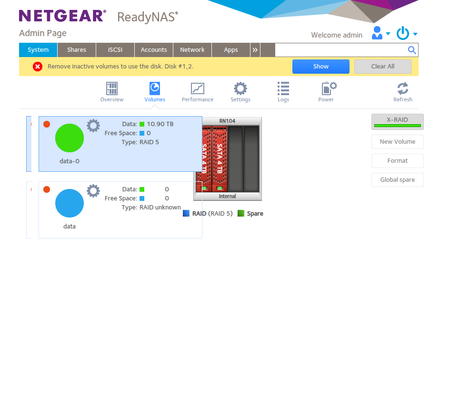
Remove inactive volumes to use the disk. Disk #1,2. troubleshooting
I had previously posted this thread Remove inactive volumes to use the disk. Disk #1,2,3,4. troubleshooting | NETGEAR Communities but I had to wait for replacement disks that i bought during th...

StephenB
Oct 06, 2025Guru - Experienced User
bizmate wrote:Moved to slot 3 it is not detected
AFAIK there is nothing you can do to fix that.
You could look for a used OS-6 ReadyNAS with four or more bays, and than migrate the disks to it.
Or live without bay 3 - getting two larger disks, and doing a factory default with those disks and maybe one of the originals in place. Then restore your data from the backup. Two 12 TB disks would give you the same capacity you have now.
Of course getting a new NAS from another vendor is another path.
bizmate
Oct 06, 2025Tutor
I am not really using all this space. I could restore it so only 3 drives are used and have up to 8TB effectiver storage with RAID 5 ?
If so what steps should i take to do so?
- format the disks once mounted in bays 1,2,4?
- how do i get back all the folders, auth info, etc
- after i can just copy back the data added manually and run my backup scripts from my PCs
but i just want to make sure i dont loose all the configs so i can go back to use the NAS as a media server, file storage etc too. The closest thing i found in my current country is https://acdtech.mu/product/storage/ssd-sata/netgear-readynas-424-4-bay-diskless/ and if you do a bit of currency conversion I am sure you see it is too expensive for the unit.
I have also seen several second hand units on ebay uk but not sure when i will go there next. Not any time soon
- StephenBOct 06, 2025Guru - Experienced User
bizmate wrote:
I could restore it so only 3 drives are used and have up to 8TB effectiver storage with RAID 5 ?
Yes to this.
bizmate wrote:
but i just want to make sure i dont loose all the config
Normally you would do this with a factory default - then reconfigure the NAS and restore your data.
It is possible to shrink the array using ssh though. The gist is that you first shrink the file system down to 8 TB, and then you change the mdadm RAID mode.
Sandshark has experimented with this, and posted some results here:
It's not something I've tried, but perhaps he would be willing to post the needed commands for your situation.
That is, to reduce a 4x4TB degraded volume with a single RAID-5 group to 3x4TB.
- SandsharkOct 07, 2025Sensei
I've seen other ReadyNAS with that issue. Sometimes, replacing just the SATA backplane is a fix, other times the whole motherboard has to be replaced. Since parts are unavailable, though, that's not something most can do.
Anyone with a new in-the-box ReadyNAS is likely asking a lot for it since they've been unavailable for quite some time now. But there is a good possibility that if you actually inquired, you'd find that vendor really doesn't have one. So, you are looking at a used NAS. A 214 or better would be a good choice. A Pro or Ultra 6 converted to OS6 would also work for you, and they tend to be more available and affordable (but I don't know about your country). They would also be a bit faster than a 104 except for USB, which is limited to USB2 on those models.
If you decide to use just three drives, the easiest way is to factory default and start over. Even if you want to upgrade to larger drives, you first have to reduce the RAID to 3 drives or do without redundancy. Personally, I'd consider that just a temporary fix. Without knowing the cause, there is no telling if another bay will fail.
- SandsharkOct 07, 2025Sensei
bizmate wrote:
If so what steps should i take to do so?
- format the disks once mounted in bays 1,2,4?
- how do i get back all the folders, auth info, etc
- after i can just copy back the data added manually and run my backup scripts from my PCsI missed this. In this case, reducing from 4 to 3 drives is your best solution. Based on your posts, I think you have the Linux skills to accomplish it. But if in doubt, post and I'll help.
Here is what you can do as an alternative:
Since you can now access the admin interface, the first thing you want to do is backup the configuration. If you have apps you don't intend to use again, uninstall them before you do that. It's actually best if you uninstall all apps first. If your use as a "media server" includes using an app, then somebody else will have to instruct you on how to back up it's database.
At this point, you can factory default and restore the configuration. Any apps you didn't delete first should be re-installed before restoring the configuration file.
Alternately, you can delete the existing volume and create a new one. It's not as "clean" as a factory default, but it can be of use in saving configuration. Note that any apps may seem to still be there, but they are not. I order to save apps, you have to follow steps similar to what's here: How-to-save-your-apps-when-destroying-your-main-volume. But since you don't have a second volume, you'll have to save the data elsewhere. The OS partition is OK for that in the short term if none of the apps have a large database, log file, etc. A USB drive is probably better.

Related Content
NETGEAR Academy

Boost your skills with the Netgear Academy - Get trained, certified and stay ahead with the latest Netgear technology!
Join Us!
