NETGEAR is aware of a growing number of phone and online scams. To learn how to stay safe click here.
Forum Discussion

bolter
May 28, 2022Aspirant
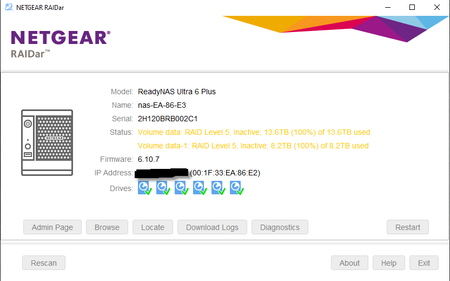
Remove inactive volumes to use the disk. Disk #1,2,3,4,5,6
I have a Readynas ultra 6 plus. After upgrading to OS 6.10.7 I now get a message saying Raid 5 inactive remove inactive volumes to use the disk in Raidar. I can see the folders I had setup in window...
 Jun 05, 2022
I Reset The Nas And Then Re-Installed OS 6.10.7 and Now All Is Good.
StephenB
May 29, 2022Guru - Experienced User
There are a lot of causes for the inactive volume problem, and normally I recommend using Netgear support.
But that is not available to you, since you have a converted legacy ReadyNAS. rn_enthusiast sometimes helps users here with this problem, and might chime in here. Get a full log zip file while you are waiting.
Do you have a backup of the files? It would be more direct to do a factory reset, and restore the files from backup.
Related Content
NETGEAR Academy

Boost your skills with the Netgear Academy - Get trained, certified and stay ahead with the latest Netgear technology!
Join Us!
