NETGEAR is aware of a growing number of phone and online scams. To learn how to stay safe click here.
Forum Discussion

bolter
May 28, 2022Aspirant
Remove inactive volumes to use the disk. Disk #1,2,3,4,5,6
I have a Readynas ultra 6 plus. After upgrading to OS 6.10.7 I now get a message saying Raid 5 inactive remove inactive volumes to use the disk in Raidar. I can see the folders I had setup in window...
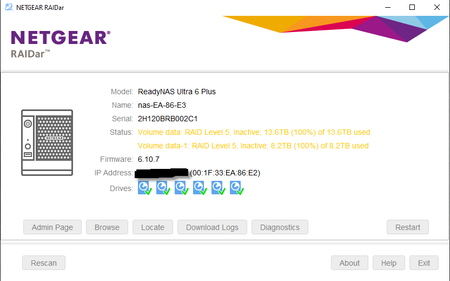
 Jun 05, 2022
I Reset The Nas And Then Re-Installed OS 6.10.7 and Now All Is Good.

Sandshark
May 29, 2022Sensei
bolter wrote:I have a Readynas ultra 6 plus. After upgrading to OS 6.10.7 I now get a message saying Raid 5 inactive remove inactive volumes to use the disk in Raidar.
If you mean right after the upgrade, that's to be expected. The OS6 is incompatible with the old file system from OS4.2.x. That's why all the conversion instructions say the first step is to backup the data and that the conversion does a factory default. If that's the case, but you never did the factory default last step in the conversion, you should be able to do a USB recovery to OS4.2.31 and see your data again so you can back it up before doing the conversion again.
If that's not the case, then don't you still have the backup you made before the conversion?
- bolterJun 05, 2022Aspirant
I Reset The Nas And Then Re-Installed OS 6.10.7 and Now All Is Good.
Related Content
NETGEAR Academy

Boost your skills with the Netgear Academy - Get trained, certified and stay ahead with the latest Netgear technology!
Join Us!
