NETGEAR is aware of a growing number of phone and online scams. To learn how to stay safe click here.
Forum Discussion

Chan1011
Sep 21, 2014Guide
RN104 - Can't *rename* but can move/delete.
When I try to rename files through Windows Explorer it's giving me permission problems, but I can delete/move/copy.
I tried to set lowest permissions for my folders, guest has all access etc.
Any ideas?
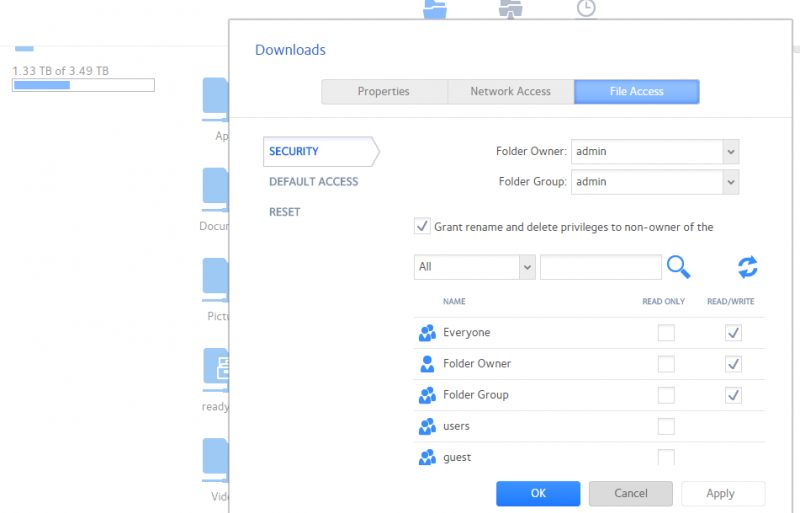
I tried to set lowest permissions for my folders, guest has all access etc.
Any ideas?
5 Replies
Replies have been turned off for this discussion
 StephenBGuru - Experienced UserIs the windows machine using a user name/password configured on the NAS?
 Chan1011GuideMy NAS is set to guest access, so anyone on the network can just access the shared folders.
- mdgm-ntgrNETGEAR Employee RetiredDid you use the guest user to add these files.
If you ever used a different user e.g. an ordinary user or the "admin" user that could perhaps explain the permission issues. - StephenBGuru - Experienced UserTry clicking on the "reset" button on the screen shot above. That will reset the owner/group of all files and folders in the share back to "guest", and adjust the permissions.
Generally its better to use a consistent username that exists on the NAS. One way to do that is create a username/password that matches the windows credentials for each PC.
A second way is to use the windows credentials manager in the windows control panel, and create a windows credential for the NAS, specifying a NAS username/password (which can be "admin"). - Chan1011GuideI need to learn more about this file permissions stuff, I've had this NAS since I moved into my Condo for about 1 year and it's been really good. But things are starting to fill up and I need to re-organize my files.
I will try the Reset option later and see what happens.
FYI, all the files aren't copied there by any user, it's actually automatically downloaded by QBittorrent, but I'm not sure if that has anything to do with it.

Related Content
NETGEAR Academy

Boost your skills with the Netgear Academy - Get trained, certified and stay ahead with the latest Netgear technology!
Join Us!
