NETGEAR is aware of a growing number of phone and online scams. To learn how to stay safe click here.
Forum Discussion

RPG_228
Aug 26, 2015Aspirant
RN104 adding third drive takes very long
Hello everyone,
I've got a readynas 104 with 2 x 2TB drives (XRAID). They are 95% full of data so i added a third 2 TB drive.
Since i added the third drive the drive i can't view the admin page of the NAS anymore.
It's been 48 hours since i added the drive and the volume still hasn't expanded.
Is it normal that it takes so long?
I can still use the NAS as normal, all my data is intact and all the sevices are running (FTP,plex, etc)
the blue drivenumber on the NAS is blinking. So i assumed it was busy with syncing the data.
The display shows: Readynas and its IP number.
I thougt about resetting the NAS but i'm a bit afraid of losing my data.
Thanks for the logs.
Your data volume is pretty much 100% full.This is not good.
We recommend keeping volume usage around the 80-85% mark.Do you have a backup? You should backup your data if you have not already as the next step.
It looks like your new disk has been added to the data volume array, but not to the OS or swap arrays. Expansion has not occurred.
You could try rebooting the NAS via RAIDar and see what happens.

10 Replies
Replies have been turned off for this discussion
 StephenBGuru - Experienced User
What status is RAIDar giving you?
If you don't have a backup, it would be a good idea to make one.
- RPG_228Aspirant
I didn't of checking RAIDar before.
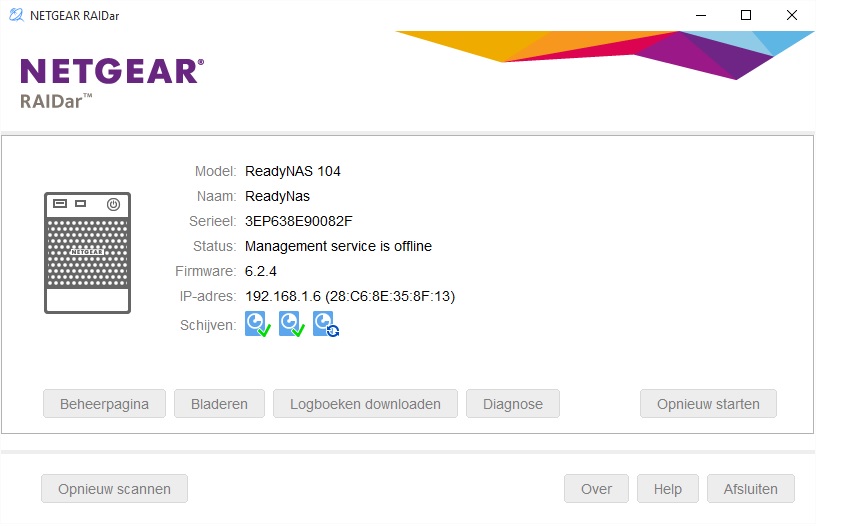
RAIDar shows 2 working drives and 1 with a syncing symbol.
I tried pasting a image of the raidar view in this message.
I hope it shows up.
l
- StephenBGuru - Experienced User
If you hover your mouse over the syncing drive, it should provide some completion status info.
- RPG_228Aspirant
i tried doing that.
But it just shows CHANNEL 3 followed by the drive name/type and temperature.
Basicly the same info as the 2 allready installed drives.
No info on the completion status.
If it helps i can download the logs.
- RPG_228AspirantOops sorry,
I'll send them again.- mdgm-ntgrNETGEAR Employee Retired
Thanks for the logs.
Your data volume is pretty much 100% full.This is not good.
We recommend keeping volume usage around the 80-85% mark.Do you have a backup? You should backup your data if you have not already as the next step.
It looks like your new disk has been added to the data volume array, but not to the OS or swap arrays. Expansion has not occurred.
You could try rebooting the NAS via RAIDar and see what happens.- RPG_228Aspirant
i didn't know about not exeding the 85% mark.
I will keep that in mind in the future
So, i rebooted the NAS via Raidar and it rebooted like normal.
Even al 3 drives showed as normal and running in both RAIDar and the admin view, only the total volume didn't expand.
Then i shut down the device removed the 3rd (new) disc and started it up again.
When it was finished booting the display warned about degraded data and RAIDar gave a warning about the RAID5 being non redundant.
I decided to shut the NAS down again and put the drive back in.
When i booted up again the drive starting syncing (message in display)
RAIDar also displays the volume data is syncing (3,4% complete)
I guess this is a good sign?
Related Content
NETGEAR Academy

Boost your skills with the Netgear Academy - Get trained, certified and stay ahead with the latest Netgear technology!
Join Us!
