NETGEAR is aware of a growing number of phone and online scams. To learn how to stay safe click here.
Forum Discussion

BurgerP
May 19, 2018Tutor
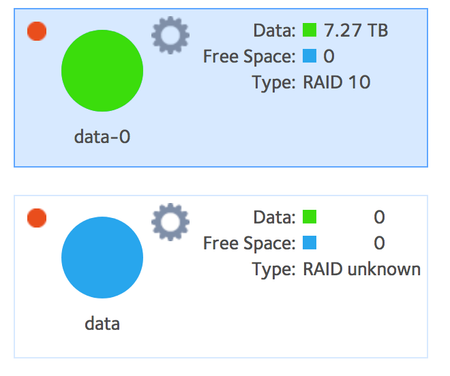
RN104 RAID 10 after drive failure
A couple of weeks ago, I received an alert from my RN104 that the volume had "degraded". Shortly thereafterI had one of the four drives in my RAID 10 setup remove itself then add itself back to the u...

StephenB
May 21, 2018Guru - Experienced User
Powering down in the middle of a resync is risky.
I wouldn't say it's bricked, since it is powering up and booting normally. The issue is "just" the RAID array. If you do have a backup, I'd destroy the volume, create a new one, and the reload the files from backup.
If not, then perhaps send a PM to a Netgear mod (for instance mdgm-ntgr ) and ask if they are willing to review your logs.
RAID recovery is expensive (Netgear's service is here: https://kb.netgear.com/69/ReadyNAS-Data-Recovery-Diagnostics-Scope-of-Service ). If you have a Windows PC, you could also look at ReclaiMe software. Several users have had success with it, though I don't recall any off-hand that were using RAID-10. ReclaiMe has the benefit that you can see if it can recover data prior to purchase.
You could try contacting support at my.netgear.com, and ask if they can try to remount the RAID array w/o data recovery (using per-incident support). I don't know if they'd do that or not, but I think it is worth having the conversation.

Marc_V
May 21, 2018NETGEAR Employee Retired
Hi BurgerP
I would follow StephenB 's advise on getting the NAS back and working. On Data recovery if you are comfortable of doing the procedure then you can try recovery using a PC. Otherwise, we can check if the RAID is still mountable but you will still have to contact support regarding getting it done. You can always create a ticket through the Support page. If you don't have a contract a Pay-per Incident Support is available. Data Recovery service has a different charge though.
You can send us the logs through the link on the Sig.
Regards
- BurgerPMay 21, 2018Tutor
Thanks everyone for your replies and suggestions.
Marc_V , I've sent a copy of my logs from the unit. At this point all options are on the table, although going the PC route might be a bit of a challenge since we're a Mac shop. I'd either have to buy or borrow a Windows machine to do that, but it's not beyond reason to do so. I did note that on the ReclaiMe site, they have a different tool for non XRAID configurations to address RAID 10 - I'm not sure if anyone has any experience with that to let me know if it's as viable as their more mainstream product.
Regardless, I think I'd like to at least get an assessment of how hosed this array is before choosing a path.
- mdgm-ntgrMay 21, 2018NETGEAR Employee Retired
This does look like a data recovery situation. Hope you have a good backup.
kernel.log:
May 21 10:11:23 ReadyNAS104 kernel: md/raid10:md127: not enough operational mirrors.
status.log:
[18/05/19 12:00:50 CDT] notice:disk:LOGMSG_ADD_DISK Disk Model:ST4000NM0033-9ZM170 was added to Channel 2 of the head unit.
[18/05/19 12:05:20 CDT] notice:system:LOGMSG_SYSTEM_HALT The system is shutting down.
[18/05/19 12:08:28 CDT] info:system:LOGMSG_START_READYNASD ReadyNASOS background service started.
[18/05/19 12:41:00 CDT] warning:disk:LOGMSG_DELETE_DISK Disk Model:ST4000NM0033-9ZM170 was removed from Channel 4 of the head unit.
[18/05/19 12:46:46 CDT] notice:disk:LOGMSG_ADD_DISK Disk Model:ST4000NM0033-9ZM170 was added to Channel 4 of the head unit.
[18/05/19 13:14:18 CDT] notice:system:LOGMSG_SYSTEM_HALT The system is shutting down.
[18/05/21 10:13:35 CDT] info:system:LOGMSG_START_READYNASD ReadyNASOS background service started.
[18/05/21 10:32:06 CDT] notice:disk:LOGMSG_ADD_DISK Disk Model:ST4000NM0033-9ZM170 was added to Channel 4 of the head unit.
[18/05/21 10:33:07 CDT] notice:disk:LOGMSG_ZFS_DISK_STATUS_CHANGED Disk in channel 4 (Internal) changed state from RESYNC to ONLINE.
[18/05/21 10:57:32 CDT] notice:disk:LOGMSG_ADD_DISK Disk Model:ST4000NM0033-9ZM170 was added to Channel 2 of the head unit.
[18/05/21 10:59:26 CDT] notice:disk:LOGMSG_ZFS_DISK_STATUS_CHANGED Disk in channel 3 (Internal) changed state from RESYNC to ONLINE.

Related Content
NETGEAR Academy

Boost your skills with the Netgear Academy - Get trained, certified and stay ahead with the latest Netgear technology!
Join Us!
