NETGEAR is aware of a growing number of phone and online scams. To learn how to stay safe click here.
Forum Discussion

colinm
Dec 14, 2015Aspirant
RN104 X-RAID not syncing to a new disk
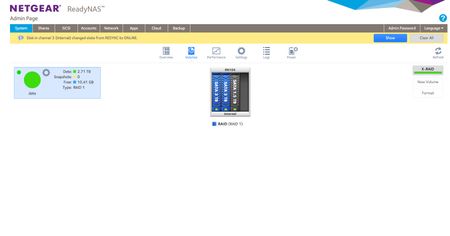
Hi, I'm sure this is something simple I'm missing, but I started out with a RN104 in X-RAID (RAID 1) with two 3TB disks. They are now full so I've just added another 1.5TB disk....and waited......

DaneA
Dec 15, 2015NETGEAR Employee Retired
Hi colinm,
I apologize for the inconvenience. Kindly read below:
You have an existing 2x3TB drives in your RN104. With X-RAID configured in the RN104, this will be RAID-1 since there are 2 drives and this will do mirroring. This will allow one-disk failure which means if ever one drive fails, data is still intact on the healthy drive. You will just simply remove the faulty drive and replace it with a new 3TB drive.
If you will add another 3TB drive in the RN104, this will be RAID-5 (still X-RAID configured). It will give you approximately 6TB of storage and the remaining 3TB will be used for parity. This will allow one-disk failure. For example: you have 3x3TB drives labeled disks A, B and C. If disk A fails, data is still intact in disks B and C. You will just have to replace disk A with a new 3TB drive to allow one-disk failure again. In the event that two disks fails at the same time then you will need to contact NETGEAR Support.
Since you mentioned that XRAID is configured on XRAID (RAID1) in your initial post, you will just have to add another 3TB drive then it will automatically proceed with the resync process. After the resync process, you should still be able to access your data. It will give you approximately 6TB of storage and the remaining 3TB will be used for parity. This is possible because of XRAID. But with the traditional RAID, you will have to back up the data first, then factory reset the NAS, insert all 3x3TB drives, then reconfigure it from scratch, and finally transfer back the data to the NAS.
Kindly access this NETGEAR RAID Calculator and follow the steps. It will help you check the capacity used for data and protection with your RN104 configured on XRAID.
Hope it helps.
Regards,
DaneA
NETGEAR Community Team
colinm
Dec 15, 2015Aspirant
Hi DaneA
Perfect explanation, many thanks - so my misunderstanding is that you have to add drives that are equal or greater to the original disks installed to be able to let X-RAID do its stuff.
I'm glad I don't need to start from scratch at least!
I just need to decant the data from my 3TB drive in my RN102 and then I can install that in my RN104, and everything will be good.
Cheers
Colin
Related Content
NETGEAR Academy

Boost your skills with the Netgear Academy - Get trained, certified and stay ahead with the latest Netgear technology!
Join Us!
