NETGEAR is aware of a growing number of phone and online scams. To learn how to stay safe click here.
Forum Discussion

VolkerB
Nov 06, 2021Aspirant
RN214 refuses to take snapshots
Hi! After factory-resetting and reinstalling my RN214 (check out https://community.netgear.com/t5/Using-your-ReadyNAS-in-Business/Admin-page-unavailable-after-cancelled-backup-job-amp-hard/m-p/21...
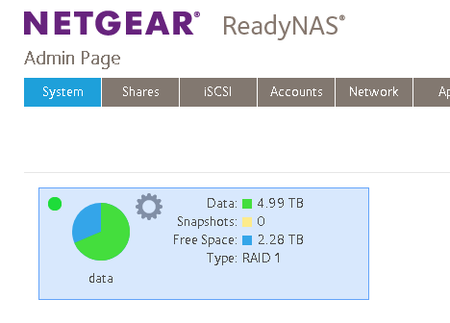
- Nov 08, 2021
VolkerB wrote:[...] snapshots (neither smart nor custom, no matter what schedule) did not seem to work anymore for the home shares of all users. Manual and automatic snapshots for other shares not related to individual users worked fine. There was no issue with insufficient space (no snapshot pruning taking place) [...] So I have created a new user "test" with all default settings in the "Users" group. [...] for user "test" automatic snapshots are actually taken successfully, while at the same time, no snapshots for user "volker" are stored even though he is sharing the same schedule. As it happens to be, [X] Allow snapshot access was enabled for volker and [ ] Protection was disabled, user "test" had it the other way round. [...]
Currently, I'm running a test with various combinations of (dis)allowing snapshot access and en-/disabling the protection feature, (de)activating bit rot protection and compression for the other shares to find out what exactly spoils the fun here.
The tests have completed. Conclusion:
If you don't activate the [X] Protection option in the Home Folders > Settings > Snapshot Access for all the users where snapshots should be taken, no schedule whatsoever is going to work. Everything else (Bit-rot-protection and compression for shares, snapshot access for individual users, the type of schedule and whether you want snapshots even if nothing changed) does not matter.
So if some Netgear dude is listening: Perhaps this critical relationship could at least be made more clear in the manual or probably even a warning displayed if the admin deviates from a setting that implicitely disables snapshots.
HTH & Greets,
Volker

StephenB
Nov 08, 2021Guru - Experienced User
VolkerB wrote:
BTW, I don't remember having created subvolumes.
The web ui creates a subvolume automatically when you create a share. Unfortunately, home folders are treated differently. The subvolume is created the first time the user accesses the NAS using Windows - not when the user is created in the web ui (or when restoring the config files).
When you restored the NAS, you needed to access the NAS from Windows using each user's credentials before you ran the backup job - and based on your description, you didn't do that. The backup job would have created ordinary subfolders in home, and not subvolumes.
This would certainly explain why snapshots aren't working. You can confirm my explanation with ssh by
root@NAS:~# btrfs subvol list /data | grep home
ID 257 gen 1123683 top level 5 path home
ID 9340 gen 1123683 top level 257 path home/admin
You should see a path for each user in the output. I don't think you will.
If I am correct, what you need to do to recover is
- rename each /home subfolder temporarily
- access the NAS using each user's credentials from Windows using file explorer.
- confirm that the subvolumes were created
- copy the contents of the temporary folders into the appropriate user folders
- delete the temporary folders.
FWIW, the complexity of restoring home folders when rebuilding the NAS is one reason I've decided not to use them. I've turned off all sharing protocols in home. Creating a regular share with restricted access gives you something easier to manage - though the share isn't hidden.
VolkerB
Nov 08, 2021Aspirant
StephenB wrote:
VolkerB wrote:
BTW, I don't remember having created subvolumes.The web ui creates a subvolume automatically when you create a share. Unfortunately, home folders are treated differently. The subvolume is created the first time the user accesses the NAS using Windows - not when the user is created in the web ui
That is exactly what I found as well while I was creating the "test" user for my snapshots experiments. You had to log in/mount the directory on the client once to have the directory created.
StephenB wrote:When you restored the NAS, you needed to access the NAS from Windows using each user's credentials before you ran the backup job - and based on your description, you didn't do that. The backup job would have created ordinary subfolders in home, and not subvolumes.
Not 100% sure if I did that. However... (see below). But I agree that this process is a little counterintuitive and hampers a successful restore quite considerably.
StephenB wrote:You can confirm my explanation with ssh byroot@NAS:~# btrfs subvol list /data | grep home
ID 257 gen 1123683 top level 5 path home
ID 9340 gen 1123683 top level 257 path home/admin
I get the following:
root@rn214-volker:/home/admin# btrfs subvol list /data | grep home
ID 257 gen 2306 top level 5 path home
ID 279 gen 2617 top level 257 path home/volker
ID 280 gen 2333 top level 257 path home/admin
ID 281 gen 2307 top level 257 path home/anja
ID 5405 gen 2621 top level 280 path home/admin/.snapshots
ID 5407 gen 2621 top level 281 path home/anja/.snapshots
ID 5410 gen 2621 top level 279 path home/volker/.snapshots
This hopefully means "all is good", all user's home directories are valid BTRFS subvolumes and just enabling the "[X] Protection" option does the trick. I'm seeing snapshots arrive after this so just wanted to make sure I don't create broken/useless ones or fscking up my system in other nasty ways (again).
StephenB wrote:If I am correct, what you need to do to recover is
- rename each /home subfolder temporarily
- access the NAS using each user's credentials from Windows using file explorer.
- confirm that the subvolumes were created
- copy the contents of the temporary folders into the appropriate user folders
- delete the temporary folders.
So - despite this probably not being necessary in my case - what you essentially do is let the NAS' OS create the BTFRS subvolumes first (by logging in the respective user) and then move back the data that you have (temporarily) parked elsewhere. Makes sense. Very helpful information indeed.
And, yes, I get the point that creating "regular" shares with appropriate access rights might be more straightforward. However, I sincerely hope that excercises such as completely resetting the system or restoring a backup won't be necessary anytime soon...
Thanks again & greets,
Volker
Related Content
NETGEAR Academy

Boost your skills with the Netgear Academy - Get trained, certified and stay ahead with the latest Netgear technology!
Join Us!
