NETGEAR is aware of a growing number of phone and online scams. To learn how to stay safe click here.
Forum Discussion

fooboo
May 20, 2016Star
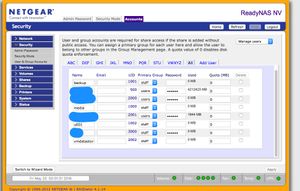
Shares disappeared after restarting Frontview manually.
ReadyNAS NV (I know, I know) running latest firmware. Been a faithful user for years. Somewhere between restarting frontview and nfs-kernel-server via command line (in an attempt to tighten ...

kohdee
May 20, 2016NETGEAR Expert
You might be able to try restoring the original config files from /etc/default/config/etc/frontview
cp -rP /etc/default/config/etc/frontview/* /etc/frontview/
- foobooMay 20, 2016Star
Oh cool!
I found a (semi?) intact Shares.conf at
/etc/default/config/etc/default/samba/Shares.conf (it's missing /c/u001 and /c/vmdatastore)
[backup]
comment = "Backup Share"
path = "/c/backup"
public = 1
writeable = 1
oplocks = 1
[media]
comment = "Media Server Share"
path = "/c/media"
public = 1
writeable = 1
oplocks = 1
Similarly, /etc/default/config/etc/netatalk/AppleVolumes.default
After restoring the files and cleaning out /etc/passwd, what do you recommend as the best way to restart things? Reboot or restart services? (AFP, CIFS and NFS are all currently impacted for me).
- kohdeeMay 21, 2016NETGEAR Expert
fooboo wrote:
I found a (semi?) intact Shares.conf at
/etc/default/config/etc/default/samba/Shares.conf (it's missing /c/u001 and /c/vmdatastore)
No, that's actually the default config file; that's the config it would have used if you factory defaulted. You can copy the default config Shares.conf to the /etc/frontview/samba/Shares.conf to match your existing shares and get yourself back up and running. You might also be able to check /var/backups/ to see if there is a config backup there of your original shares.
- foobooMay 21, 2016Star
Ok thanks. I looked in /var/backups and it appears that there are a number of compressed tars there so I'll copy them off and look around.
- Is it safer/better to either cherry pick the files that I need or just copy it over completely?
- I'm assuming that I should reboot after copying the files over? Or should I just restart frontview from the command line?
Thanks much! I'm excited about the prospect of getting things back to normal.
Related Content
NETGEAR Academy

Boost your skills with the Netgear Academy - Get trained, certified and stay ahead with the latest Netgear technology!
Join Us!
