NETGEAR is aware of a growing number of phone and online scams. To learn how to stay safe click here.
Forum Discussion

fooboo
May 20, 2016Star
Shares disappeared after restarting Frontview manually.
ReadyNAS NV (I know, I know) running latest firmware. Been a faithful user for years. Somewhere between restarting frontview and nfs-kernel-server via command line (in an attempt to tighten ...

StephenB
May 20, 2016Guru - Experienced User
I am not seeing your shares in your ls output, just your user account folders.
If the shares are there, have you backed them up?
fooboo
May 20, 2016Star
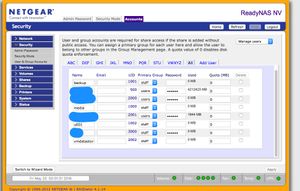
Please see the link above for similar problems experienced by others. It looks like the shares and users somehow get confused and dumped into /etc/passwd.
The initial ls screenshot shows /c which are just the shares. I have blanked out the user account names (blue stuff). The shares are still there as of now and no, the shares are not backed up right now and therefore I'm hesitant to try to, a) delete the shares showing up as account names and b) try to create a new share to try to manually determine the format necessary to recreate the existing shares.
I've got another NAS coming (hopefully by Monday) so my plan is to back up to that first via rsync.
Related Content
NETGEAR Academy

Boost your skills with the Netgear Academy - Get trained, certified and stay ahead with the latest Netgear technology!
Join Us!
