NETGEAR is aware of a growing number of phone and online scams. To learn how to stay safe click here.
Forum Discussion

BigAl1
Jan 20, 2019Aspirant
Shares, Where am I going wrong.
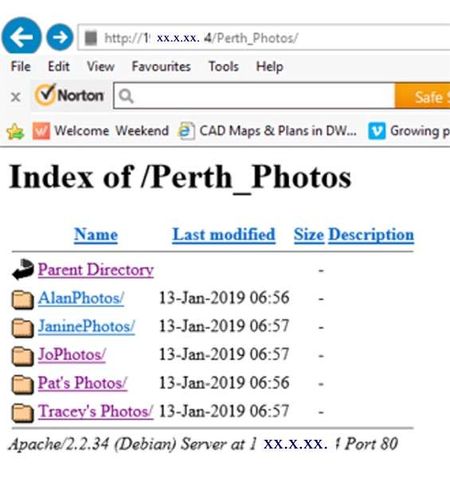
I have created a share on my NAS (Perth_Photos) and I think I have done everything correctly, yet when I go to my browser and type in http://1XX.XXX.X.XX/Perth_Photos the browser displays this. ...
 Jan 22, 2019
BigAl1 wrote:
Obviously I can get into the Share via my admin login, but the idea behind all this is that I have just spent 4 weeks in Perth W.A. with my 3 daughters, 2 of which live in Australia, the other lives here in the UK.Well, if http is enabled for the share (not just enabled in system->settings) then http://1XX.XXX.X.XX/Perth_Photos should show it.
Looking again at your screenshot, it appears to be doing that (at least showing folders in the share), so I am unclear on what your problem actually is. If you click on the subfolder links you should see the photos in them. However, you really want remote access to the NAS over the internet, which isn't the same as just enabling http. You'd also need to forward ports in your browser and set up DDNS. And http isn't a secure way to access the NAS remotely, so I recommend using a different approach.
If this is a one-time project, you could just use cloud storage like Google Drive. Google offers 15 GB of free cloud storage (including gmail storage if you use that), and the family downloads wouldn't be limited by your ISP upload speed. If you need more storage, you can temporarily upgrade it for a small monthly fee - then remove the photos and go back to the free account when you are done. You can sync Perth_Photos to your google drive using a built-in ReadyNAS cloud app (though I'd probably upload the photos from a PC myself).
If this is longer-term, then you might want to consider ReadyCloud. You'd create accounts for the family, and they'd use those to access the photos. They can access them from a browser, or they can install the ReadyCloud app and use file explorer. There are a couple of other options (ZeroTier and FTPS/FileZilla), but they are a bit more work to set up.

BigAl1
Jan 21, 2019Aspirant
Thank you for your reply. I have switched on all the protocols except AFP.
My NAS is a 204 running 6.9.4. which states that it is the latest version of software.
Obviously I can get into the Share via my admin login, but the idea behind all this is that I have just spent 4 weeks in Perth W.A. with my 3 daughters, 2 of which live in Australia, the other lives here in the UK.
We have taken over 1,000 photo's and most would be 3 Mb, so to email them to each other isn't going to work.
The idea was for each of us to upload them to my NAS and one of the girls is going to vcreate a photo album.
It was about having all the photo's in one place to start with.
Thanks for helping.
StephenB
Jan 22, 2019Guru - Experienced User
BigAl1 wrote:
Obviously I can get into the Share via my admin login, but the idea behind all this is that I have just spent 4 weeks in Perth W.A. with my 3 daughters, 2 of which live in Australia, the other lives here in the UK.
Well, if http is enabled for the share (not just enabled in system->settings) then http://1XX.XXX.X.XX/Perth_Photos should show it.
Looking again at your screenshot, it appears to be doing that (at least showing folders in the share), so I am unclear on what your problem actually is. If you click on the subfolder links you should see the photos in them. However, you really want remote access to the NAS over the internet, which isn't the same as just enabling http. You'd also need to forward ports in your browser and set up DDNS. And http isn't a secure way to access the NAS remotely, so I recommend using a different approach.
If this is a one-time project, you could just use cloud storage like Google Drive. Google offers 15 GB of free cloud storage (including gmail storage if you use that), and the family downloads wouldn't be limited by your ISP upload speed. If you need more storage, you can temporarily upgrade it for a small monthly fee - then remove the photos and go back to the free account when you are done. You can sync Perth_Photos to your google drive using a built-in ReadyNAS cloud app (though I'd probably upload the photos from a PC myself).
If this is longer-term, then you might want to consider ReadyCloud. You'd create accounts for the family, and they'd use those to access the photos. They can access them from a browser, or they can install the ReadyCloud app and use file explorer. There are a couple of other options (ZeroTier and FTPS/FileZilla), but they are a bit more work to set up.
- BigAl1Jan 22, 2019Aspirant
Thank you Stephen, in fact, thank you everybody who has attempted to help me on this. I think that you have hit the nail on the head with your answer Stephen, I think that what I thought was a 'shared folder' isn't what Netgear have enable in their software.
Having given this some thought, I thought, that if I set up a Shared Folder on my NAS, my daughter in Australia could upload photos to it from her browser, I see now that this isn't the case.
The 'shared folder' is purely a folder sitting on my NAS which needs a password to read it.
But then why when creating a user account are you given the option of giving the user Read Only or Read / Write Permission if all they can do is see (read) the images? Where does the 'write' come into it?
I think where I got it wrong was, I assumed that by creating a shared folder, my daughter could upload files into it, but in reality all it seems to do is allow somebody, in this case my daughter, access to it.
I think ReadyCloud is the answer, but I've never really understood 'the cloud', so I guess I'll have to learn it as I go.
I remember getting my first PC, a Commodore Vic 20 back in the early 1980's, it came with an A5 Manual of about 500 pages, I thought, 'I'm never going to learn all this', then realised that you only read the bits which you needed to learn at the time.
A bit like this 'sharing' and 'ReadyCloud', every day is a learning day.
Thank you for your help.
- StephenBJan 22, 2019Guru - Experienced User
BigAl1 wrote:
The 'shared folder' is purely a folder sitting on my NAS which needs a password to read it.
The folder on the NAS is shared, but normally that sharing is limited to your home network. For instance, we have 4 PCs in the house (including work PCs), plus a couple of iPads and smartphones and media players - and all can access the NAS shared folders. That allows me to consolidate our storage onto one device - which makes it easier to organize our files and more convenient to access them. It also simplifies our backup.
ReadyCloud expands that sharing to include remote access (as do the other methods I outlined earlier).
Related Content
NETGEAR Academy

Boost your skills with the Netgear Academy - Get trained, certified and stay ahead with the latest Netgear technology!
Join Us!
