NETGEAR is aware of a growing number of phone and online scams. To learn how to stay safe click here.
Forum Discussion

brb1800
Jun 04, 2017Aspirant
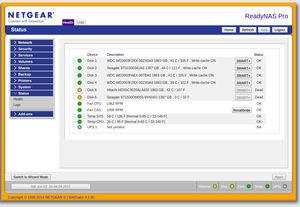
Two Disks Status Dead
I have two identical Pro Pioneer's that I keep in sync. This week I got the following error: "Detected increasing uncorrectable errors[14] on disk 5 [ST31500341AS, 9VS2H4KV] in the past 30 days. ...

Retired_Member
Jun 04, 2017After downloading the logs you might want to check smart_history.log in column uncorrectable_err and probably see some information.
You can download the logs from the webadmin page. Go to /system/logs and press the button "Download logs". The result will be a zip-container on your workstation, where you can see about 60+ different logs. smart_history.log is one of them.

StephenB
Jun 04, 2017Guru - Experienced User
The smart info on the two drives you posted shows 0 non--correctable counts for both disks. Maybe check SMART stats on all the drives?
On the HCL - Netgear stopped updating it for legacy NAS quite a while ago. There's no point in trying to track down discontinued disks and buying them as replacements. The best strategy is to ignore it for legacy NAS. If you normally get consumer-grade drives, then get a WDC Red or a Seagate Ironwolf. If you normally get enterprise, then consider the Red Pro and the Ironwolf Pro (though any enterprise grade disk from WDC or Seagate should work with RAID).
 brb1800Jun 04, 2017Aspirant
StephenB wrote:The smart info on the two drives you posted shows 0 non--correctable counts for both disks. Maybe check SMART stats on all the drives?
On the HCL - Netgear stopped updating it for legacy NAS quite a while ago. There's no point in trying to track down discontinued disks and buying them as replacements. The best strategy is to ignore it for legacy NAS. If you normally get consumer-grade drives, then get a WDC Red or a Seagate Ironwolf. If you normally get enterprise, then consider the Red Pro and the Ironwolf Pro (though any enterprise grade disk from WDC or Seagate should work with RAID).
Stephen thanks for the useful information!
In summary:
-The NAS has 6 drives and two of them have status of "dead" - but I can still access all data. If they were both truly dead there should be data loss. It can only function with a maximum of one dead drive.
-I tested on a workstation - live Ubuntu Live CD for Smart info on disk 5 and it passed SMART -
The SMART for the other 4 drives checked out as OK. I'm on the current version of Raidiator, so my guess is the hardware (motherboard/controller) is starting to go. If that's true, I still got many years of use from the NAS so no complaints.
- SandsharkJun 04, 2017Sensei
I have seen this type of behavior before when I was still on OS4.2.x. It started happening when I added two new drives to a system that previously had 4. The new drives were a different brand. After it happened more than once, I noticed that the problem was occurring when the drives came out of sleep mode and speculated the cause to be that the two new ones came out of sleep mode at a different pace than the old ones. Turning off drive spin-down was the solution to stop it from happeneing, whihc seemed to confirm my speculative cause. I posted the problem on the firum, and it was never addressed that I know of.
Before I fixed the issue, to get rid of the "dead" drives, I made sure my backup was in order, pulled one "dead" drive, connected it to a PC, tested it (all OK), deleted the partitions, then re-inserted it. Once that re-sync'ed, I did the same with the other. Of course, the first time I did this I didn't realize why it had happened and it happened again. Once I figured out the trigger, I did a factory default for good measure, so I can't say for sure the individual drive fixes would have stayed fixed, but I think they would have.
Ultimately, I upgraded the system to OS6.x and have had no problems, even with drive spin-down enabled.


Related Content
NETGEAR Academy

Boost your skills with the Netgear Academy - Get trained, certified and stay ahead with the latest Netgear technology!
Join Us!
