NETGEAR is aware of a growing number of phone and online scams. To learn how to stay safe click here.
Forum Discussion

michaelst
Oct 26, 2022Aspirant
vertical expansion question NAS 212
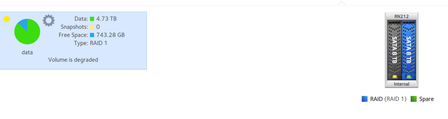
Ready NAS 212, firmware 6.10.8 WD Red plus 8tb (5900 class) Raid 1 (X-Raid enabled) I upgraded from a 6tb to an 8tb by hot swapping disk 2. All went well and disk is Online. Hot swapped disk ...

StephenB
Oct 26, 2022Guru - Experienced User
michaelst wrote:
Ready NAS 212, firmware 6.10.8
WD Red plus 8tb (5900 class)
Raid 1 (X-Raid enabled)
I upgraded from a 6tb to an 8tb by hot swapping disk 2. All went well and disk is Online.
Hot swapped disk 1, disk found, no errors. Status reads "Resync" and it's is yellow on the volume display. But there is no progress detail displayed, like it did for 18 hours when syncing disk 2. and it says it's 'degraded'.
Power light flashing twice (blue), and activity light on disk 1 is quick flashing.
Is the drive being synced?
Hard to say - normally it would also give you progress in the web ui.
You could download the log zip, and look at mdstat. You could then do that again after an hour or so, and see if there is any apparent progress.
If you are comfortable with the linux command line, you could also use ssh to take a look at progress.

michaelst
Oct 26, 2022Aspirant
I downloaded the logs and this is what is in the mdstat log:
Personalities : [raid0] [raid1] [raid10] [raid6] [raid5] [raid4]
md1 : active raid1 sdb2[0]
523264 blocks super 1.2 [1/1] [U]
md127 : active raid1 sda3[3](F) sdb3[2]
5855672800 blocks super 1.2 [2/1] [_U]
md0 : active raid1 sda1[3](F) sdb1[2]
4190208 blocks super 1.2 [2/1] [_U]
unused devices: <none>
/dev/md/0:
Version : 1.2
Creation Time : Sat Sep 2 00:54:48 2017
Raid Level : raid1
Array Size : 4190208 (4.00 GiB 4.29 GB)
Used Dev Size : 4190208 (4.00 GiB 4.29 GB)
Raid Devices : 2
Total Devices : 2
Persistence : Superblock is persistent
Update Time : Wed Oct 26 23:09:35 2022
State : clean, degraded
Active Devices : 1
Working Devices : 1
Failed Devices : 1
Spare Devices : 0
Consistency Policy : unknown
Name : 207a30d7:0 (local to host 207a30d7)
UUID : cc1a6df7:2c3bae07:f116df4d:84bf0a1b
Events : 2753
Number Major Minor RaidDevice State
- 0 0 0 removed
2 8 17 1 active sync /dev/sdb1
3 8 1 - faulty /dev/sda1
/dev/md/data-0:
Version : 1.2
Creation Time : Sat Sep 2 00:54:48 2017
Raid Level : raid1
Array Size : 5855672800 (5584.40 GiB 5996.21 GB)
Used Dev Size : 5855672800 (5584.40 GiB 5996.21 GB)
Raid Devices : 2
Total Devices : 2
Persistence : Superblock is persistent
Update Time : Wed Oct 26 22:46:57 2022
State : clean, degraded
Active Devices : 1
Working Devices : 1
Failed Devices : 1
Spare Devices : 0
Consistency Policy : unknown
Name : 207a30d7:data-0 (local to host 207a30d7)
UUID : 352d156c:ba53d8ef:4d3176bc:ed4f9079
Events : 26439
Number Major Minor RaidDevice State
- 0 0 0 removed
2 8 19 1 active sync /dev/sdb3
3 8 3 - faulty /dev/sda3
I have no idea what I'm looking at or for.
What might be a possible solution if it's not syncing? Remove and reinsert
the drive?
- StephenBOct 27, 2022Guru - Experienced User
michaelst wrote:
State : clean, degraded
Active Devices : 1
Working Devices : 1
Failed Devices : 1
Spare Devices : 0This suggests that the system thinks disk 1 has failed (and there is no sign of syncing of md0, md1, or md127 in this log).
I'd download again, and if you are still seeing this same status, then I'd remove the drive. If you can connect it to a Windows PC via SATA or a USB adapter/dock, then I suggest testing it with vendor tools (WD's dashboard or Seagate's Seatools).
- michaelstOct 27, 2022Aspirant
alright...
I removed the drive and reinserted it with more "effort", and it was recognized. The sync started, but after 10 minutes, it said the sync had failed.
So, like any good IT professional(which I was for 29years), I removed it and re-inserted it with equal gusto. This time, it began the sync, but after 15 minutes (about 0.29%) it changed the status from resync to online, but it remains degraded. The blue power light returns to flashing twice, but the activity light on the drive is now constant blue.
I think I'll just exchange it back to NewEgg and try my luck with another drive.
Thanks for all your help.
- michaelstNov 12, 2022Aspirant
2 weeks and another WD drive failed. So, I returned it and bought 2 Toshiba N300 8tb drives.
The WD red plus 8tb is still in volume 2 of the ReadyNAS 212, tho degraded as it was a copy of my 6tb drive.
When I installed the Toshiba N300 8tb drive, it was recognized and began syncing. However, after 15 minutes, the status went from 'resync to online', then 10 seconds later from 'online to failed'. There's over 4tb's to sync, it should take 16-18 hours.
what am I not doing, or what setting do I have or have not set?
It's hard to believe I got 3 bad drives from 2 different manufacturers. It's gotta be a setting, or something in the software.
Related Content
- Sep 06, 2016Retired_Member
NETGEAR Academy

Boost your skills with the Netgear Academy - Get trained, certified and stay ahead with the latest Netgear technology!
Join Us!
