NETGEAR is aware of a growing number of phone and online scams. To learn how to stay safe click here.
Forum Discussion

michaelst
Oct 26, 2022Aspirant
vertical expansion question NAS 212
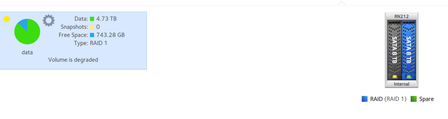
Ready NAS 212, firmware 6.10.8 WD Red plus 8tb (5900 class) Raid 1 (X-Raid enabled) I upgraded from a 6tb to an 8tb by hot swapping disk 2. All went well and disk is Online. Hot swapped disk ...

StephenB
Oct 26, 2022Guru - Experienced User
michaelst wrote:
Ready NAS 212, firmware 6.10.8
WD Red plus 8tb (5900 class)
Raid 1 (X-Raid enabled)
I upgraded from a 6tb to an 8tb by hot swapping disk 2. All went well and disk is Online.
Hot swapped disk 1, disk found, no errors. Status reads "Resync" and it's is yellow on the volume display. But there is no progress detail displayed, like it did for 18 hours when syncing disk 2. and it says it's 'degraded'.
Power light flashing twice (blue), and activity light on disk 1 is quick flashing.
Is the drive being synced?
Hard to say - normally it would also give you progress in the web ui.
You could download the log zip, and look at mdstat. You could then do that again after an hour or so, and see if there is any apparent progress.
If you are comfortable with the linux command line, you could also use ssh to take a look at progress.

michaelst
Oct 27, 2022Aspirant
It's been over 24 hours and no change. The Activity light on disk 1 still flashing, the power light still blue flashing twice. No change to the status of disk 1. But no sync, no data on disk 1.
Is there a way to force, or manually initiate the sync process?
Should I reboot the NAS? Reseat the disk?, Shut down and reseat?
Related Content
- Sep 06, 2016Retired_Member
NETGEAR Academy

Boost your skills with the Netgear Academy - Get trained, certified and stay ahead with the latest Netgear technology!
Join Us!
