NETGEAR is aware of a growing number of phone and online scams. To learn how to stay safe click here.
Forum Discussion

nickjames
May 13, 2017Luminary
Volume operations causing slowness across SMB
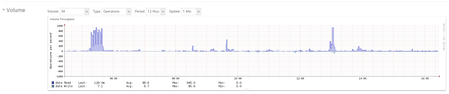
Greetings! I'm trying to understand the behavior that I'm experiencing, whether or not its expected and most importantly, how can I improve it. We are a graphic design shop. We use a lot of Adob...

nickjames
May 15, 2017Luminary
Thanks for the reply, cpu8088, however I dont see the snapshots being a problem at 10am? Am I misunderstanding how snapshots are made/utilized? My assumption is when the snapshot is being created (12pm) the volume is busy making those snapshot(s) but once it finishes, it shouldn't be using the disk, correct? Later that same hour but closer to 1pm, the snapshots are pruned. In my book, 12pm-1pm is noted slow access times as expected due to this schedule but anytime before 12pm should not be affected in terms of performance due to snapshots, right?
Noted on the Red drives being slow-- what enterprise drives you suggest?
I thought Red was best for NAS systems or is it just a fancy marketing name/logo?
cpu8088
May 15, 2017Virtuoso
snapshots actions include read read write on same disk. if u use a separate nas for backup the actions will be read only and then read write on the disk in separate nas.
if your disk has mechanical, electrical failure your snapshots will be gone. so it is not a good way as backup.
regarding enterprise drives i use wd re or gold. red is just a modified desktop green with some vibration control. red pro and se are better. re or gold is top.
with btrfs plenty of defrag, scrub and balancing the reds life span is very short.
- nickjamesMay 15, 2017Luminary
Thanks cpu8088. Noted.
I did forget to mention, we do backup via Rsync nightly to another RN516. We use this as the actual backup but like the snapshots for same day issues. I suppose we could pull the day before file off the device but the idea of a mid day snapshot is needed.
How does the mid day snap shot/prune between 12pm-1pm affect disk usage at 10am though?
- mdgm-ntgrMay 26, 2017NETGEAR Employee Retired
We do have an additional RAID option for 6-bays in 6.7.x, namely RAID-50. 8-bays and above now also have the option to use RAID-60.
If you've got a high workload RAID-5 probably isn't the best choice. I'd consider using RAID-50.
 StephenBMay 27, 2017Guru - Experienced User
Also, if you aren't using NIC bonding, you might want to try that. Network congestion at peak usage times might also be a factor.
mdgm wrote:
If you've got a high workload RAID-5 probably isn't the best choice. I'd consider using RAID-50.
There is some basic information on RAID-50 here: http://www.techrepublic.com/blog/the-enterprise-cloud/raid-50-offers-a-balance-of-performance-storage-capacity-and-data-integrity/ If you try that, you'll go with a 6 disk array (with 4 disks you'd use RAID-10 - which is also an option if you are replacing the drives anyway).
I'm not keen on RAID-0 for a production shop that needs high availability - so I'd disagree with cpu8088 on that idea. But I agree that red pro or golds will give better performance on small file transfers.
But since you have 2 free slots, you could alternatively switch to flexraid and add a RAID-1 SSD volume (2x1TB), shifting your main project share to the SSD volume. You can do that w/o rebuilding the current volume. That's also cheaper than replacing all your mechanical disks.
 TeknoJnkyMay 27, 2017Hero
A lot of good discussion and recommendations here.
As Stephen mentioned, I suspect your first bottleneck is network.
Most x86 nas devices are capable of faster than gbit ethernet.
I suspect that what is happening during your sluggish period is the file is being saved and fully utilzing the network connection, causing the other connections to be sluggish.
Similarly how if you ever used bittorrent wiithout speed restrictioned or tried to streamed HD across a slow internet connection, its hard for any other connections to get through at the same time.
So I would look into a switch that supports NIC bonding, bonding can nearly double your throughput during multiple connections.
Regarding the folder with 22k subfolders; I would definately recommend splitting those up into smaller groups as you mentioned. For my media storage I have 0-9, ABCDEFG, HIJKLMN, OPQRSTU, VWXYZ folders to split my movies across.
But 22k folders should only affect performance whenever a user accesses that project folder. Consider what happens; a user opens the project folder, the nas has to respond with all files/folders in it, it has to read the directory entries off the array, process and send that information across the network, the local pc then has to read that info and display it in explorer or whatever application dialog has requested the folder/file list.
Frankly I am amazed anyone can find anything in a folder with 22k items in it.
However, 22k folders should not really have any bearing on performance on saving already opened files, or accessing other parts of the array filesystem.
Finally another option I don't think has been mentioned, but might also help alleviate the performance is putting more RAM in your nas.
Extra ram will be used as additional cache/buffer to help cushion against high workloads.
 ctechsMay 27, 2017Apprentice
As others have stated, WD Reds are about the slowest NAS drives around. Nothing wrong with them, and they're priced accordingly, but they're relatively slow. We use WD SE drives in our 516.
Given the slowness you report seems to involve long sequential writes (e.g. saving a 2GB file) - even with the Red drives, with a ReadyNAS 516, your first limitation is almost certainly a network bottleneck if you're only using a single NIC on the 516. You need to get a managed switch that can do LACP and bond both gigabit nics on the 516. That way, when one of your (gigabit, I'm asssuming) network clients is saving a huge file and saturating one of the gigabit links (only 100MB/sec) there's at least some hope for some file i/o to still happen over the second link. But even bonded gigabit nics will net you 200MB/sec theoretical peak, which isn't terribly fast if you're doing big file i/o.
If large file manipulation is the name of the game and you have the resources, you'll probably want a 528X, use 7x00RPM drives like the Gold (or SE, or Red Pro), set up them up with RAID-50 and connect it a switch with 10 gigabit capabilities. Maybe even hook up some of the heavy user clients with 10 gigabit nics too.
- nickjamesMay 28, 2017Luminary
Thank you everyone for taking a moment to comment.
I never thought about bonding the NICs to be honest as I thought the disk speed would be the bottleneck before the NIC. At any rate, I know how to setup LAGs and are using them elsewhere on the network switches (GS748Tv5) so why not setup bonding since the network supports it.
In terms of the disks (Red vs. Gold/Pro), I will keep that in mind moving forward.
A lot of good ideas here in terms of RAID-50 vs. setting up a second RAID-1 using SSDs for the production folder. I will take this into account as well. This might be a lot cheaper vs. buying all new Gold/Pro discs. The new RAID-1 seems like an easier solution perhaps too.
I will keep you guys posted. I appreciate all the information.
I will also look into the RAM situation. I know RAM comes into play here as well. Just never thought about opening up the device to upgrade.
- ctechsMay 28, 2017Apprentice
Even though they are on the slower side, even 4TB Reds can sustain over 130MB/s sequential writes, which means your NIC is maxed out every time a user writes a big file to disk and squeezes out competing traffic. Definitely the cheapest/easiest thing you can do to improve responsiveness is to bond the NICs since you already have managed switches.
- TeknoJnkyMay 28, 2017Hero
another thing to consider regarding disks;
like mentioned above, many disks can easily max gbit on single file saves.
but what separates the big dogs from the little dogs is performance under mixed/multiple user loads, which is much more difficult for physical disks to do well.
IE, saving one large file fast is easy.
saving a large file while reading/writing multiple other users smaller files, is more complex and difficult, which you seen earlier on with the ~600 IOPS spikes.
That is why enterprise and SAS disks are often utilized in data centers/heavy duty servers, they are better able to handle complex multiuser workloads. (note while similar, SAS are different and generally way more expensive than SATA drives used in the nas)
So take that into consideration when you upgrade the drives.
But definately make use of network bonding since it sounds like you already have the hardware for it.
- nickjamesJun 03, 2017Luminary
I got the NIC bonding all setup tonight. I went with LACP Layer 2 + 3. I was moving a few files around just for fun and was getting between 98-116MB/sec via SMB. I thought I would see more though? My test PC is on switch A, which has a LACP (gigabit) to switch B where the RN516 is.
I guess I should have tested before bonding the NICs to see what I was getting before? What should I expect to see?

Related Content
NETGEAR Academy

Boost your skills with the Netgear Academy - Get trained, certified and stay ahead with the latest Netgear technology!
Join Us!
