NETGEAR is aware of a growing number of phone and online scams. To learn how to stay safe click here.
Forum Discussion

Sandshark
Jan 25, 2023Sensei
ZeroTier as a ReadyCloud replacement.
Well, a big part of a replacement, anyway. With ReadyCloud going away, a lot of folks are going to be looking for a replacement in order to have remote access to their ReadyNAS, I have been using...

Sandshark
Feb 09, 2023Sensei
NextCloud and OwnCloud are excellent for Google drive like file sharing. Unfortunately, the RNXTRAS site which used to have ReadyNAS-specific versions of those available for a small price is no more. The remnants of the site point to his repository of the final versions he created, but I don't really see anything there on how to use it. I find no .deb files that can be downloaded.
Honestly, I think you'd be better off running one of those on an always-on PC (which needn't be very powerful), Raspberry Pi, etc. and then using the NAS for it's storage. At some point, I'll likely convert to this myself instead of OwnCloud on a NAS I currently use for this purpose.
If you were to compile one yourself, you'd have to deal with the back-ports of dependencies (which is one of the reason he stopped development) as well as insuring it is configured so as not to fill the OS partition.

Leventh
Feb 12, 2023Apprentice
So, as I understand we couldn't use any app. for browse the NAS shares upon remotely except ReadyCloud (that will be tetminating) especially on smart phone?
Still investigating, how can I do that without an app. running on ReadyNAS...
- SandsharkFeb 12, 2023Sensei
This thread is all about using ZeroTier to do just that. If you have no interest in that, you can search the forum for other potential solutions discussed elsewhere, or start a new post. I recommend using Google, not the built-in forum search which is, frankly, useless. Tacking on additional subjects to an existing post just makes for a confusing thread where one cannot be sure which subject is being discussed.
- LeventhFeb 12, 2023Apprentice
Sandshark sorry for inconvenience but I'm just finding a way to using my NAS device remotely, I already Googled but can not find anything about that, this is just because why I wrote previous post. Again, sorry for if it makes confusing.
I also try to install ZT to ReadyNAS via Web UI and SSH but installing failed on RN214 Arm V7, firmware: 6.10.8
 StephenBFeb 12, 2023Guru - Experienced User
Leventh wrote:
Still investigating, how can I do that without an app. running on ReadyNAS...
The other VPN-type solution is to get a router that has OpenVPN. Netgear Nighthawk and Orbi models for example. Then you can install the free OpenVPN app on your phone (or an PCs), and use that to connect to your home network. Once you do that, you access the NAS the same way you do when you are home.
ZT is similar, but rather than giving you full access to your home network, you only have access to the NAS.
- SandsharkFeb 16, 2023Sensei
Seems the curl script no longer works in Debian Jessie. But manual install does.
I have an OS6.10.8 Intel-based NAS and successfully manually installed V1.6.6. Anything later fails. I will try an ARM machine when I get a chance to re-initialize one, or somebody else can try and report results.
Below is how to do the manual installation. In this example, I'm assuming a volume name of data and that share Temp exists. Use whatever is appropriate to you.
Go here: https://download.zerotier.com/RELEASES/1.6.6/dist/debian/jessie/ and download the amd64 version to the Temp share.
From SSH:
cd /data/Temp
apt install ./zerotier-one_1.6.6_amd64.deb
Note that the leading ./ is required, or it will try to install from a network source.
You will have to answer Y to a couple of prompts, and the default for at least one may be N.
Now just join your network and enable the member in ZeroTierOne.
- SandsharkFeb 16, 2023Sensei
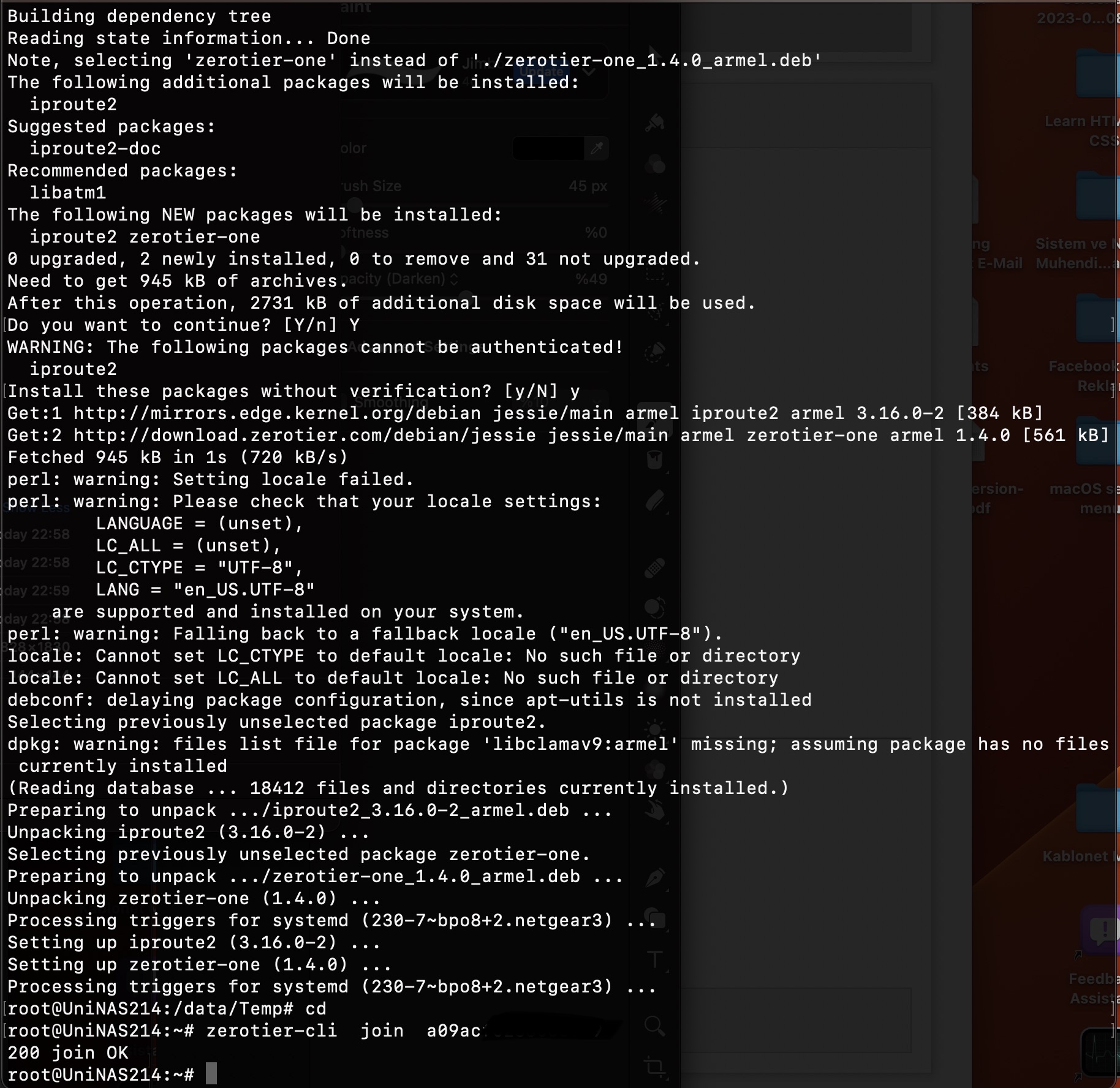
OK, got to testing with an ARM version faster than I thought I would. I successfully installed the armel version of V1.4 from here: https://download.zerotier.com/RELEASES/1.4.0/dist/debian/jessie/pool/main/z/zerotier-one/ on a newly-initialized RN212 on OS6.10.8. Given the limited memory of the 100 series, I'm not sure if it's a good idea to use it on those. I have no 100 series NAS on which to test.
- LeventhFeb 16, 2023Apprentice
Well, It seems curl script no longer works in Debian Jessie as you mentioned.
Web UI always fails to install both 1.1.14-nt3 and 1.4.0
Local/manual install V1.4.0 (as you did with V1.6.6) worked for my armel RN214 OS6.10.8 (with kernel plus installed).
I tested it via my iPhone with ZeroTier app. installed and connected my ZT network to NAS upon it's managed IP.
Now I can use the Resilio sync for ReadyNAS and on my IOS, macOS devices.
Btw. Thank you to your effort here to help and hope this community live long enough although Netgear quits from NAS market.
- XtheUnknownFeb 20, 2023Apprentice
Just FYI:
I managed to install on (upgrade from 1.4.0) my x64 ReadyNAS simply by uploading the 1.6.6 version via the UI.
YMMV.
- SandsharkFeb 20, 2023Sensei
I believe you cannot do an initial install via the GUI any more because you have to answer "Y" to a prompt where the default is "N". But if you are upgrading and that upgrade doesn't need an update of a dependency where you had to make that choice, then it would work. That includes if you installed the older version before the status of the dependencies changed, you could answer "Y" to all.
Note that you should not update a ReadyNAS-specific version with a non-ReadyNAS version this way, as they install in different places.
- LeventhFeb 22, 2023Apprentice
Just for the information,
Additionallly I've been able to install ZT 1.1.14-nt3.deb locally via SSH, now it's working on RN214 (v6.10.8) with GUI 👍
(Btw. Tested it from scratch after factory reset).
 tigertenFeb 26, 2023Luminary
I am able to install Version 1.8.7 through the web-interface. unable to install any version via command line.
root@RN628X:~# zerotier-cli status
200 info xxxxxxx 1.8.7 ONLINE- JohnS530Mar 10, 2023Guide
I successfully downloaded, installed and configured ZeroTier on a RN314 running 6.10.8. (Intel). Using the 1.6.6. Joined the network. Added 2 Win 11 clients. Enabled all in the ZeroTier web portal.
But I am unclear how I access the shared folders on the NAS? I do not see anything in my File Explorer under Network - Computers, except for other local computers. Thoughts?
- SandsharkMar 10, 2023Sensei
Did you also install ZeroTier on the PC and add it to the same network?
I'm not sure how Windows decides how to show things in "My Network", but it doesn't show two devices with the same name at two different IP addresses, so you won't see it there, at least when it's also on the local network. But you can map a drive to it or just go there directly by typing the IP address and share name into a Windows Explorer window's address field.
In my case \\192.168.0.42\Documents gets me to the Documents share via the local network and \\192.168.192.42\Documents gets me there via ZeroTier. I've assigned reserved IP addresses in ZeroTier that just change the third field from 0 to 192 compared to the IP addresses reserved in my router to make things easier.
.
- rodcritMar 20, 2023Luminary
@Sandshark @StephenB Thanks for all help so far: As stated elsewhere, I am 80 years of age and don't find setting up systems very easy - that's why readycloud was so good in that respect. it did all that was necessary.
anyway: I have installed Zero-Tier (ZT) on my NAS RN204 and on 2 ~PCs and an Android phone.
they seem to have installed correctly and the ZT management site has recognised them ( almost ).
the netgear NAS entry on the ZT management site is reporting "unknown" and on the NAS there is an account for ZT which is showing disabled. I don't know how to progress that problem.
the PC and android connections look good. I can Ping between them successfully . BUT - how do I set up a GUI to connect to that VPN ( what GUI do I use ?) so that I can see what files are on the system and be able to move them between systems?
Sorry to be so negative, but I do need a system that is easy to use, and more importantly, one that my daughter in America can also set up herself with help from me. which at the moment I cannot even help myself.
Any advice you can give me would be greatly appreciated.
- StephenBMar 20, 2023Guru - Experienced User
rodcrit wrote:
the netgear NAS entry on the ZT management site is reporting "unknown" and on the NAS there is an account for ZT which is showing disabled. I don't know how to progress that problem.
I haven't used ZeroTier for a while now, so Sandshark is better able to help you on this.
rodcrit wrote:
the PC and android connections look good. I can Ping between them successfully . BUT - how do I set up a GUI to connect to that VPN ( what GUI do I use ?) so that I can see what files are on the system and be able to move them between systems?
With Android/iPhone, you simply connect to the ZeroTier VPN. Once that is done, you access the NAS using the same methods you use at home. So in the case of iPhone, you could use the built-in Files app to copy files. The NAS server would need to use the ZeroTier IP address (so you'd need to check for that). There are similar tools for Android (though it's been a few years since I've had an Android phone).
Similarly on a PC - you connect to the VPN using the ZeroTier software, and then you can just use Window File Explorer or Finder (Mac). If you have a laptop, you can test this by taking it to a place with a hotspot, and then connect to your home network with the ZeroTier VPN.
One thing - if you or family members are using the NAS home folders, then you will need to copy them. ReadyCloud uses different usernames from the normal local NAS accounts, and so those home folder contents won't be accessible when you disable it.
I suspect you folks can simply use public shares (no need to keep the files "private"). If that's the case, you can simply migrate the home files to public shares now, and disable SMB and other file sharing protocols for Home in the NAS admin ui.
- SandsharkMar 20, 2023Sensei
Yes, ZeroTier doesn't recognize the NAS OS, so it reports it as "unknown". You can change it manually. As long as it's reporting as being from your IP address, then that's sure to be your NAS. Once you enable in ZT Central, it should show as connected on the NAS.
- carloswebApr 12, 2023Aspirant
Buenas he seguido lo mismo que ha realizado usted pero me da error y no me instala el zerotier adjunto pantallazo de errorr.
la instalación la estoy ejecutando sobre un ready nas 212 con el firmeware 6.10.8 no se si hay que instalar algo previo al paquete
- SandsharkApr 12, 2023Sensei
The error is telling you you need iprout2. Unfortunately, Debian Jessie is no longer available from the standard sources, so apt can't download it. You can find a solution here: How-I-got-apt-update-and-install-to-work-with-Debian-Jessie . Or, you can download the .deb package from one of the Debian archives and install it locally as you did zerotier. You want iproute2_3.16.0-2_armhf.deb, which you can get from https://archive.kernel.org/debian-archive/debian/pool/main/i/iproute2/
Note to others: If you have an Intel based NAS, you obviously need the AMD64 version.
Google Translate:
El error te dice que necesitas iprout2. Desafortunadamente, Debian Jessie ya no está disponible en las fuentes estándar. Puede encontrar una solución aquí: How-I-got-apt-update-and-install-to-work-with-Debian-Jessie . O bien, puede descargar el paquete .deb de uno de los archivos de Debian e instalarlo como lo hizo con zerotier. Desea iproute2_3.16.0-2_armhf.deb, que puede obtener de https://archive.kernel.org/debian-archive/debian/pool/main/i/iproute2/.
Nota para los demás: si tiene un NAS basado en Intel, obviamente necesita la versión AMD64.
- SandsharkApr 12, 2023Sensei
BTW, there is an armhf version of ZeroTier available that will also work on an ARM based OS6 ReadyNAS. armel is 32-bit and armhf is 64-bit. Probably doesn't much.
- SandsharkApr 12, 2023Sensei
Well, maybe there is a reason. If you go with the armhf version, you can install 1.6.0.
- LeventhApr 18, 2023Apprentice
After installing the ZeroTier on client device, simply "Add Network Location" from Windows file manager then you can use managed IPs getting from ZeroTier network eg. 172.22.xx.xx (even on iPhone iOS > Files > Connect Server > ZT IP)
That's all
- SS4098Jun 07, 2023Aspirant
Sandshark I used your instructions in message 30 of this thread to install 1.6.6 over 1.2.12 on a 6.10.8 NAS314 . It seems to have upgraded successfully and functions as normal, but I have two concerns. One, I did not have to answer any prompts; Two, the zerotier web interface still reports this NAS as 1.2.12. Looking at the info below, is there any reason to think the upgrade failed?
root@NetgearOnsite:~# cd /data/Backup
root@NetgearOnsite:/data/Backup# apt install ./zerotier-one_1.6.6_amd64.deb
Reading package lists... Done
Building dependency tree
Reading state information... Done
Note, selecting 'zerotier-one' instead of './zerotier-one_1.6.6_amd64.deb'The following packages will be upgraded:
zerotier-one
1 upgraded, 0 newly installed, 0 to remove and 32 not upgraded.
Need to get 0 B/1,017 kB of archives.
After this operation, 1,213 kB of additional disk space will be used.
Get:1 /data/Backup/zerotier-one_1.6.6_amd64.deb zerotier-one amd64 1.6.6 [1,017 kB]
debconf: delaying package configuration, since apt-utils is not installed
dpkg: warning: files list file for package 'libclamav9:amd64' missing; assuming package has no files currently installed
dpkg: warning: files list file for package 'samba4-clients' missing; assuming package has no files currently installed
(Reading database ... 15014 files and directories currently installed.)
Preparing to unpack .../zerotier-one_1.6.6_amd64.deb ...
Unpacking zerotier-one (1.6.6) over (1.2.12) ...
Processing triggers for systemd (230-7~bpo8+2.netgear3) ...
Setting up zerotier-one (1.6.6) ...
root@NetgearOnsite:/data/Backup# zerotier-cli join xxxxxxxxxxxxxxxx
200 join OK
root@NetgearOnsite:/data/Backup# zerotier-cli info
200 info xxxxxxxxxx 1.6.6 ONLINE
root@NetgearOnsite:/data/Backup# - SandsharkJun 07, 2023Sensei
Try disconnecting and re-connecting to see if ZeroTier Central then sees your new version.
You didn't have to answer any questions because you already had all of the dependencies installed.
- SS4098Jun 07, 2023Aspirant
Thanks. I think the web interface just doesn't update that data very often at all. Disconnect/reconnect didn't change it. I also removed the identity files to get a new device ID and now it's showing 0.0.0, so whatever.
- tigertenJun 07, 2023LuminaryYou may have installed two copies. Believe they installed in two different directories. So not an upgrade. Uninstall the old version first.
Related Content
NETGEAR Academy

Boost your skills with the Netgear Academy - Get trained, certified and stay ahead with the latest Netgear technology!
Join Us!